Topic 1.2 Notes – Suspicious Website Logins
What Website Login Authentication Is
Authentication means proving you are the real owner of an account. On a normal website, you usually enter:
- a username or email to identify which account it is
- a password to prove you should get access
An online password attack happens when an adversary tries passwords directly on a live login page. That matters because they may not need to break into the system itself. If your password is weak or reused, they may simply sign in as you.
The three password sources in this topic are:
- Common passwords like easy, overused choices
- Common patterns that look complex but are predictable
- Stolen passwords taken from a breach, phishing, or malware
How Adversaries Guess or Obtain Passwords
Weak authentication often comes from human habits. People make passwords they can remember, and that predictability is exactly what attackers use.
Common password patterns
A classic weak password has:
- one or two familiar words
- a 2-digit number, often a year
- a special character at the end
Example: Luna18!
Why this is weak:
- Luna could be a pet name
- 18 could be a graduation year or birth year ending
- ! is in the most expected spot
So even if it has letters, numbers, and a symbol, it is still predictable.
Personal information in passwords
Passwords get even weaker when they include:
- pet names
- family names
- birthdays
- anniversaries
- graduation years
- other meaningful words or numbers
Attackers can learn those from social media, public posts, old messages, or social engineering. That is why a password can feel private to you but still be guessable to someone who knows a little about your life.
Targeted password dictionaries
A dictionary here means a prepared list of likely passwords. It is not just real words from a dictionary.
An attacker might build guesses from details about the target, then use an automated tool to try them through the login page. In a targeted attack, public details like a pet name, graduation year, or favorite team can be turned into a short list of high-probability guesses.
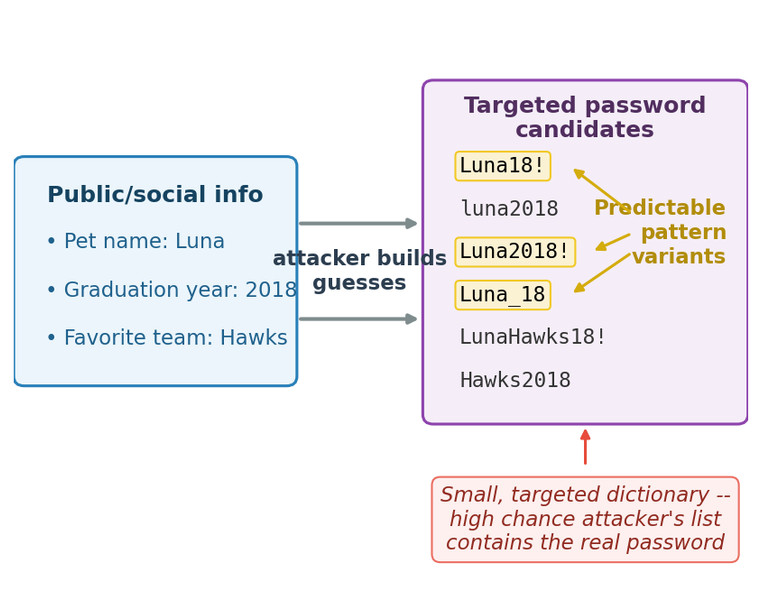
Targeted password dictionary
The key inference is important on the AP exam. The attacker may not know the exact password. They only need the real password to be in a small, predictable set.
Stolen passwords and credential stuffing
Passwords can be stolen through:
- data breaches
- phishing
- malware
If the user reused that same password elsewhere, attackers can try it on other sites. That is credential stuffing.
One breach can spread to many accounts because the attacker is reusing the victim’s own reused credentials.
Signs of a Suspicious Login
The three big warning signs are:
- many failed login attempts in a short time
- unusual times
- unknown devices
A single sign is not proof by itself. What gets suspicious is the pattern and the context.
- A few failed attempts can be normal
- 2:00 a.m. is only suspicious if that account is not normally used then
- A new device could just be a new phone
When these signs appear together, the case gets much stronger.
How to Read Login Evidence
Login records often show:
- account name
- date and time
- device or browser info
- success or failure
In a real log, you might see several warning signs show up together in just a few lines.
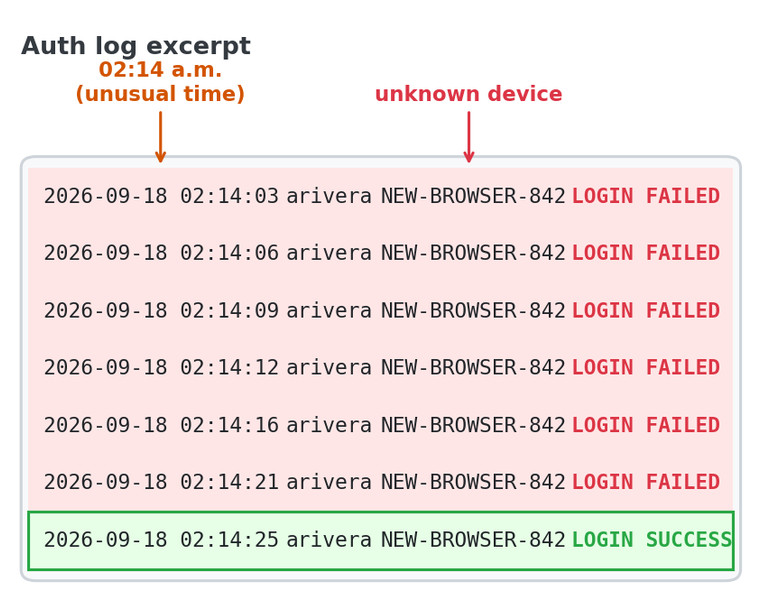
Authentication log excerpt
Use the evidence in this order:
- Identify what you directly see
- six failed logins in about 20 seconds
- 2:14 a.m.
- unknown device
- Combine the signs
- one sign can be innocent
- several signs together suggest a password attack
- Make a careful inference
- good conclusion: likely password attack or possible account compromise
- too far: claiming exactly who did it or exactly how they got the password
That careful difference between observation and inference shows up a lot in AP-style questions.
How to Make Authentication Stronger
Strong password properties
Good passwords should be:
- long so they are harder to guess
- random so they do not follow common patterns
- unique so one stolen password does not unlock other accounts
Practical tools
A password manager can generate and store strong unique passwords.
A passphrase can work when you need to remember it yourself. It should still be long, unique, and not based on personal facts.
What to avoid
Avoid:
- names
- dates
- pet or family references
- meaningful years
- reused passwords across sites
Multifactor authentication
MFA means the password is only one step. You also provide another proof, such as a one-time code.
If the password is guessed or stolen, the attacker still lacks the second factor. That is why MFA is stronger than relying on password complexity alone.
Key Takeaways
Authentication
The process of proving an asserted identity, such as by supplying a password for an identified account
Online Password Attack
An adversary’s attempt to log in to a live device or service using common, patterned, or stolen passwords
Common Password Pattern
A predictable password structure, often one or two familiar words followed by a two-digit number and a special character
Targeted Password Dictionary
A prepared list of likely passwords built from a target’s personal information, common passwords, and predictable variations
Password Reuse
Using the same password for multiple accounts, allowing exposure at one service to endanger the others
Credential Stuffing
Trying previously stolen username-and-password combinations against other live services
Suspicious Login
A login attempt that differs from expected activity, indicated by many rapid failures, an unusual time, or an unknown device
Weak Authentication
Authentication whose required proof can be guessed, derived from personal information, stolen and reused, or otherwise obtained too easily
Strong Password
A password that is long, random, unique to one account, and free of predictable or personally meaningful content
Password Manager
A tool that generates and stores strong, unique passwords for a user’s accounts
Passphrase
A long, unique sequence used as a password that is easier to remember but should still avoid predictable or personal content
Multifactor Authentication (MFA)
Authentication requiring extra proof of identity, such as a one-time code, in addition to the password
Notes
Authentication
The process of proving an asserted identity, such as by supplying a password for an identified account
Online Password Attack
An adversary’s attempt to log in to a live device or service using common, patterned, or stolen passwords
Common Password Pattern
A predictable password structure, often one or two familiar words followed by a two-digit number and a special character
Targeted Password Dictionary
A prepared list of likely passwords built from a target’s personal information, common passwords, and predictable variations
Password Reuse
Using the same password for multiple accounts, allowing exposure at one service to endanger the others
Credential Stuffing
Trying previously stolen username-and-password combinations against other live services
Suspicious Login
A login attempt that differs from expected activity, indicated by many rapid failures, an unusual time, or an unknown device
Weak Authentication
Authentication whose required proof can be guessed, derived from personal information, stolen and reused, or otherwise obtained too easily
Strong Password
A password that is long, random, unique to one account, and free of predictable or personally meaningful content
Password Manager
A tool that generates and stores strong, unique passwords for a user’s accounts
Passphrase
A long, unique sequence used as a password that is easier to remember but should still avoid predictable or personal content
Multifactor Authentication (MFA)
Authentication requiring extra proof of identity, such as a one-time code, in addition to the password
