Topic 5.2 Notes – Protecting Applications and Data: Managerial Controls and Access Controls
What Data Protection Depends On
Security depends on two questions at the same time.
- Data state asks where the data is right now.
- Is it stored, moving, or being used?
- That tells you what kind of protection fits.
- Data classification asks how sensitive the data is.
- That tells you how much protection it needs.
If the damage from disclosure, change, destruction, or loss is high, the controls should be stronger.
Data states
A quick way to picture the three states is to follow the same record as it is stored, sent across a network, and then opened on a screen.
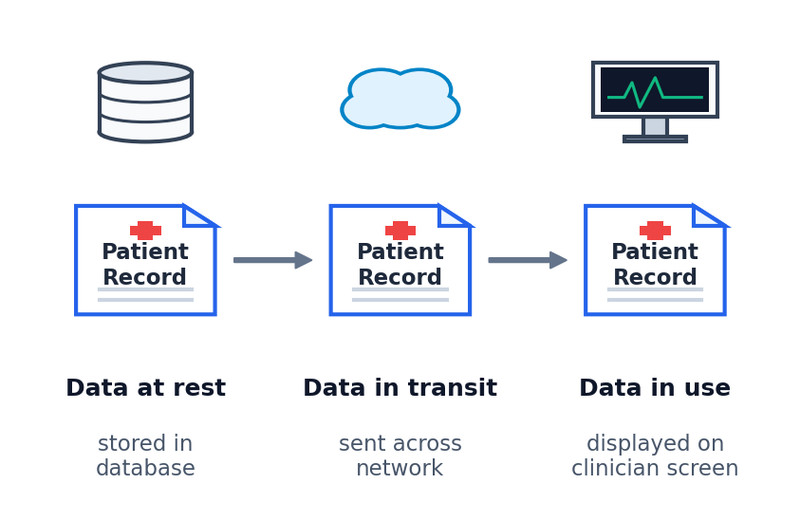
- Data at rest
- Stored on a drive, server, USB, or other storage.
- Main protections are physical security, encryption, and access controls.
- Important exam idea: encryption helps if a laptop is stolen, but it does nothing if the drive is destroyed.
- Data in transit
- Moving between devices over a network or through physical media like cables.
- Main protections are secure transmission media, encryption, and limits on which systems can send or receive.
- Stored-data protection does not automatically protect moving data.
- Data in use
- Opened, processed, viewed, or edited by software or a person.
- Main protection is access control.
- In this course model, data must be unencrypted to be used, so encryption alone cannot protect active data.
Sensitivity and regulated data
Organizations often label data as public, internal, confidential, or restricted. The exact labels can vary. The rule stays the same. More sensitive data gets stronger protection.
That usually means:
- stricter access
- fewer authorized users
- stronger encryption
- tighter handling rules
- more monitoring and auditing
- faster fixes for vulnerabilities
Regulated categories
| Category | What it includes | Rule or law |
|---|---|---|
| PII | Name, SSN, DOB, email, address, phone, biometrics | Privacy Act of 1974, COPPA 1998 for children under 13 |
| PHI | Test results, treatment records, visit notes, healthcare payment records | HIPAA 1996 |
| PCI | Cardholder name, account number, expiration date, address, CVV | PCI-DSS |
A record can fit more than one category.
An online pediatric clinic is the easiest way to see both ideas together:
- child name and DOB = PII
- visit notes and test results = PHI
- parent card info = PCI
- collecting child data online may trigger COPPA
So the clinic has to ask two separate questions. How sensitive is this data? and what state is it in right now?
Policies That Tell the Organization What to Do
Managerial controls are policies. They tell the organization what security must happen. The software and settings that enforce them are technical controls.
Cryptography policy
A cryptography policy defines approved encryption use across the organization. It usually includes:
- approved algorithms for different uses
- minimum or maximum key lengths
- key-generation requirements
- key-storage requirements
Test trap: the policy is managerial. The encryption software is technical.
Web application security policy
This policy sets rules for finding and fixing web app vulnerabilities.
It usually includes:
- when an app must be assessed
- how the assessment must be done
- required tools or frameworks
- remediation timelines based on risk
High-risk flaws get shorter deadlines.
How Access Control Decides Who Can Do What
Access control always has three parts:
- subject = user or application requesting access
- object = file or application being accessed
- operation = view, edit, add, remove, run
Authorization means what an identified subject is allowed to do.
Access control models
- RBAC
- Access comes from a role.
- Good for job-based access.
- Example: only the accountant role can access payroll software.
- RuBAC
- Access depends on rules like time, device, or location.
- Usually layered on top of another model.
- Example: deny database access outside work hours.
- DAC
- The object owner decides who gets access.
- Admins can override.
- Common idea behind normal file sharing.
- Example: Bob creates a file and decides that Alice may edit it, Frank may only view it, and everyone else is denied access.
- MAC
- A central authority assigns levels to subjects and objects.
- Strict and common in government or military systems.
Bell-LaPadula
This MAC model protects confidentiality. The diagram highlights the two Bell-LaPadula rules you need to remember.
- no read up
- no write down
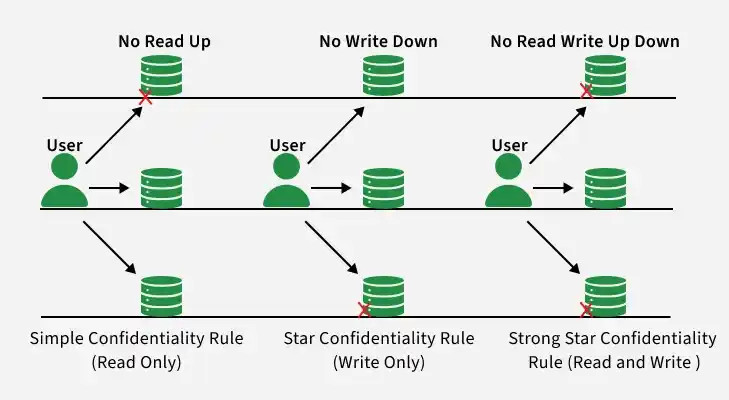
Bell-LaPadula access rules
Memory phrase is WURD. Write up, read down.
Least privilege
Give exactly the access needed and no more. This matters on the AP exam because it often explains why a permission or rule is a problem.
Linux Permissions and Core Commands
rwxr-x--- means:
- owner =
rwx - group =
r-x - others =
---
Use ls -l to view permissions. If you see a + at the end, extra ACL permissions exist. Use getfacl to see them.
ls -l
getfacl testfile
chmod 750 test
chmod ug+rx testfile
With chmod:
- Numeric uses
r=4,w=2,x=1chmod 750 testreplaces the full owner/group/other pattern withrwxr-x---.chmod 543 testgivesr-xr---wx, andchmod 777 testgives everyone fullrwxrwxrwxaccess.
- Symbolic uses
u g o aand+or-chmod ug+rx testfilechanges only those named permissions.
Key Takeaways
Data at Rest
Data stored on a drive or other medium; protected through physical security, encryption, and access controls
Data in Transit
Data being sent between devices; protected through transmission-media security, encryption, and restrictions on senders and receivers
Data in Use
Data being processed by a person or software; it must be unencrypted for use, so access controls are especially important
Data Sensitivity Classification
Categorizing data by potential harm from disclosure, alteration, destruction, or loss of access so more sensitive data receive stronger protection
Personally Identifiable Information (PII)
Data that allows a person to be identified, such as a name, address, biometric data, Social Security number, birth date, or email address
Privacy Act of 1974
A law associated in this course with protecting personally identifiable information
Children’s Online Privacy Protection Act of 1998 (COPPA)
A law protecting personal information collected online from children under age 13
Protected Health Information (PHI)
Data about an individual’s health, treatment, or health-care payment, such as test results, treatment records, and visit notes
Health Insurance Portability and Accountability Act of 1996 (HIPAA)
A law that includes protections for protected health information
Payment Card Information (PCI)
Data collected to process card payments, including the name, account number, expiration date, address, and CVV code
Payment Card Industry Data Security Standard (PCI-DSS)
The principal security standard for protecting payment card information
Managerial Controls
Organizational policies, requirements, and processes that direct what security work must be done, when, and under which standards
Cryptography Policy
An organizational policy defining approved encryption protocols and algorithms, key lengths, key generation, and key storage
Web Application Security Policy
A policy defining when web applications require security assessment, how assessments occur, and risk-based deadlines for remediation
Access Control
Enforcement of which entities may perform particular actions on particular resources
Subject
A user, service, process, or application requesting access
Object
A file, application, or other resource to which access is requested
Operation
The action a subject requests on an object, such as accessing, modifying, adding, or removing
Access Control Model
A method for determining which subjects may perform which operations on which objects
Authorization
Granting an entity permission to have a particular type of access to a resource
Role-Based Access Control (RBAC)
An access model that assigns subjects to roles and gives permissions to those roles
Rule-Based Access Control (RuBAC)
An access model that evaluates stated rules and contextual conditions to allow or deny access, usually on top of another model
Discretionary Access Control (DAC)
An access model in which object owners choose other subjects’ permissions, subject to administrator or superuser overrides
Mandatory Access Control (MAC)
An access model using strict, centrally administered rules and externally assigned levels for subjects and objects
Bell-LaPadula Model
A mandatory access control model that protects confidentiality through ordered security levels for subjects and objects
Simple Security Property
Bell-LaPadula’s “no read up” rule: a subject may not read an object above its security level
Star Security Property
Bell-LaPadula’s “no write down” rule: a subject may not write to an object below its security level
Write Up, Read Down (WURD)
Bell-LaPadula’s permitted direction: subjects may write at their level or higher and read at their level or lower
Principle of Least Privilege
Give each entity exactly the access needed to perform its function and no more
Linux Read, Write, and Execute Permissions
r allows viewing a file, w allows changing it, and x allows running it; they always appear in rwx order
Linux Owner, Group, and Others Permission Classes
The three Linux permission classes, always ordered as file owner, file group, and all other users
ls -l Command
Displays a detailed file listing, including the conventional owner, group, and others permissions
getfacl Command
Displays additional file permissions when a plus sign after the conventional permissions indicates they exist
chmod Numeric Method
Use chmod ### filename; the digits represent owner, group, and others, with each permission sum using r=4, w=2, and x=1
chmod Symbolic Method
Use chmod with u, g, o, or a; + or -; and r, w, or x to add or remove named permissions, such as chmod ug+rx testfile
Notes
Data at Rest
Data stored on a drive or other medium; protected through physical security, encryption, and access controls
Data in Transit
Data being sent between devices; protected through transmission-media security, encryption, and restrictions on senders and receivers
Data in Use
Data being processed by a person or software; it must be unencrypted for use, so access controls are especially important
Data Sensitivity Classification
Categorizing data by potential harm from disclosure, alteration, destruction, or loss of access so more sensitive data receive stronger protection
Personally Identifiable Information (PII)
Data that allows a person to be identified, such as a name, address, biometric data, Social Security number, birth date, or email address
Privacy Act of 1974
A law associated in this course with protecting personally identifiable information
Children’s Online Privacy Protection Act of 1998 (COPPA)
A law protecting personal information collected online from children under age 13
Protected Health Information (PHI)
Data about an individual’s health, treatment, or health-care payment, such as test results, treatment records, and visit notes
Health Insurance Portability and Accountability Act of 1996 (HIPAA)
A law that includes protections for protected health information
Payment Card Information (PCI)
Data collected to process card payments, including the name, account number, expiration date, address, and CVV code
Payment Card Industry Data Security Standard (PCI-DSS)
The principal security standard for protecting payment card information
Managerial Controls
Organizational policies, requirements, and processes that direct what security work must be done, when, and under which standards
Cryptography Policy
An organizational policy defining approved encryption protocols and algorithms, key lengths, key generation, and key storage
Web Application Security Policy
A policy defining when web applications require security assessment, how assessments occur, and risk-based deadlines for remediation
Access Control
Enforcement of which entities may perform particular actions on particular resources
Subject
A user, service, process, or application requesting access
Object
A file, application, or other resource to which access is requested
Operation
The action a subject requests on an object, such as accessing, modifying, adding, or removing
Access Control Model
A method for determining which subjects may perform which operations on which objects
Authorization
Granting an entity permission to have a particular type of access to a resource
Role-Based Access Control (RBAC)
An access model that assigns subjects to roles and gives permissions to those roles
Rule-Based Access Control (RuBAC)
An access model that evaluates stated rules and contextual conditions to allow or deny access, usually on top of another model
Discretionary Access Control (DAC)
An access model in which object owners choose other subjects’ permissions, subject to administrator or superuser overrides
Mandatory Access Control (MAC)
An access model using strict, centrally administered rules and externally assigned levels for subjects and objects
Bell-LaPadula Model
A mandatory access control model that protects confidentiality through ordered security levels for subjects and objects
Simple Security Property
Bell-LaPadula’s “no read up” rule: a subject may not read an object above its security level
Star Security Property
Bell-LaPadula’s “no write down” rule: a subject may not write to an object below its security level
Write Up, Read Down (WURD)
Bell-LaPadula’s permitted direction: subjects may write at their level or higher and read at their level or lower
Principle of Least Privilege
Give each entity exactly the access needed to perform its function and no more
Linux Read, Write, and Execute Permissions
r allows viewing a file, w allows changing it, and x allows running it; they always appear in rwx order
Linux Owner, Group, and Others Permission Classes
The three Linux permission classes, always ordered as file owner, file group, and all other users
ls -l Command
Displays a detailed file listing, including the conventional owner, group, and others permissions
getfacl Command
Displays additional file permissions when a plus sign after the conventional permissions indicates they exist
chmod Numeric Method
Use chmod ### filename; the digits represent owner, group, and others, with each permission sum using r=4, w=2, and x=1
chmod Symbolic Method
Use chmod with u, g, o, or a; + or -; and r, w, or x to add or remove named permissions, such as chmod ug+rx testfile
