Topic 5.1 Notes – Application and Data Vulnerabilities and Attacks
What Application and Data Vulnerabilities Are
An application is a program whose instructions run on a computer, so it is executable data. Some run locally on your device. Web applications mostly run on a server, and you reach them through a browser over a network.
That matters because attacks on apps often become attacks on data like records, credentials, configs, or files.
The damage is usually described with the CIA triad:
- Confidentiality means unauthorized access to data
- Integrity means unauthorized changes to data or app behavior
- Availability means data or apps become unusable
One exam habit that matters here: a flaw by itself is not the full risk. Risk = asset + vulnerability + likely exploit + impact.
File Access and Permission Weaknesses
Unencrypted files
If files are stored in plaintext and an attacker gets the device or drive, they can read them. A login screen or file permission is weaker than encryption if the drive is removed, mounted elsewhere, or the attacker gets deeper system access.
Usual first effect:
- Confidentiality loss because the attacker can see the data
Standard users and administrative users
A standard user can do normal work. An administrative user can change settings, manage software and accounts, and often access nearly everything on the system.
If a regular user is given admin rights and that account gets compromised, the attacker inherits those elevated privileges too.
What the test wants you to say:
- The problem is unnecessary admin access
- The problem is not that admin accounts exist at all
Weak access controls
Weak access controls mean too many users can read, edit, delete, or execute resources they do not need.
On Linux and Unix-style systems, that often shows up as overly broad owner, group, or other permissions.
If one account is compromised, the attacker gets all of that account’s permissions. That can lead to:
- file theft
- file deletion
- changed configs
- broken applications
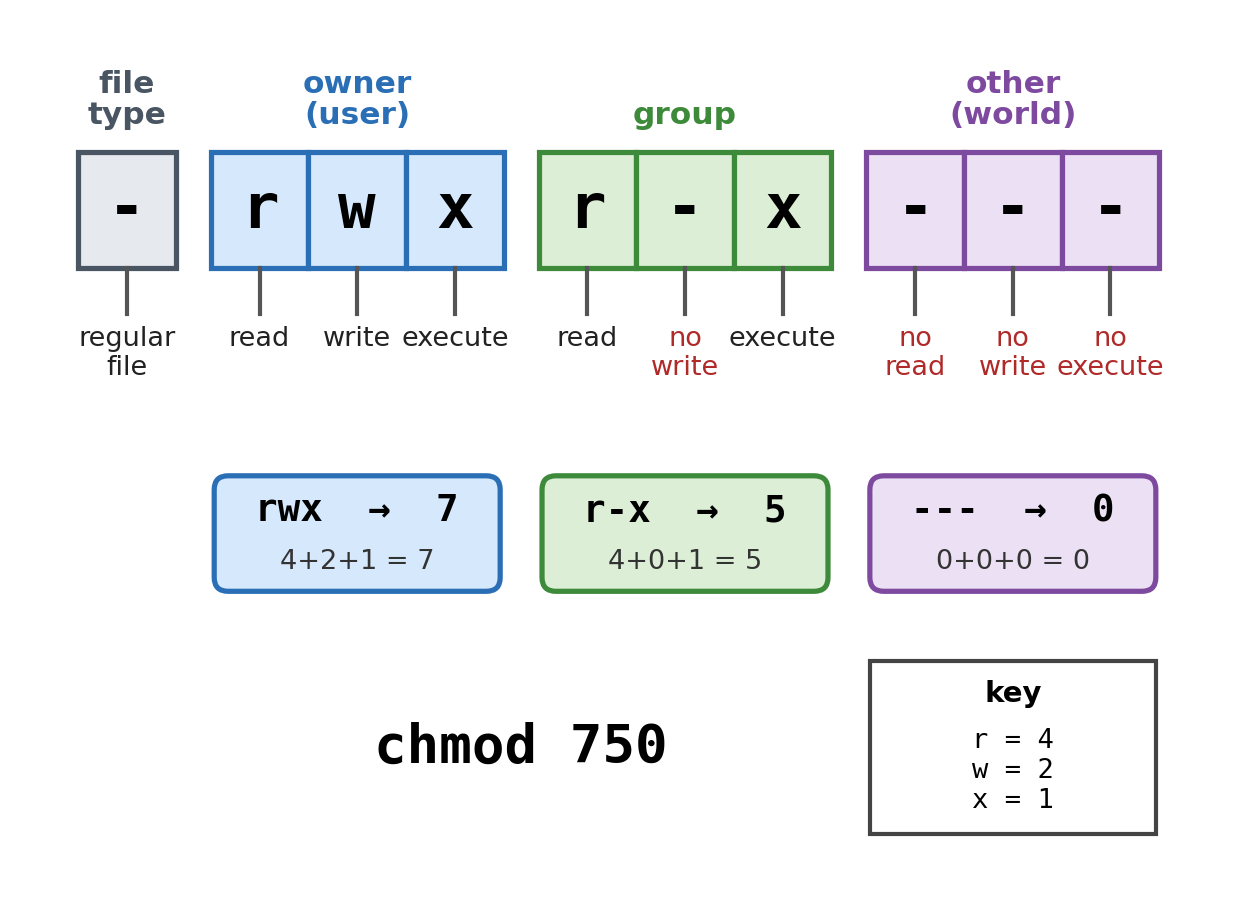
Linux file permissions for -rwxr-x---: owner rwx = 7, group r-x = 5, other --- = 0, written as chmod 750
The diagram is a quick reminder of how permissions are grouped for the owner, the group, and everyone else, and how the same settings can be written in numeric form with chmod.
How Input-Based Application Attacks Work
The common building block is data validation. Applications should check input for:
- type
- length
- range
- format
- allowed characters
- required values
If that checking fails, the app may treat hostile input as instructions instead of data.
SQL injection
SQL is the language used to query and modify databases. SQL injection happens when user input is inserted into a query unsafely.
Classic payload:
' OR 1=1 --
That can make a query return extra records, bypass conditions, change data, or delete data. This can hit:
- Confidentiality by exposing records
- Integrity by changing records
- Availability if data is deleted
Cross-site scripting XSS
Websites use HTML, and many use JavaScript, which runs in the visitor’s browser. In XSS, malicious script gets executed by the browser as if it came from the site.
- Type I reflected XSS means the payload comes in a crafted link or request and is reflected back immediately.
- Type II stored XSS means the payload is saved on the site, like in a comment, and later hits visitors.
Big threat:
- stealing browser-accessible data such as session info or other sensitive values
Buffer overflow
A buffer is a fixed-size memory area for input. If the input is too large, it overwrites nearby memory.
Results can include:
- app crash
- corrupted behavior
- unauthorized code execution
The biggest CIA hit is often availability, though integrity and unauthorized actions can follow.
Directory traversal
Web apps often use HTTP GET requests to reach server files. In directory traversal, the attacker changes the path with ../ to move outside the intended folder.
Example: a web server keeps site images in /var/www/images/. An attacker requests ../../../etc/passwd instead of an image. Each .. climbs one directory, so three of them reach the root, and the request pulls the passwd file that lists every authorized username on the device.
Main risk is confidentiality, though writable paths could also damage integrity or availability.
Comparing the Attack Types
| Attack | What changes | Where it runs |
|---|---|---|
| SQLi | query logic | database |
| XSS | page content or script | user browser |
| Buffer overflow | memory contents | vulnerable program |
| Directory traversal | file path | server filesystem or app file access logic |
This table is great for MCQs because the exam loves asking what interpreted the hostile input.
Assessing Risk From These Vulnerabilities
A strong risk write-up names:
- the asset
- the vulnerability
- the likely exploit
- the likelihood
- the CIA impact
- the overall risk level
Risk levels usually look like this:
- High means highly sensitive or regulated data plus a likely exploit
Example: Air Force jet engine specs on an unencrypted drive - Moderate means sensitive data with weak encryption or loose access controls
Example: customer PII in a spreadsheet encrypted with a small key - Low means less sensitive data with weaker protection
Example: CEO memos on an open unencrypted share drive - Very low means public data that needs no confidentiality
Example: a web server storing the images it displays on a public website
Key Takeaways
Unencrypted Files
Files with no cryptographic barrier; an adversary with access to the device or drive can read their contents even if operating-system permissions are bypassed
Standard User vs. Administrative User
A standard user has limited permissions for routine tasks; an administrative user has elevated privileges to control settings and typically access any files or applications
Weakly Configured Access Controls
Permissions that allow more users or applications than necessary to view, edit, execute, or delete resources
Application
A program stored as executable data whose instructions a computer runs; it may run locally or on a server as a web application accessed over a network
Data Validation
Verifying before processing that user input meets expected criteria such as type, length, range, format, or allowed characters
Injection Attack
Supplying an unexpected character string that an application interprets as instructions, altering the program’s intended behavior
Structured Query Language (SQL)
A computer language used to request information from databases and create, change, or delete database entries
SQL-Injection Attack
Placing SQL commands or control characters in application input so a database query discloses, changes, adds, or deletes unintended data
Hypertext Markup Language (HTML)
The markup language used to describe the structure and content of web pages
JavaScript
A scripting language used for dynamic web content whose commands commonly execute in a website visitor’s browser
Cross-Site Scripting (XSS) Attack
Injecting malicious code into a website so that a visitor’s browser executes it in the website’s context
Type I or Reflected XSS
XSS in which malicious code in a crafted link or request is reflected by a vulnerable website and executed by the victim’s browser
Type II or Stored XSS
XSS in which malicious code is saved in website content and executed by the browsers of users who later view that content
Buffer
A designated section of computer memory with a fixed size for holding data such as application input
Buffer-Overflow Attack
Feeding more data into a buffer than it can hold, overwriting adjacent memory and potentially causing crashes or unauthorized code execution
HTTP GET Request
A request sent using Hypertext Transfer Protocol that asks a server for the resource identified by a URL or path
Directory-Traversal Attack
Modifying a URL or GET request, often with ../ parent-directory components, to access server files outside the intended directory
High Data Risk
Risk often involving highly sensitive or regulated data and a highly likely or easily performed exploit with severe consequences
Moderate Data Risk
Risk often involving sensitive data protected by encryption that is too weak or access controls that are not strict enough
Low Data Risk
Risk often involving less sensitive information with weak encryption or loose access controls and relatively limited likely harm
Notes
Unencrypted Files
Files with no cryptographic barrier; an adversary with access to the device or drive can read their contents even if operating-system permissions are bypassed
Standard User vs. Administrative User
A standard user has limited permissions for routine tasks; an administrative user has elevated privileges to control settings and typically access any files or applications
Weakly Configured Access Controls
Permissions that allow more users or applications than necessary to view, edit, execute, or delete resources
Application
A program stored as executable data whose instructions a computer runs; it may run locally or on a server as a web application accessed over a network
Data Validation
Verifying before processing that user input meets expected criteria such as type, length, range, format, or allowed characters
Injection Attack
Supplying an unexpected character string that an application interprets as instructions, altering the program’s intended behavior
Structured Query Language (SQL)
A computer language used to request information from databases and create, change, or delete database entries
SQL-Injection Attack
Placing SQL commands or control characters in application input so a database query discloses, changes, adds, or deletes unintended data
Hypertext Markup Language (HTML)
The markup language used to describe the structure and content of web pages
JavaScript
A scripting language used for dynamic web content whose commands commonly execute in a website visitor’s browser
Cross-Site Scripting (XSS) Attack
Injecting malicious code into a website so that a visitor’s browser executes it in the website’s context
Type I or Reflected XSS
XSS in which malicious code in a crafted link or request is reflected by a vulnerable website and executed by the victim’s browser
Type II or Stored XSS
XSS in which malicious code is saved in website content and executed by the browsers of users who later view that content
Buffer
A designated section of computer memory with a fixed size for holding data such as application input
Buffer-Overflow Attack
Feeding more data into a buffer than it can hold, overwriting adjacent memory and potentially causing crashes or unauthorized code execution
HTTP GET Request
A request sent using Hypertext Transfer Protocol that asks a server for the resource identified by a URL or path
Directory-Traversal Attack
Modifying a URL or GET request, often with ../ parent-directory components, to access server files outside the intended directory
High Data Risk
Risk often involving highly sensitive or regulated data and a highly likely or easily performed exploit with severe consequences
Moderate Data Risk
Risk often involving sensitive data protected by encryption that is too weak or access controls that are not strict enough
Low Data Risk
Risk often involving less sensitive information with weak encryption or loose access controls and relatively limited likely harm
