Topic 3.5 Notes – Detecting Network Attacks
What Network Attack Detection Is
Detection means looking for evidence of attacks, not just trying to block them ahead of time. Even well-defended networks still generate activity, and that activity leaves traces.
You’ve already seen the main evidence sources across the unit:
- Log files are time-ordered event records. Common fields include timestamp, source and destination IP, ports, protocol, allow or deny action, and alert text.
- Packet captures store packet-level traffic so you can inspect IPs, ports, protocols, and patterns.
- Device state tables show what a device currently believes, like an ARP table on a gateway or a MAC address table on a switch.
- Wireless scans show SSIDs, BSSIDs, channels, and signal strength.
A log becomes useful when you can spot a pattern that stands out, like repeated failed SSH logins followed by a successful one from the same source IP.
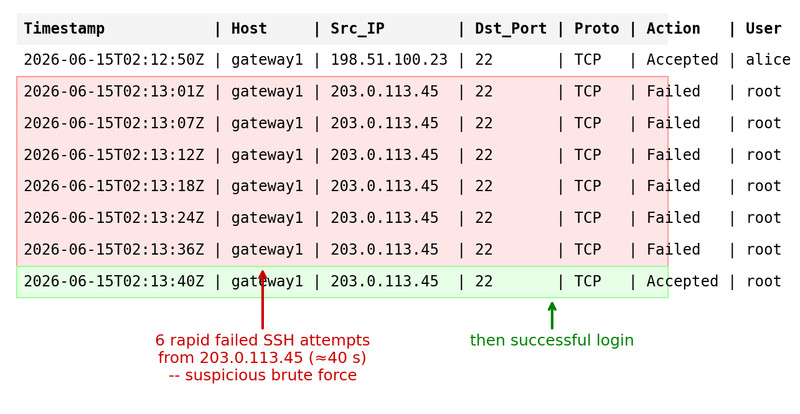
Suspicious SSH login pattern in a network log
The big problem is scale. A medium-sized organization may produce millions of records per day, so humans need automated tools to filter and prioritize what matters.
Automated Detection Tools
Three tools show up over and over on quizzes and scenarios.
NIDS
A network intrusion detection system watches network data for malicious patterns and raises an alert.
- It detects and alerts
- An alert means suspicious, not automatically confirmed attack
- You still need context. A port scan alert could be an attacker, or it could be an approved admin scan
NIPS
A network intrusion prevention system does detection too, but it can also act.
Common actions include:
- closing ports
- blocking IP addresses
- blocking MAC addresses
- rejecting protocols
This is faster for containment, but a bad decision can block legitimate traffic.
SIEM
A security information and event management system collects logs and alerts from many places and correlates them.
- Sources include firewalls, NIDS/NIPS, routers, switches, servers, and applications
- Its value is seeing the pattern across systems, not just one event
- Analysts investigate SIEM alerts and then close, contain, resolve, or escalate
This network diagram helps you picture the placement difference. The NIPS sits inline where it can stop traffic, and the NIDS monitors traffic from the side and alerts on what it sees.
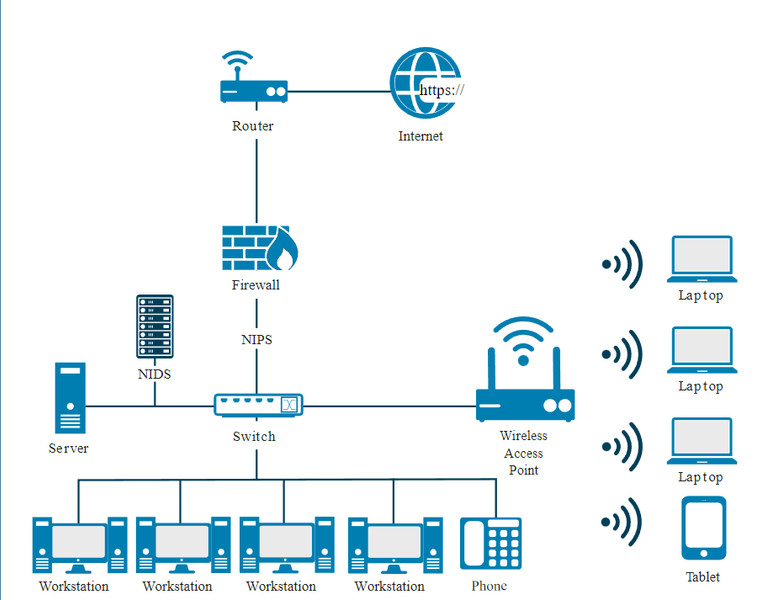
NIDS vs. NIPS placement in a network
Lock in this distinction:
- NIDS = detects and alerts
- NIPS = detects, alerts, and can stop traffic
- SIEM = centralizes and correlates many data sources
Detection Methods and When to Use Them
There are three detection methods.
| Method | How it works | Best fit | Main weakness |
|---|---|---|---|
| Signature-based | Matches activity to known IoCs/signatures | High-traffic networks | Misses brand-new attacks |
| Anomaly-based | Compares activity to a normal baseline | Stable, predictable traffic | More cost and more false positives |
| Hybrid | Uses both | Critical or sensitive networks | Most expensive, more alerts |
A few details matter a lot:
- Signature-based is faster and more efficient. It needs signature updates.
- Anomaly-based depends on a clean baseline. If the baseline was built on compromised systems, the “normal” model is poisoned.
- Hybrid is chosen when missing an attack would be especially costly.
A simple selection routine:
- High traffic volume points toward signature-based
- Stable traffic patterns make anomaly-based useful
- Critical systems often justify hybrid
- Likely novel attacks plus limited budget points toward anomaly-based
Tradeoffs in Detection and AI Thresholds
You’ll compare methods using four impacts:
- Speed: signature is faster than anomaly, especially at scale
- Cost: anomaly needs more hardware; hybrid costs the most
- False positive: says attack when activity is legitimate
- False negative: misses a real attack
Students mix up the last two constantly. Keep them straight:
- False positive = wasted investigation time and alert fatigue
- False negative = attacker keeps operating
AI is used because the data volume is too large for people alone. It classifies activity as malicious or normal and often gives a probability score.
Memory anchor:
- same event scored 72% malicious
- threshold 65% → alert
- threshold 80% → no alert
Low threshold means more alerts and more false positives, but fewer missed attacks. High threshold means fewer alerts, but more false negatives.
Recognizing Attack Indicators in Logs and Traffic
Use the same routine every time:
- Identify the evidence source
- Find the unusual field, volume, or pattern
- Match it to the likely attack
- Check a second source to confirm it
A wireless scan is a good example. If a network name looks familiar but the access point identity does not match the trusted one, that points to an evil twin.
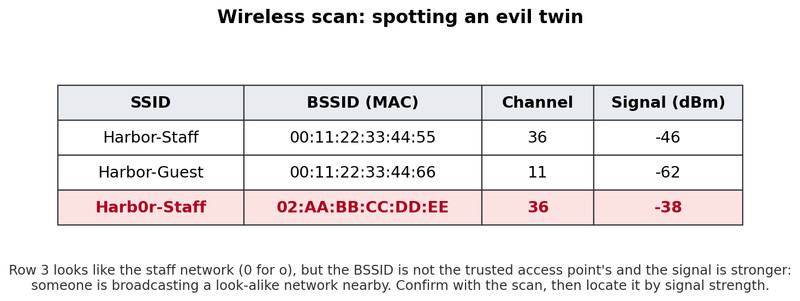
Wireless scan showing a possible evil twin
Common attack indicators:
- Evil twin
Suspiciously similar SSID, or same SSID with an unexpected AP identity or location. Confirm with a wireless scan and locate by signal triangulation. - Jamming
Devices in one area cannot connect, and a scan shows electromagnetic noise in the wireless range. - ARP poisoning
Unusual ARP traffic, especially duplicate MAC-related ARP messages. Check the gateway’s ARP table for one MAC tied to multiple IPs. - MAC flooding
Sudden surge of Ethernet frames with many different source MACs. Check the switch MAC table for rapid MAC learning or capacity warnings. - DNS poisoning
Hard to spot directly. An abrupt unexplained drop in website traffic can point you to altered DNS records. - Smurf attack
Sudden increase in ICMP echo requests sent to a broadcast address. - General network IoCs
Connections to known malicious IPs, unauthorized scans, unusual spikes or slowdowns, and mismatched port-application traffic like SSH on port 443.
Key Takeaways
Log
A time-ordered record of events that may include timestamps, addresses, ports, protocols, traffic amounts, actions, and alerts
Packet Capture (Packet Capture File)
A record of packets observed at a monitoring point, used to examine addresses, ports, protocols, and traffic patterns
Network Intrusion Detection System (NIDS)
An automated tool that analyzes network data for malicious activity and generates an alert when its detection criteria are met
Network Intrusion Prevention System (NIPS)
A tool that detects malicious network activity and can halt or mitigate it by blocking addresses, closing ports, rejecting protocols, or interrupting traffic
Security Information and Event Management (SIEM) System
A system that collects and correlates security data from multiple sources to detect suspicious patterns and raise alerts for investigation
AI-Based Threat Detection
Using AI algorithms to analyze large data sets, classify patterns as malicious or normal, and report probabilistic threat likelihoods
Alert Threshold
The threat-likelihood percentage at which a system generates an alert; lower thresholds create more alerts and false positives, while higher thresholds risk missed attacks
Signature-Based Detection
Detection that quickly compares observed data with stored signatures of known IoCs; it suits high traffic but requires updates and cannot detect attacks without signatures
Anomaly-Based Detection
Detection that compares activity with a clean baseline and alerts on deviations beyond a tolerance range; it can find novel attacks but costs more and produces more false positives
Hybrid Detection
Detection combining signature-based and anomaly-based methods for known and novel threats, with greater cost and alert volume
False Positive
Legitimate or nonmalicious activity incorrectly classified as malicious, wasting investigative resources and potentially contributing to alert fatigue
False Negative
Malicious activity that bypasses detection without an appropriate alert or action, allowing the attack to continue
Alert Fatigue
A condition in which responders become accustomed to false alerts and take new alerts less seriously
Network-Based Indicator of Compromise (IoC)
Evidence of possible malicious activity found in network traffic, logs, or packet captures, such as malicious IP connections, scans, traffic changes, or port-application mismatches
Evil-Twin Attack Detection
Scan for suspiciously similar or duplicate local SSIDs and investigate unfamiliar access-point identifiers or unexpected signal locations
Signal Triangulation
Locating a wireless transmitter by comparing signal-strength measurements from multiple physical positions
Wireless Jamming Detection
Look for wireless connection failures concentrated in one physical area and scan that area for strong electromagnetic noise in the wireless range
ARP Poisoning Detection
Monitor for unusual ARP messages, especially duplicate MAC-address claims, and check the default gateway's ARP table for incorrect mappings
MAC Flooding Detection
Look for a surge of Ethernet frames with many different source MAC addresses and inspect the switch's MAC address table
DNS Poisoning Detection
After an unexplained drop in legitimate website traffic, inspect DNS records for unexpected addresses or altered name-to-address mappings
Smurf Attack Detection
Watch for a sudden increase in ICMP requests directed to a network's broadcast address
Notes
Log
A time-ordered record of events that may include timestamps, addresses, ports, protocols, traffic amounts, actions, and alerts
Packet Capture (Packet Capture File)
A record of packets observed at a monitoring point, used to examine addresses, ports, protocols, and traffic patterns
Network Intrusion Detection System (NIDS)
An automated tool that analyzes network data for malicious activity and generates an alert when its detection criteria are met
Network Intrusion Prevention System (NIPS)
A tool that detects malicious network activity and can halt or mitigate it by blocking addresses, closing ports, rejecting protocols, or interrupting traffic
Security Information and Event Management (SIEM) System
A system that collects and correlates security data from multiple sources to detect suspicious patterns and raise alerts for investigation
AI-Based Threat Detection
Using AI algorithms to analyze large data sets, classify patterns as malicious or normal, and report probabilistic threat likelihoods
Alert Threshold
The threat-likelihood percentage at which a system generates an alert; lower thresholds create more alerts and false positives, while higher thresholds risk missed attacks
Signature-Based Detection
Detection that quickly compares observed data with stored signatures of known IoCs; it suits high traffic but requires updates and cannot detect attacks without signatures
Anomaly-Based Detection
Detection that compares activity with a clean baseline and alerts on deviations beyond a tolerance range; it can find novel attacks but costs more and produces more false positives
Hybrid Detection
Detection combining signature-based and anomaly-based methods for known and novel threats, with greater cost and alert volume
False Positive
Legitimate or nonmalicious activity incorrectly classified as malicious, wasting investigative resources and potentially contributing to alert fatigue
False Negative
Malicious activity that bypasses detection without an appropriate alert or action, allowing the attack to continue
Alert Fatigue
A condition in which responders become accustomed to false alerts and take new alerts less seriously
Network-Based Indicator of Compromise (IoC)
Evidence of possible malicious activity found in network traffic, logs, or packet captures, such as malicious IP connections, scans, traffic changes, or port-application mismatches
Evil-Twin Attack Detection
Scan for suspiciously similar or duplicate local SSIDs and investigate unfamiliar access-point identifiers or unexpected signal locations
Signal Triangulation
Locating a wireless transmitter by comparing signal-strength measurements from multiple physical positions
Wireless Jamming Detection
Look for wireless connection failures concentrated in one physical area and scan that area for strong electromagnetic noise in the wireless range
ARP Poisoning Detection
Monitor for unusual ARP messages, especially duplicate MAC-address claims, and check the default gateway's ARP table for incorrect mappings
MAC Flooding Detection
Look for a surge of Ethernet frames with many different source MAC addresses and inspect the switch's MAC address table
DNS Poisoning Detection
After an unexplained drop in legitimate website traffic, inspect DNS records for unexpected addresses or altered name-to-address mappings
Smurf Attack Detection
Watch for a sudden increase in ICMP requests directed to a network's broadcast address
