Topic 3.2 Notes – Protecting Networks: Managerial Controls and Wireless Security
What Managerial Controls Are
A managerial control is a policy or standard set by the organization. It says what security must exist. The device setting is the configuration, which is how admins make that rule real.
That distinction shows up all over this topic:
- Policy says router logins must use the approved authentication server.
- Configuration means the router is actually set to use that server.
- Policy says wireless traffic must use strong encryption.
- Configuration means the WAP is set to WPA3 with approved AES-based encryption.
These controls create a minimum security baseline. That matters because without a baseline, two similar devices may be configured very differently.
Why this matters on real networks:
- It reduces unauthorized admin access to routers and switches.
- It makes it harder for unauthorized devices to join wired or wireless networks.
- It protects remote access through VPNs.
- It reduces wireless exposure outside the building, which supports defense in depth.
Think of defense in depth as stacked layers of protection around what matters most, with data at the center.
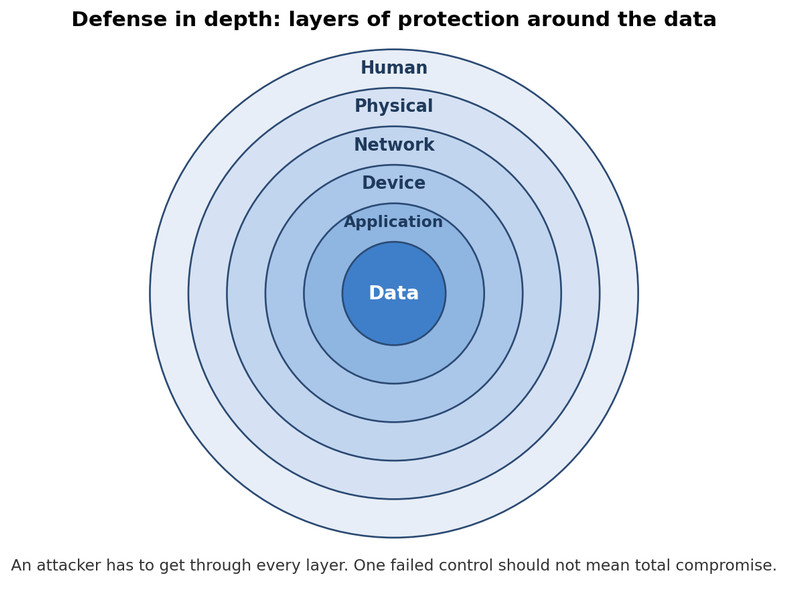
Defense in depth
Minimum Security Standards for Routers, Switches, VPNs, and Wireless
These four policy areas are easy to mix up, so keep each one tied to its device.
Router security policy
A router connects networks, so bad router access can expose or reroute traffic.
Common router policy requirements:
- Ban local user accounts so admins must log in through an approved authentication server. Centralized accounts are easier to revoke and track.
- Disable unnecessary services, especially Telnet. Telnet is the classic insecure example.
- Require a firewall. It can be built into the router or be a separate device. In this topic, know that the firewall must exist. Detailed firewall rules come later in the course.
Switch security policy
A switch connects devices inside the LAN, so open ports and weak controls create easy entry points.
Common switch policy requirements:
- Ban local user accounts for switch administration.
- Require port security, which limits what devices or how many MAC addresses can use a port. This helps with unused ports and MAC flooding.
- Use MAC filtering, which allows or denies devices by MAC address. Helpful, but limited because MAC addresses can be spoofed.
VPN policy
A VPN gives remote users a protected path into the internal network. Since it creates a path inward, the policy must be strict.
Common VPN policy requirements:
- Only authorized roles get VPN access.
- Users need strong authentication, such as a public/private key system or MFA.
- Split tunneling must be prohibited. A remote device should not talk to the internal network and the open internet at the same time.
Wireless security policy
Wireless changes the network boundary because radio signals can leave the building.
Common wireless policy requirements:
- Users authenticate through EAP tied to an approved authentication server.
- Wireless traffic uses AES encryption with an approved minimum key length.
- Beacon frame broadcasting is disabled.
How Wireless Security Is Configured
Discoverability and physical exposure
Disabling beacon broadcasts makes the network less obvious to casual scanning, since the WAP is no longer openly advertising the SSID and basic info. That helps with discovery, but it does not protect data by itself.
Signal control matters too. The goal is coverage for the offices without unnecessary spillover beyond the exterior wall.
- Direction should aim coverage into the intended area.
- Strength should be high enough for users, but not so high that the signal spills into a parking lot or street.
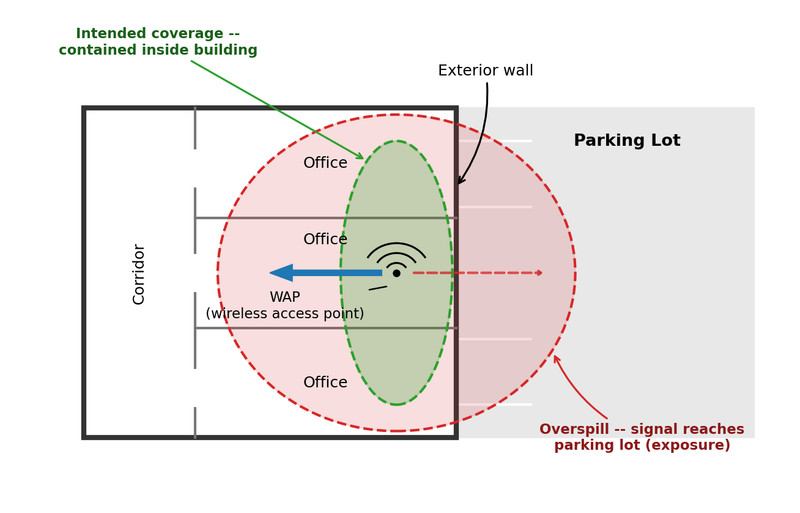
Wireless coverage and signal spillover
Encryption and protocol choices
For the AP course, the ranking is simple:
- WPA3 = strongest choice covered here
- WEP = insecure
- Original WPA = insecure
- WPS = insecure convenience feature and should be disabled
A common trap is seeing “encrypted” and assuming “secure.” Old protocols can still be encrypted and still be weak.
Device and user access controls
- MAC filtering adds a device-based barrier, but spoofing can bypass it.
- EAP authentication is stronger because it authenticates users through the approved server instead of relying on one shared Wi-Fi password.
The High-Yield Distinctions
- Authentication checks who is allowed in. Encryption protects traffic from eavesdropping.
- Beacon suppression hides the network more. It does not secure the data.
- Port security protects switch ports. MAC filtering allows or denies by MAC address.
- Router policy is about admin access, services, and firewall presence. Switch policy is about admin access, port security, and MAC filtering.
Key Takeaways
Managerial Control (Administrative Control)
A management-established policy, standard, or required procedure stating what must be protected and the minimum conditions systems must meet
Minimum Configuration Standard (Security Baseline)
The minimum security requirements that every covered device or service must satisfy, even when stronger protections are added
Router Security Policy
A policy setting the minimum router configuration, such as centralized login, disabled unnecessary services, and an approved firewall
Local User Account
An account stored and authenticated on a network device itself; router and switch policies may ban these in favor of a centralized authentication server
Disabling Unnecessary Services
Turning off every network service that lacks an approved operational purpose to reduce a device’s attack surface
Telnet
An insecure remote command-line service that inadequately protects sessions and credentials and should be disabled on routers
Switch Security Policy
A policy setting the minimum switch configuration, commonly including centralized administrator authentication, port security, and MAC filtering
Port Security
Restrictions on the devices or number of MAC addresses permitted through a switch port
MAC Filtering
Permitting or denying network access according to listed MAC addresses; it is supplementary because MAC addresses can be spoofed
Virtual Private Network (VPN)
A protected connection through an untrusted network that allows a remote user to access an organization’s internal network
VPN Policy
A policy specifying who may use a VPN, required authentication methods such as keys or MFA, and whether split tunneling is prohibited
Wireless Security Policy
A policy setting minimum wireless authentication, encryption, and beacon-broadcasting requirements
Extensible Authentication Protocol (EAP)
A framework supporting network-access authentication methods, commonly linking wireless infrastructure to an approved authentication server
Advanced Encryption Standard (AES) for Wireless Security
A symmetric encryption algorithm that a wireless policy may require for all wireless traffic, along with a minimum permitted key length
Wireless Authentication vs. Wireless Encryption
Authentication determines who may join the network; encryption makes intercepted wireless traffic unreadable without the required key
Disabling Beacon Frame Broadcasting (Hiding the SSID)
Stopping a wireless access point’s ordinary advertisements to reduce discovery of the network and its properties without providing authentication or encryption
Wireless Broadcast Direction
Positioning or selecting an access point and antenna so wireless coverage is directed toward the intended physical area
Wireless Signal Strength (Transmit Power)
The access point’s transmission power, set to the minimum level that reliably covers the intended area without unnecessary external exposure
Wired Equivalent Privacy (WEP)
An obsolete wireless encryption protocol with known vulnerabilities that should not be used
Original Wi-Fi Protected Access (WPA)
An obsolete wireless security protocol that improved on WEP but has known vulnerabilities and is now insecure
Wi-Fi Protected Setup (WPS)
A simplified wireless joining mechanism with known vulnerabilities that should be disabled on a protected organizational network
Wi-Fi Protected Access 3 (WPA3)
The strongest current wireless security protocol covered by the course and the preferred choice for protected wireless networks
Split Tunneling (Dual Tunneling)
Sending some traffic through a VPN while other traffic goes directly to another network; policies may prohibit it to prevent simultaneous trusted and untrusted connections and force traffic through organizational controls
Notes
Managerial Control (Administrative Control)
A management-established policy, standard, or required procedure stating what must be protected and the minimum conditions systems must meet
Minimum Configuration Standard (Security Baseline)
The minimum security requirements that every covered device or service must satisfy, even when stronger protections are added
Router Security Policy
A policy setting the minimum router configuration, such as centralized login, disabled unnecessary services, and an approved firewall
Local User Account
An account stored and authenticated on a network device itself; router and switch policies may ban these in favor of a centralized authentication server
Disabling Unnecessary Services
Turning off every network service that lacks an approved operational purpose to reduce a device’s attack surface
Telnet
An insecure remote command-line service that inadequately protects sessions and credentials and should be disabled on routers
Switch Security Policy
A policy setting the minimum switch configuration, commonly including centralized administrator authentication, port security, and MAC filtering
Port Security
Restrictions on the devices or number of MAC addresses permitted through a switch port
MAC Filtering
Permitting or denying network access according to listed MAC addresses; it is supplementary because MAC addresses can be spoofed
Virtual Private Network (VPN)
A protected connection through an untrusted network that allows a remote user to access an organization’s internal network
VPN Policy
A policy specifying who may use a VPN, required authentication methods such as keys or MFA, and whether split tunneling is prohibited
Wireless Security Policy
A policy setting minimum wireless authentication, encryption, and beacon-broadcasting requirements
Extensible Authentication Protocol (EAP)
A framework supporting network-access authentication methods, commonly linking wireless infrastructure to an approved authentication server
Advanced Encryption Standard (AES) for Wireless Security
A symmetric encryption algorithm that a wireless policy may require for all wireless traffic, along with a minimum permitted key length
Wireless Authentication vs. Wireless Encryption
Authentication determines who may join the network; encryption makes intercepted wireless traffic unreadable without the required key
Disabling Beacon Frame Broadcasting (Hiding the SSID)
Stopping a wireless access point’s ordinary advertisements to reduce discovery of the network and its properties without providing authentication or encryption
Wireless Broadcast Direction
Positioning or selecting an access point and antenna so wireless coverage is directed toward the intended physical area
Wireless Signal Strength (Transmit Power)
The access point’s transmission power, set to the minimum level that reliably covers the intended area without unnecessary external exposure
Wired Equivalent Privacy (WEP)
An obsolete wireless encryption protocol with known vulnerabilities that should not be used
Original Wi-Fi Protected Access (WPA)
An obsolete wireless security protocol that improved on WEP but has known vulnerabilities and is now insecure
Wi-Fi Protected Setup (WPS)
A simplified wireless joining mechanism with known vulnerabilities that should be disabled on a protected organizational network
Wi-Fi Protected Access 3 (WPA3)
The strongest current wireless security protocol covered by the course and the preferred choice for protected wireless networks
Split Tunneling (Dual Tunneling)
Sending some traffic through a VPN while other traffic goes directly to another network; policies may prohibit it to prevent simultaneous trusted and untrusted connections and force traffic through organizational controls
