Topic 5.6 Notes – Detecting Attacks on Data and Applications
Detective Controls for Data and Applications
Earlier in Unit 5, a lot of controls were about prevention. Think access controls, sanitization, and encryption. Here, the point is different. A detective control helps you find evidence of an attempted or completed attack, even if it didn’t stop it.
The main detective controls here are:
- Accounting and log analysis
Systems record who accessed what, when, from where, on what device, and what action they tried. - Honeypot files
Fake valuable-looking files that should never be touched. - Cryptographic hashes
Digests used to check whether a file changed. - DLP services
Data loss prevention tools that monitor data access, use, and transmission across an organization.
The most tested idea in this topic is being precise with evidence:
- An indicator of attack suggests malicious activity.
- It may show an attempt.
- It may show a successful attack.
- Sometimes the outcome cannot be determined.
That last one matters a lot on the AP exam. Don’t claim success unless the evidence truly shows it.
Detecting Suspicious Activity in Data
Accounting and access logs
Accounting means recording and monitoring user activity. Logs can show suspicious patterns like:
- Unusual files being accessed, especially ones the user does not normally open
- Unusual timing, like payroll data opened at 2:30 a.m.
- Unusual location or device type, such as a new phone or foreign IP
- Attempts to copy or delete sensitive files, even if denied
Denied activity still matters. A blocked delete attempt did not succeed, but it still shows malicious intent.
Honeypot files
A honeypot file is fake data made to look valuable, like passwords, PII, or credit card info. If someone opens it, that is highly suspicious because there is no legitimate reason to do so.
A classic example is executive-passwords.xlsx sitting in a shared drive.
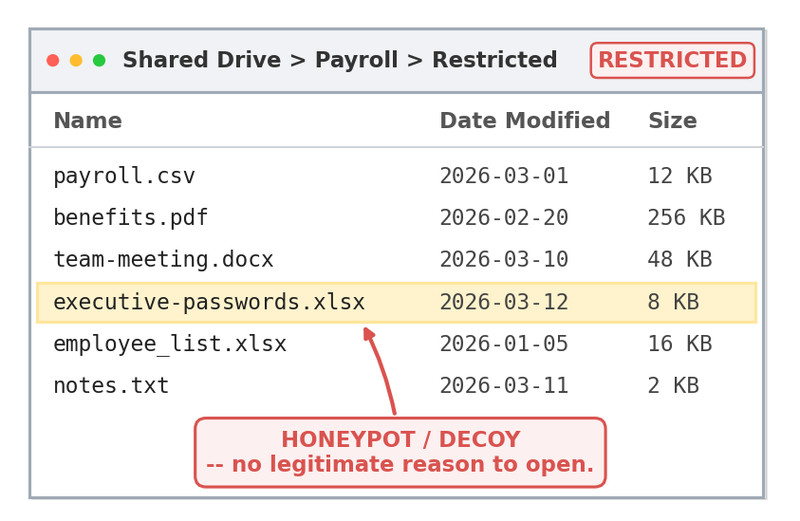
Honeypot file in a shared drive
That kind of filename is exactly what makes the decoy effective. It looks tempting and sensitive, so opening it becomes a strong indicator of suspicious behavior.
Cryptographic hashes
A hash gives the same digest every time for the same file and same algorithm. That makes it useful for integrity.
- Same file + same algorithm = same hash
- Different hash later = the file changed
Hashes detect alteration. They do not detect simple viewing or copying.
What each one catches best
| Control | Best at detecting |
|---|---|
| Logs and DLP | Access, copy, move, delete behavior |
| Honeypots | Interaction with decoy files |
| Hashes | File integrity changes |
Choosing and Evaluating Detection Methods
Organizations choose controls based on what they need to protect.
- Cost
Honeypots and hash checks are relatively cheap. DLP is broader and stronger, but more expensive. - Sensitivity and criticality
More valuable or mission-critical data and apps need closer monitoring. - Data classification
Private, educational, healthcare, and financial data often come with legal or regulatory monitoring requirements.
Speed matters too:
- Real-time or near-real-time
- honeypots
- some DLP tools
- automated log analysis
- Retrospective
- manual log review
- hash comparison
False negatives are the weakness you need to remember:
- Hashes miss theft if the file was only copied or viewed.
- Honeypots miss attackers who never touch the decoy.
So you layer controls.
Verifying Whether a File Was Altered
Hash checking is a simple sequence:
- Calculate the file’s hash.
- Record that baseline.
- Calculate it again later using the same file and same algorithm.
- Compare the outputs.
- Matching hashes mean no change detected.
- Different hashes mean the file was altered.
sha256sum testfile
shasum -a 256 testfile
Get-FileHash testfile -Algorithm SHA256
The first two are Linux and macOS; the third is Windows PowerShell.
A changed hash proves the file changed. It does not prove who changed it, what changed, or whether the change was malicious.
Detecting Application Attacks in Logs
The four attack indicators are easy to test from logs. This sample log shows one example of each so you can see what those artifacts look like in context.
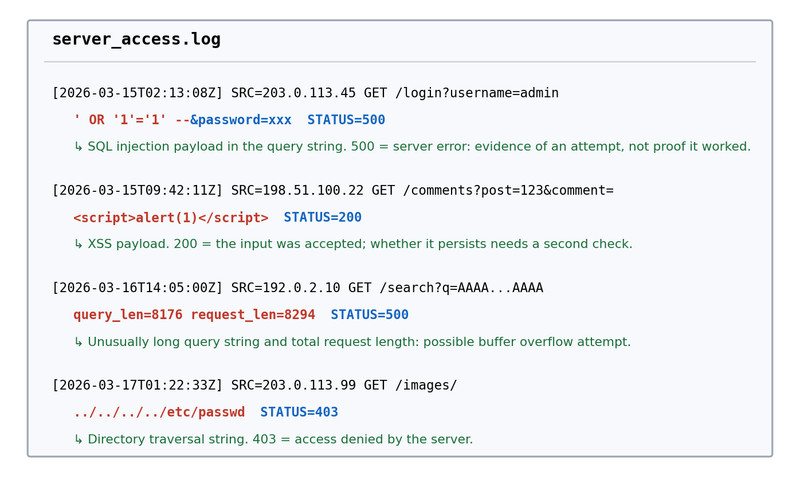
Application log entries with common attack indicators
- SQL injection
Look for',",OR 1=1,--,WHERE,IN,FROM - XSS
Look for<script>...</script> - Buffer overflow
Look for unusually long URL, cookie, query string, or total request length - Directory traversal
Look for../in HTTP GET paths
When you analyze a log record, name the suspicious artifact, connect it to the likely attack, include timestamp, source, field or path, and status code, and stop at what the evidence supports.
For example, the ../ entry in the sample GET request shows a traversal attempt. A 403 suggests it was denied. That does not prove the attacker got the file.
Key Takeaways
Indicator of Attack
Evidence consistent with malicious activity; it may show an attempt without proving that the attack succeeded
Detective Control
A control that reveals an attempted or completed attack rather than necessarily preventing it
Accounting
The process of recording and monitoring user activities, including who accessed data, when, and what operation was attempted or completed
Log Analysis
Reviewing recorded events for suspicious operations or deviations from normal time, location, device, file, or application access patterns
Honeypot
A monitored file containing fake valuable-looking data; attempted access triggers a high-confidence alert because no legitimate user should access it
Cryptographic Hash Function
A repeatable function that converts data into a hash or digest; the same input and algorithm produce the same output
File Integrity Verification by Hash
Record a file’s hash as a baseline, hash the same file later with the same algorithm, and compare the full digests; a difference means the file was altered
SHA-256 Hash Command — Windows PowerShell
Get-FileHash testfile -Algorithm SHA256
SHA-256 Hash Command — Bash
Sha256sum testfile
SHA-256 Hash Command — zsh
Shasum -a 256 testfile
Data Loss Prevention (DLP)
Monitoring of users’ data access, use, copying, and transmission across an organization to detect suspicious activity, with strong coverage at a higher cost
Detective-Control Selection Criteria
Choose controls according to cost, data or application sensitivity and criticality, and data classification or regulatory requirements
Sensitivity vs. Criticality
Sensitivity concerns the nature, value, or potential harm of information; criticality concerns how essential data or an application is to operations
Data Classification
The category and handling requirements formally assigned to data, such as private, educational, healthcare, or financial, which may require specific monitoring
Real-Time vs. Retrospective Detection
Real-time detection alerts while activity is occurring and enables prompt response; retrospective detection discovers an attack or change after it occurred
False Negative
A real attack that a detection method fails to identify, such as unchanged data being stolen or an adversary avoiding a honeypot
SQL Injection Indicators
SQL syntax in logged user input, especially quotes, OR 1=1, the comment marker --, or capitalized control words such as WHERE, IN, and FROM.
Cross-Site Scripting (XSS) Indicators
Suspicious HTML or JavaScript in logged user input, particularly <script>...</script> tags
Buffer Overflow Indicators
Unusually long URL, cookie, query string, or total request lengths in a web request
Directory Traversal Indicators
Sequences of ../ in an HTTP GET path, especially repeated sequences leading to files outside the intended web directory
Application-Attack Indicator Report
Report the timestamp, source, affected account, field, application, or resource; exact indicator; likely attack type; and whether the evidence shows success, failure, or an undetermined outcome
Automated Log Analysis
Using software to compare log events with rules or normal patterns and quickly alert defenders to suspicious activity
Notes
Indicator of Attack
Evidence consistent with malicious activity; it may show an attempt without proving that the attack succeeded
Detective Control
A control that reveals an attempted or completed attack rather than necessarily preventing it
Accounting
The process of recording and monitoring user activities, including who accessed data, when, and what operation was attempted or completed
Log Analysis
Reviewing recorded events for suspicious operations or deviations from normal time, location, device, file, or application access patterns
Honeypot
A monitored file containing fake valuable-looking data; attempted access triggers a high-confidence alert because no legitimate user should access it
Cryptographic Hash Function
A repeatable function that converts data into a hash or digest; the same input and algorithm produce the same output
File Integrity Verification by Hash
Record a file’s hash as a baseline, hash the same file later with the same algorithm, and compare the full digests; a difference means the file was altered
SHA-256 Hash Command — Windows PowerShell
Get-FileHash testfile -Algorithm SHA256
SHA-256 Hash Command — Bash
Sha256sum testfile
SHA-256 Hash Command — zsh
Shasum -a 256 testfile
Data Loss Prevention (DLP)
Monitoring of users’ data access, use, copying, and transmission across an organization to detect suspicious activity, with strong coverage at a higher cost
Detective-Control Selection Criteria
Choose controls according to cost, data or application sensitivity and criticality, and data classification or regulatory requirements
Sensitivity vs. Criticality
Sensitivity concerns the nature, value, or potential harm of information; criticality concerns how essential data or an application is to operations
Data Classification
The category and handling requirements formally assigned to data, such as private, educational, healthcare, or financial, which may require specific monitoring
Real-Time vs. Retrospective Detection
Real-time detection alerts while activity is occurring and enables prompt response; retrospective detection discovers an attack or change after it occurred
False Negative
A real attack that a detection method fails to identify, such as unchanged data being stolen or an adversary avoiding a honeypot
SQL Injection Indicators
SQL syntax in logged user input, especially quotes, OR 1=1, the comment marker --, or capitalized control words such as WHERE, IN, and FROM.
Cross-Site Scripting (XSS) Indicators
Suspicious HTML or JavaScript in logged user input, particularly <script>...</script> tags
Buffer Overflow Indicators
Unusually long URL, cookie, query string, or total request lengths in a web request
Directory Traversal Indicators
Sequences of ../ in an HTTP GET path, especially repeated sequences leading to files outside the intended web directory
Application-Attack Indicator Report
Report the timestamp, source, affected account, field, application, or resource; exact indicator; likely attack type; and whether the evidence shows success, failure, or an undetermined outcome
Automated Log Analysis
Using software to compare log events with rules or normal patterns and quickly alert defenders to suspicious activity
