Topic 1.3 Notes – Best Practices for Public Networks
What Public Wi Fi Risk Really Is
A wireless access point or AP/WAP gives devices network access by radio. The SSID is the Wi-Fi name your device shows, like CoffeeShop-Guest. That name helps you pick a network, but it does not prove the network is legitimate.
It also helps to remember that Wi-Fi signals do not stay neatly inside a room or even inside a building.
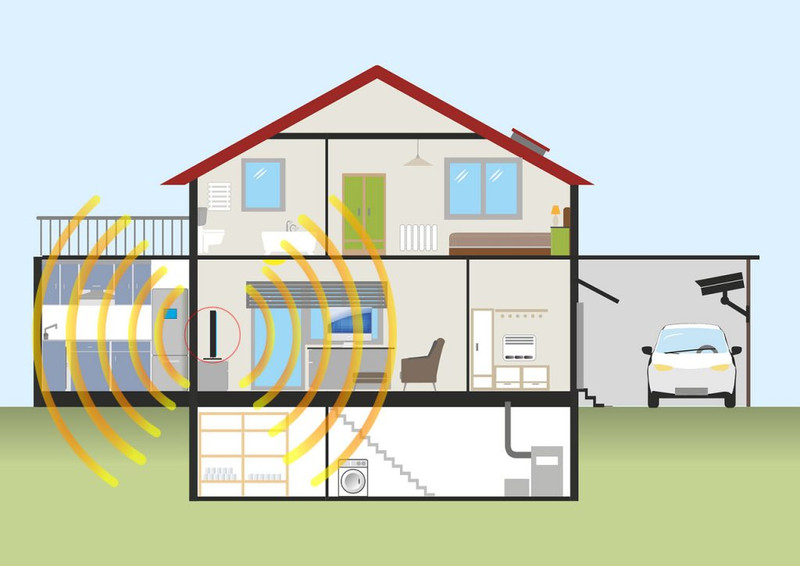
Wi-Fi signals extend beyond the access point
That matters because wireless traffic can be observed or interfered with from outside the building.
The two security effects in this topic are:
- Confidentiality risk. Someone can capture exposed traffic and learn information they should not see.
- Availability risk. Someone can stop your device from communicating at all.
One distinction shows up constantly on tests. Wi-Fi security and application encryption are different layers. If the Wi-Fi is untrusted, that does not mean every message is readable. HTTPS can still protect web content. Some traffic can still be exposed, especially unencrypted DNS queries, which reveal what domains you look up.
Adversaries by Skill and Motivation
You classify an adversary in two separate ways:
- Skill level: low-skilled or high-skilled
- Motivation: greed, recognition, cause, revenge, politics, beliefs
Skill level
- Low-skilled adversaries
- Use tools made by other people
- Often buy or download attack tools online
- Usually exploit known vulnerabilities
- Can still do major damage
- High-skilled adversaries
- Create new tools or modify existing ones
- Adapt attacks to get around defenses
- May find a zero day, which is an undocumented or unknown vulnerability with no established fix yet
What gets tested here is the evidence, not the size of the damage. A huge outage caused by a bought tool can still be low-skilled.
Motivation
- Greed means money, fraud, theft, extortion
- Recognition means attention, reputation, showing off skill
- Cause means acting for a social or ideological goal
- Revenge fits retaliation, often in insider or former employee cases
- Politics or beliefs fits attacks tied to ideology, policy, religion, or political goals
In a scenario, tie motivation to the target, statements, and behavior. The same attack method could fit different motives.
Types of Wireless Attacks
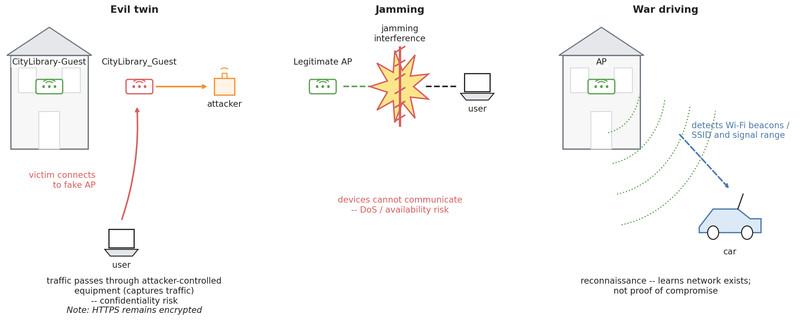
Three names matter here. The diagram below puts them side by side so you can quickly see the difference.
Evil twin
- An attacker creates a fake AP.
- It uses an identical or similar SSID.
- A victim connects to the fake network.
- Traffic passes through attacker-controlled equipment.
Example: CityLibrary-Guest versus CityLibrary_Guest.
The main effect is confidentiality risk. The attacker can capture traffic. The trap is saying they can automatically read everything. If the traffic uses HTTPS, they capture encrypted data, not readable web content.
Jamming
A jamming attack floods the area with strong electromagnetic interference in the same frequency range as the Wi-Fi. Devices cannot communicate reliably.
This is DoS attack because it blocks access. Its main effect is availability loss.
War driving
War driving means walking or driving around detecting wireless beacons. The attacker learns that a network exists, what type it is, and where the signal reaches outside the building.
In the diagram, the car is only detecting the AP's signal from outside. This is reconnaissance. It is information gathering, not proof they got in.
How to Protect Yourself on Public Networks
Good protection is layered.
- Verify the exact SSID from a trusted source. Close enough is not enough.
- Think about sensitivity. HTTPS protects web content, but exposed traffic like some DNS queries may still leak information.
- Use a VPN when appropriate. A VPN encrypts traffic from your device to the VPN provider.
A VPN protects against local network observers, including the Wi-Fi operator and others on that path. The tradeoff is simple. You shift trust to the VPN provider, because that provider can see traffic after it reaches their system.
VPN and HTTPS are not the same thing. They can work together.
Must Know Distinctions and Common Traps
- SSID is only a network name, not proof of identity.
- Evil twin means copied or similar SSID and traffic capture.
- Jamming means interference and service loss, so think DoS.
- War driving means discovery of wireless networks, not automatic compromise.
- Low-skilled means using others’ tools, not harmless.
- High-skilled means custom tools, modified tools, or zero days.
- A VPN hides traffic from the local network but not from the VPN provider.
- Exact SSID checking reduces risk, but an attacker can still fake the exact same name.
Key Takeaways
Wireless Access Point (WAP or AP)
A device that provides network access to wireless devices by radio
Service Set Identifier (SSID)
The displayed name of a wireless network; it identifies the network by name but does not prove who operates it
Low-Skilled Adversary
An adversary who relies on tools made by others, typically to automate attacks against known vulnerabilities
High-Skilled Adversary
An adversary capable of creating or substantially modifying malicious tools, adapting to defenses, or discovering undocumented vulnerabilities
Zero Day
A vulnerability previously undocumented or unknown to those responsible for defending or correcting the affected system
Adversary Motivations
Reasons for attacking, including greed, recognition, dedication to a cause, revenge, politics, or beliefs; motivation is separate from skill level
Evil Twin Attack
An attack in which an adversary-controlled access point uses an identical or similar SSID so users connect and their traffic can be captured; HTTPS-protected contents cannot be read merely from that capture
Jamming Attack
Flooding an area with a strong electromagnetic signal in a wireless network's frequency range to disrupt legitimate communication
Denial-of-Service (DoS) Attack
An attack that prevents legitimate users from accessing a system, service, or resource
War Driving Attack
Moving through an area, by driving or walking, to detect wireless beacons and gather network or signal-reach information
Wireless Network Name Verification
Obtain the intended SSID from a trustworthy source and confirm that the displayed network name matches it exactly before connecting
Virtual Private Network (VPN)
A service that encrypts all user traffic to the VPN operator's system, hiding it from the local provider while transferring visibility and trust to the VPN provider
Notes
Wireless Access Point (WAP or AP)
A device that provides network access to wireless devices by radio
Service Set Identifier (SSID)
The displayed name of a wireless network; it identifies the network by name but does not prove who operates it
Low-Skilled Adversary
An adversary who relies on tools made by others, typically to automate attacks against known vulnerabilities
High-Skilled Adversary
An adversary capable of creating or substantially modifying malicious tools, adapting to defenses, or discovering undocumented vulnerabilities
Zero Day
A vulnerability previously undocumented or unknown to those responsible for defending or correcting the affected system
Adversary Motivations
Reasons for attacking, including greed, recognition, dedication to a cause, revenge, politics, or beliefs; motivation is separate from skill level
Evil Twin Attack
An attack in which an adversary-controlled access point uses an identical or similar SSID so users connect and their traffic can be captured; HTTPS-protected contents cannot be read merely from that capture
Jamming Attack
Flooding an area with a strong electromagnetic signal in a wireless network's frequency range to disrupt legitimate communication
Denial-of-Service (DoS) Attack
An attack that prevents legitimate users from accessing a system, service, or resource
War Driving Attack
Moving through an area, by driving or walking, to detect wireless beacons and gather network or signal-reach information
Wireless Network Name Verification
Obtain the intended SSID from a trustworthy source and confirm that the displayed network name matches it exactly before connecting
Virtual Private Network (VPN)
A service that encrypts all user traffic to the VPN operator's system, hiding it from the local provider while transferring visibility and trust to the VPN provider
