Topic 5.5 Notes – Protecting Applications
What Protecting Applications Means
When an app takes untrusted input, it has to assume the user could type anything. That matters because many attacks work by sneaking special characters into a place where the app expects ordinary data.
A quick reminder of the pattern:
- SQL injection changes a database query.
- XSS makes a browser run attacker-supplied script.
- Directory traversal changes a file path to reach files outside the allowed folder.
The shared mistake is simple. The app stops treating input as data and accidentally treats it as syntax.
This topic protects against that in two layers:
- Product-level choices
- Secure by design
- Secure by default
- Application-level input handling
- Validation
- Sanitization
Secure by Design and Secure by Default
Secure by design means security is part of the whole product life cycle, not a patch added after problems show up. That includes planning, design, coding, testing, release, and updates after release.
One way to picture that idea is as a secure software development life cycle that builds security checks into each stage.
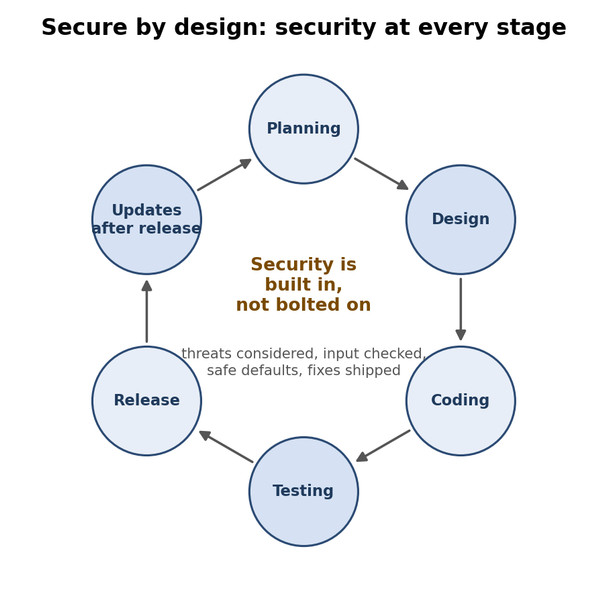
Secure by design across the software life cycle
The three secure-by-design principles
Ownership of customer security outcomes
The company is responsible for building a product that protects users. A document-sharing app should protect files, check input, and avoid risky sharing settings. Shipping something unsafe and expecting customers to fix it misses the point.Radical transparency and accountability
When flaws are found, companies should quickly tell users what happened, which versions are affected, and what to do. This is why vendors publish security advisories and patches.Organizational structure and leadership
Security needs authority behind it. Teams need standards, time, and leadership support to fix issues, test fixes, and communicate them.
Secure by default
Secure by default means the product begins in a safe state out of the box. Many users never change settings, so defaults matter a lot.
Examples:
- restrictive sharing instead of public sharing
- unnecessary services off until needed
- built-in protections already enabled
The relationship is a common test point:
- Secure by design = the broad process
- Secure by default = one part of that process, focused on initial settings
A product can have one safe default and still be weak overall.
How Input Validation and Sanitization Work
Apps build larger expressions around your input, like a database query, web page content, or a file path. Some characters help control those expressions. In this course, key control characters are ', " and ;.
- Validation checks whether input fits the field
- type
- format
- length
- range
- Sanitization handles dangerous characters or patterns that could change meaning
That includes things like:
- quotes or semicolons in a database input
<script>in a text field../in a file request
The process works like this:
- Define what valid input should look like.
- Treat all input as untrusted.
- Check it before using it.
- Detect unexpected characters or attack patterns.
- Remove unsafe content or reject the input.
- Process only approved input.
A clean way to remember it:
- Validation asks, Does this belong here?
- Sanitization asks, Could this change how the system reads the input?
How Sanitization Stops Common Application Attacks
SQL injection
Example input27' OR 1=1;--tries to change an SQL query. If a field should contain only digits, the app should reject quotes, operators, and separators. This protects database confidentiality and integrity.Cross-site scripting XSS
Example input<script>alert('XSS')</script>tries to become executable browser content.- Stored XSS stays on the site and affects later users.
- Reflected XSS comes from a crafted request or link.
Directory traversal
Example input../../../../etc/passwdtries to escape the allowed folder. If the field is supposed to be a safe filename, the app should reject..and slashes.
What Sanitization Does Not Do
Sanitization has a specific job.
- It is not authentication. Knowing who a user is does not make their input safe.
- It is not authorization. Even approved users can send malicious input.
- It is not encryption. Encryption protects confidentiality, not input safety.
- It is preventive, not detective. Logs can show attempts later, but sanitization stops bad input before processing.
Key Takeaways
Secure by Design
Building security into every phase of a product’s life cycle as a fundamental design principle rather than adding it after development
Ownership of Customer Security Outcomes
The secure-by-design principle that producers should build products around customers’ security needs instead of shifting the security burden to customers
Radical Transparency and Accountability
The secure-by-design principle that producers should promptly and responsibly communicate security issues, updates, affected products, and remediation
Organizational Structure and Leadership
The secure-by-design principle that organizations need responsible leaders, authority, and resources to maintain a security-first posture
Secure by Default
The principle that a product’s security features should be enabled in its initial configuration so it is secure out of the box
Control Characters
Characters that delimit or control parts of a processed expression, such as the single quote, double quote, and semicolon
Data Validation
Verifying before processing that input meets the expected type, format, length, range, or other criteria
Input Sanitization
Removing unsafe content or rejecting input before processing so user data cannot become commands, executable code, or unauthorized file paths
Notes
Secure by Design
Building security into every phase of a product’s life cycle as a fundamental design principle rather than adding it after development
Ownership of Customer Security Outcomes
The secure-by-design principle that producers should build products around customers’ security needs instead of shifting the security burden to customers
Radical Transparency and Accountability
The secure-by-design principle that producers should promptly and responsibly communicate security issues, updates, affected products, and remediation
Organizational Structure and Leadership
The secure-by-design principle that organizations need responsible leaders, authority, and resources to maintain a security-first posture
Secure by Default
The principle that a product’s security features should be enabled in its initial configuration so it is secure out of the box
Control Characters
Characters that delimit or control parts of a processed expression, such as the single quote, double quote, and semicolon
Data Validation
Verifying before processing that input meets the expected type, format, length, range, or other criteria
Input Sanitization
Removing unsafe content or rejecting input before processing so user data cannot become commands, executable code, or unauthorized file paths
