Topic 1.1 Notes – Introduction to Algorithms, Programming, and Compilers
1. What an Algorithm Is
An algorithm is a step-by-step process for solving a problem or completing a task.
Think beyond code. An algorithm for “finding the tallest student in a class” might look like:
- Start with the first student as the tallest so far.
- Compare each remaining student’s height to the current tallest.
- If someone is taller, update who is tallest.
- After checking everyone, report the tallest.
Notice what makes this an algorithm:
- It has a clear starting point.
- It follows a defined sequence of steps.
- It executes one step at a time.
- It has a clear ending point.
- It works for the general case (any class), not just one specific group.
Sequencing
Sequencing means steps happen in a specific order, one at a time.
If you change the order, you change the result. For example, you can’t compare heights before you decide who you’re comparing to. Computers are strict about this. They execute instructions exactly in the order written unless you explicitly tell them otherwise (which you’ll learn later with conditionals and loops).
On quizzes, you might be asked to:
- Spot when steps are out of order.
- Identify a missing step.
- Rewrite a vague process to make it precise.
Representing Algorithms
You should be comfortable expressing algorithms in:
- Written language (clear, numbered steps)
- Diagrams, such as flowcharts
Here’s a simple flowchart that represents an algorithm for checking whether a number is positive:
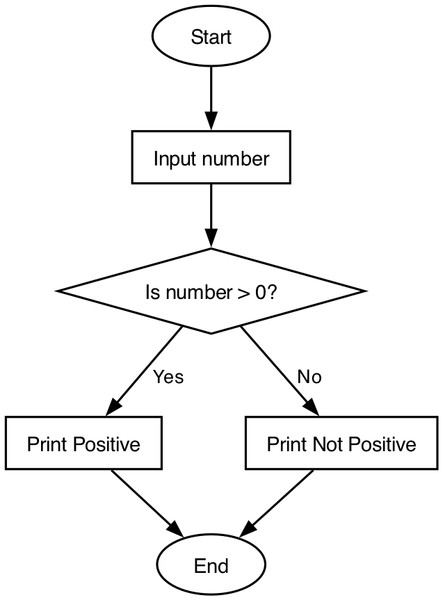
Flowchart for checking if a number is positive
Even if you never draw one by hand on the AP exam, you should be able to read this and trace the logic from start to finish.
Strong representations:
- Use precise language
- Avoid vague phrases like “do something”
- Account for all expected inputs
Weak ones:
- Skip steps
- Only work for one example
- Assume the reader fills in missing logic
On the AP exam, they love giving you a short written algorithm and asking what it does, or asking you to turn one into Java code.
2. From Java Code to Execution
When you click “Run,” more is happening than you might think.
The Compilation and Execution Process
Here’s the full path from your code to actual output on the screen:
- You write Java source code in a
.javafile. - The javac compiler checks your code for syntax errors.
- If there are no syntax errors, the compiler creates bytecode in a
.classfile. - The Java Virtual Machine (JVM) loads and runs that bytecode.
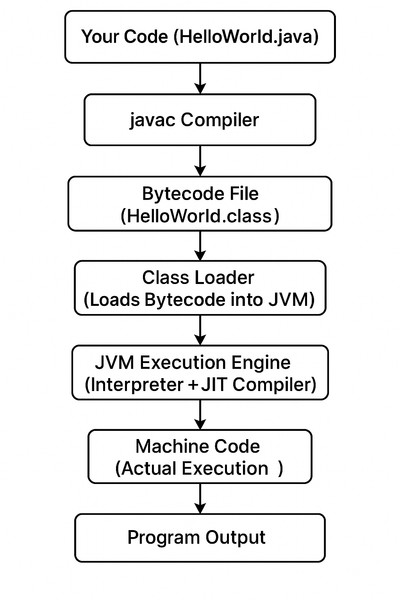
Java compilation and execution pipeline
The diagram shows this pipeline step by step, from your .java file to machine code and finally program output.
Important details:
- If there’s a syntax error, no
.classfile is created. - The program cannot run until syntax errors are fixed.
- Java uses bytecode so it can run on different systems. Each system has its own JVM.
IDE vs Text Editor
You can write Java in a basic text editor. An IDE (Integrated Development Environment) just gives you tools:
- Syntax highlighting
- Error underlines
- Built-in compiler
- Run and debug buttons
The IDE doesn’t replace the compiler. It just uses it behind the scenes.
3. Types of Programming Errors
You need to quickly classify errors. This shows up constantly in multiple-choice questions.
a. Syntax Errors
A syntax error breaks Java’s grammar rules.
Examples:
- Missing semicolon
- Misspelled keyword
- Mismatched braces
Detected by the compiler.
If it doesn’t compile, it’s syntax.
b. Logic Errors
A logic error means your algorithm is wrong.
- The program compiles.
- The program runs.
- The output is incorrect.
Examples:
- Dividing by the wrong number
- Wrong loop bounds
- Incorrect condition in an
ifstatement
The compiler cannot catch these. You find them by testing and tracing.
If it runs but gives the wrong answer, that’s logic.
c. Run-Time Errors
A run-time error happens while the program is executing.
- It compiles.
- It starts running.
- It crashes.
Examples:
- Accessing an invalid array index
- Dividing by zero
These usually cause the program to terminate abnormally.
Exceptions
An exception is a specific type of run-time error caused by an unexpected situation.
Examples:
ArrayIndexOutOfBoundsExceptionNullPointerException
The compiler cannot predict all exceptions. They interrupt normal execution when they occur.
4. How to Classify Errors on the Exam
Use this mental checklist:
- Does it compile?
- No → Syntax error
- Does it crash during execution?
- Yes → Run-time error
- Does it run but produce incorrect output?
- Yes → Logic error
Common mix-ups:
- Calling an out-of-bounds access a syntax error. It’s run-time.
- Thinking the compiler catches logic mistakes. It doesn’t.
Lock in the pattern:
- Syntax = grammar problem
- Logic = algorithm problem
- Run-time = execution problem
- Exception = specific run-time interruption
