Topic 4.14 Notes – Searching Algorithms
What Linear Search Is
A linear search checks each element in order:
- Compare the current element to the target.
- If it matches, stop.
- If not, move to the next element.
- If you reach the end, the target isn’t there.
Here’s the idea visually:
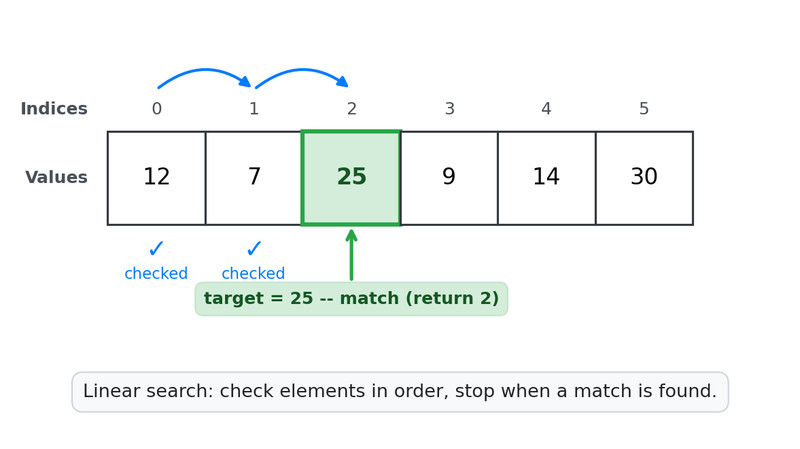
In this example, the search checks index 0, then 1, and stops at index 2 because 25 matches the target.
Key properties:
- Works on unsorted or sorted data.
- Can start from index
0and move forward, or from the end and move backward. - May stop early if the value is found.
- In the worst case, it checks every element.
At its core, linear search is just array/ArrayList traversal + an if condition.
The Linear Search Pattern in Code
Everything you’ll write follows the same structure. What changes is what you return.
Return the Index of the First Match
This is the most common version.
public static int findIndex(int[] arr, int target) {
    for (int i = 0; i < arr.length; i++) {
        if (arr[i] == target) {
            return i;
        }
    }
    return -1;
}
Important details:
- Arrays → use
arr.length - ArrayLists → use
list.size()andlist.get(i) -1means “not found”
On tests, if you see “return the position of…” this is the pattern they want.
Return a Boolean
Now you’re answering “Does it exist?”
public static boolean containsValue(ArrayList<Integer> list, int target) {
    for (int i = 0; i < list.size(); i++) {
        if (list.get(i) == target) {
            return true;
        }
    }
    return false;
}
Common mistake:
if (list.get(i) == target)
    return true;
else
    return false;  // ❌ ends search too early
That return false must be after the loop, not inside it.
Count Matches
When the question says “How many…”, you must check every element.
public static int countMatches(int[] arr, int target) {
    int count = 0;
    for (int i = 0; i < arr.length; i++) {
        if (arr[i] == target) {
            count++;
        }
    }
    return count;
}
You cannot return early unless you only care about the first match.
Custom Search Conditions
The condition does not have to be ==.
Examples you might see:
arr[i] > 50list.get(i).equals("cat")word.startsWith("pre")student.getID() == targetID
The structure stays the same. Only the condition inside the if changes.
Big reminder: use .equals() for Strings, not ==.
Linear Search in 2D Arrays
A 2D array is an array of arrays. You must search each row, then each column inside that row.
Think of it as an outer loop that moves down the rows, and an inner loop that scans left to right across each row.

Row-first traversal of a 2D array
Typical structure:
public static boolean findValue(int[][] grid, int target) {
    for (int row = 0; row < grid.length; row++) {
        for (int col = 0; col < grid[row].length; col++) {
            if (grid[row][col] == target) {
                return true;
            }
        }
    }
    return false;
}
Key details students mix up:
grid.length→ number of rowsgrid[row].length→ number of columns in that row
If you forget the nested loop, you aren’t searching the full 2D structure.
Tracing and Predicting Results
On multiple choice, they love making you trace:
- What index gets returned?
- How many comparisons occur?
- Does it return
-1?
When tracing:
- Start at index
0. - Evaluate the condition.
- Stop immediately if there’s a
return. - If no match, the loop completes and the final return runs.
Edge cases to watch:
- Target is first element → 1 comparison.
- Target is last element → maximum comparisons before stopping.
- Target not present → loop runs fully.
- Empty array → loop never runs.
That last one is sneaky. The method jumps straight to the final return.
