Topic 1.4 Notes – Assignment Statements and Input
1. What Assignment Statements Do
An assignment statement stores a value in a variable using =. The entire right side is evaluated first, then that final value is stored in the variable on the left.
General form:
variable = expression;
Here’s what that means in action:
int points = 10;
points = points + 4;
- Java looks at
points + 4first. - If
pointswas 10, that becomes 14. - Then 14 is stored back into
points.
This diagram walks through that process step by step.
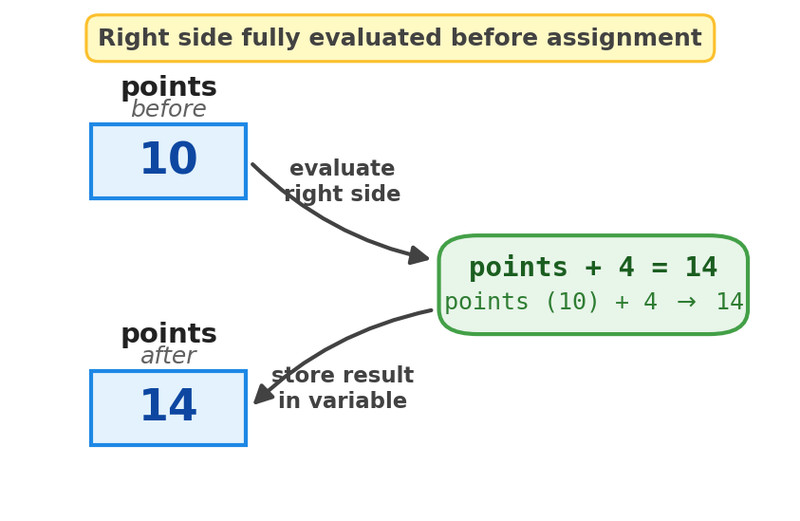
Evaluating the right side before assignment
Two rules you must remember:
- Every variable must be assigned before it’s used.
Using an uninitialized local variable causes a compile-time error. - The value assigned must be a compatible type.
int x = 3.5;does not compile.
The first time you give a variable a value, that’s called initialization.
Reference types (like String) can store:
- A reference to an object
- Or
null
null means the variable refers to no object.
2. How Expressions Evaluate
An expression produces a single value. That value has a type.
Order of Operations
Java follows normal math rules:
- Parentheses
- Multiplication and division
- Addition and subtraction
- Assignment happens last
Example:
int result = 8 - 2 * 3;
Multiplication happens first → 2 * 3 = 6
Then subtraction → 8 - 6 = 2
If you add parentheses:
int result = (8 - 2) * 3;
Now subtraction happens first → 6 * 3 = 18
Here’s a fuller operator precedence chart you can use for reference. Focus on the top-to-bottom order.
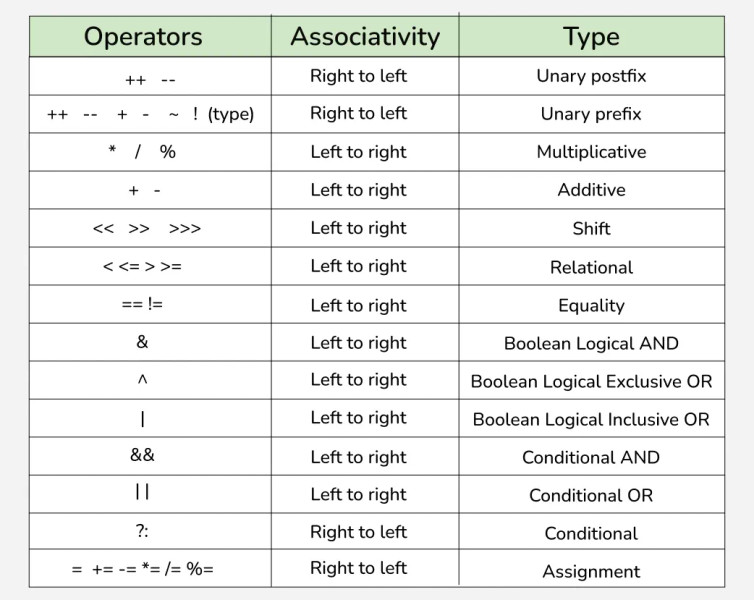
Java operator precedence and associativity
The Type of the Expression Matters
The final value has a type based on how it evaluates.
int / int→ integer division
7 / 2becomes3- If one value is
double, result isdouble
7 / 2.0becomes3.5 - If one operand is a
String,+becomes concatenation
int num = 5;
String text = "Score: " + num;  // "Score: 5"
On multiple choice, they love mixing integer division and strings in the same expression. Slow down and evaluate carefully.
3. Initialization, Reassignment, and null
Primitive Variables
Primitives (int, double, boolean) must be assigned before use.
int total = 0;   // initialized
total = total + 5;  // reassigned
Reassignment simply replaces the old value.
If you try:
int total;
int sum = total + 3;   // compile error
Java stops you immediately.
Reference Variables and null
Reference variables store memory addresses, not actual data.
String name = "Jordan";
That variable refers to a String object.
You can also do:
String name = null;
Now name refers to nothing.
Calling a method on null causes a NullPointerException:
name.length(); // crash if name is null
Safer pattern when possible:
String name = "";
Empty string is still a real object. Length is 0, but no crash.
On code-tracing questions, always check whether a reference might be null before a method call.
4. Reading Input with Scanner
Programs can get input in many ways. The Scanner class is one way to read text input.
Basic pattern:
Scanner scan = new Scanner(System.in);

int age = scan.nextInt();
double gpa = scan.nextDouble();
String word = scan.next();
String line = scan.nextLine();

scan.close();
Each next...() method call:
- Produces a value
- That value must be assigned to a variable
So this fits directly with assignment statements.
The nextInt and nextLine Issue
Common bug:
int age = scan.nextInt();
String name = scan.nextLine();  // often reads empty string
Why? nextInt() leaves the newline character behind.
Fix:
int age = scan.nextInt();
scan.nextLine();  // clear leftover newline
String name = scan.nextLine();
You won’t see detailed keyboard input scenarios on the AP exam, but understanding how assignment works with input is still important, especially when reading from files later in the course.
5. Common Assignment Mistakes
Confusing = and ==
=assigns==compares
This shows up constantly in quizzes.
Forgetting the Right Side Evaluates First
If you see:
x = x + 1;
It does not mean “x equals x.”
It means “compute x + 1 using the old value, then store it.”
Chained or Embedded Assignments
Things like:
a = b = 4;
are outside the scope of the AP exam. Keep assignments simple and readable.
