Topic 4.9 Notes – ArrayList Traversals
1. What Traversing an ArrayList Is
Traversal means using iteration (a loop) to access all elements - or an ordered sequence of elements - in an ArrayList.
Quick reminders you already know:
- Valid indices are
0tolist.size() - 1 - Access elements with
list.get(i) - Replace elements (without changing size) using
list.set(i, value) add()andremove()change the size of the list
Here’s what an ArrayList looks like conceptually, with elements stored at numbered indices and shifted when you insert at a specific position:
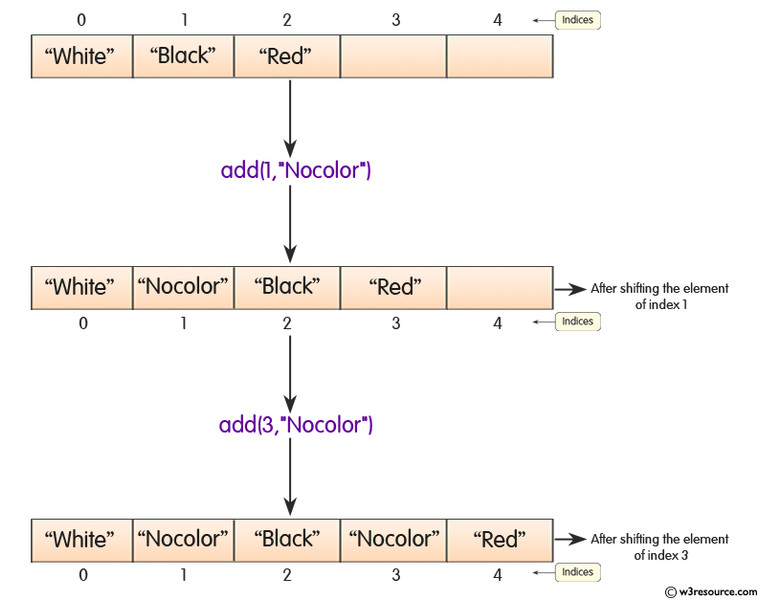
ArrayList indices and element shifting with add(index, value)
Notice how calling add(1, "Nocolor") shifts every element at index 1 and beyond one position to the right. The indices update automatically, which is why traversal must always stay within 0 through size() - 1.
Traversal is used to:
- Search for a value
- Compute something (sum, count, max)
- Modify values
- Remove elements
- Build a new
ArrayList
If you access list.get(list.size()), Java throws an
IndexOutOfBoundsException.
That index does not exist. The last valid one is size() - 1.
2. The Two Ways to Traverse
There are exactly two traversal patterns you need.
Traditional for Loop (Index-Based)
for (int i = 0; i < list.size(); i++) {
    int value = list.get(i);
}
You get:
- Direct access to the index
i - Control over direction (forward or backward)
- Ability to safely modify structure (with care)
Use this when:
- You need the index
- You are removing elements
- You are iterating backward
Enhanced for Loop (For-Each)
for (Integer value : list) {
    // use value
}
Cleaner. No index variable.
You can:
- Read elements
- Compute values
- Add elements to a different list
- Modify object state (if elements are objects)
You cannot:
- Call
add() - Call
remove() - Call
clear()
If you change the size during an enhanced loop, Java throws:
ConcurrentModificationException
The AP loves giving a loop that looks fine but removes inside a for-each loop. That’s an automatic exception.
3. Modifying an ArrayList During Traversal
This is where students lose points.
Why Removal Is Tricky
When you remove index i:
- Everything after it shifts left
- The list shrinks
- The next element moves into position
i
Example:
Index:  0   1   2   3
Values: A   B   C   D
Remove index 1:
Index:  0   1   2
Values: A   C   D
C moved into index 1. If your loop increments i, you skip C.
This is called index shifting.
Safe Removal Pattern 1 - Loop Backward
for (int i = list.size() - 1; i >= 0; i--) {
    if (list.get(i) < 0) {
        list.remove(i);
    }
}
Why this works:
- Removing an element does not affect earlier indices
- You never skip elements
Bounds must be:
- Start at
size() - 1 - Continue while
i >= 0 - Decrement with
i--
Starting at size() causes IndexOutOfBoundsException.
Safe Removal Pattern 2 - Adjust the Index
for (int i = 0; i < list.size(); i++) {
    if (list.get(i) < 0) {
        list.remove(i);
        i--;
    }
}
i-- forces the loop to re-check the shifted element.
This works, but backward looping is cleaner and less error-prone.
Safe Modification That Does Not Change Size
This is always safe:
list.set(i, list.get(i) * 2);Because the size stays the same, no shifting occurs.
You can even use set() inside an enhanced for loop if you are tracking the index separately, but most of the time, use a traditional loop for modifications.
4. Common Errors the AP Tests
IndexOutOfBoundsException
Causes:
i <= list.size()instead of<- Starting backward loop at
size() - Accessing
list.get(-1)
Always remember:
Valid indices → 0 through size() - 1
ConcurrentModificationException
for (String s : list) {
    list.remove(s);   // Exception
}
Enhanced loops cannot change list size.
If you see removal inside a for-each loop on a test, the answer is the exception.
Skipping Elements
This buggy pattern shows up constantly:
for (int i = 0; i < list.size(); i++) {
    if (condition) {
        list.remove(i);
    }
}
Trace it carefully. After a removal, the next element shifts left but i still increments.
Many multiple-choice questions ask what remains in the list after this runs.
