Topic 2.7 Notes – while Loops
1. What a While Loop Is
A while loop is a pre-test loop. That means the Boolean condition is checked before each iteration, including the first one.
while (condition) {
    // loop body
}
Here’s the mental model. Each time through, the program checks the condition first. If it’s true, the loop body runs and control jumps back to test the condition again. If it’s false, the loop ends immediately.
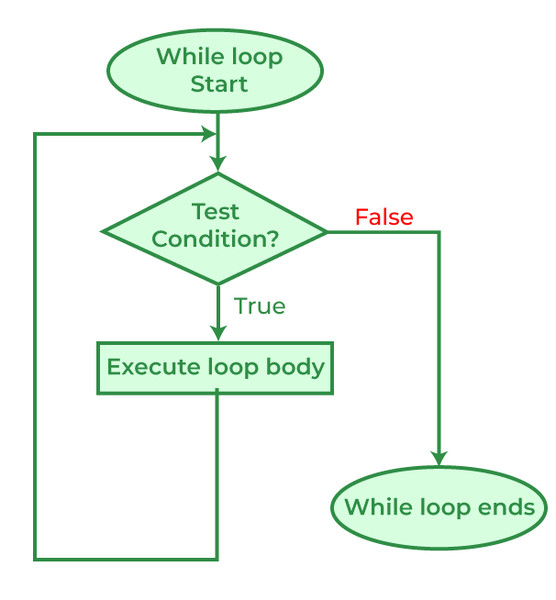
What this means in practice:
- The loop runs zero or more times.
- If the condition is false at the start, the body never runs.
- As soon as the condition becomes false, the loop stops.
- If the condition is always true, you get an infinite loop.
Example of zero iterations:
int x = 8;

while (x < 5) {
    System.out.println("Hello");
}

System.out.println("Done");
"Hello" never prints. "Done" does.
That “zero times” possibility is something the AP loves testing in trace questions.
2. The Loop Control Variable Pattern
Most while loops follow a 3-part structure. If one piece is missing, the loop probably breaks.
a. Initialization (before the loop)
int count = 1;b. Condition (in the header)
while (count <= 4)c. Update (inside the loop)
count++;Full example:
int count = 1;

while (count <= 4) {
    System.out.println(count);
    count++;
}
Here it is all labeled together so you can see the three parts in one place.
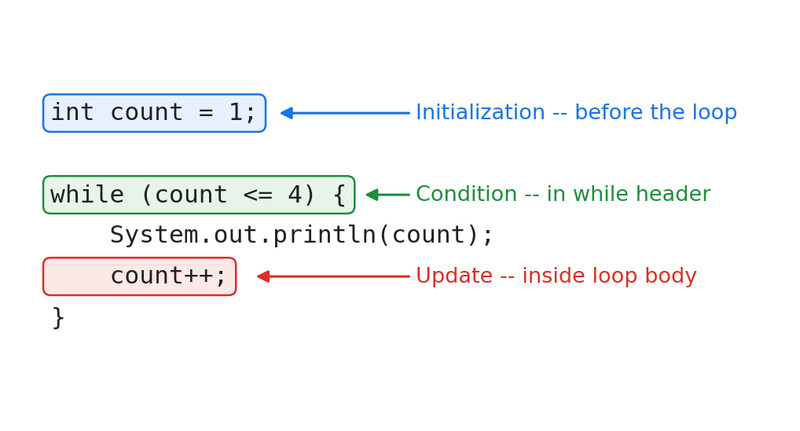
Three-part loop control variable structure
Two big things to check:
- The update must move toward stopping.
- If condition is
count <= 4, you must increasecount. - If condition is
count > 0, you must decreasecount.
- If condition is
- The update must actually execute each time through the loop.
Bad example (infinite loop):
int count = 3;

while (count > 0) {
    System.out.println(count);
    count++;   // wrong direction
}
count keeps growing. The condition never becomes false.
3. When You Use a While Loop
You use a while loop when the number of repetitions isn’t fixed ahead of time.
a. Accumulator Pattern
Used to build a total.
int sum = 0;
int n = 1;

while (n <= 5) {
    sum += n;
    n++;
}
sum is the accumulator. It changes each iteration.
This pattern shows up constantly in FRQs when you’re counting, totaling, or averaging.
b. Sentinel-Controlled Loop
Stops when a special value appears.
int input = 0;
int total = 0;

while (input >= 0) {
    total += input;
    input = input - 1;  // imagine new input here
}
The sentinel value is the value that ends the loop. Usually, you don’t want to process the sentinel itself. Watch for that detail in problems.
c. Search Until Found
Continue looping until something becomes true.
boolean found = false;
int num = 1;

while (!found) {
    if (num == 4) {
        found = true;
    }
    num++;
}
The loop stops once found becomes true.
4. Tracing While Loops on the Exam
When you see a while loop in a multiple choice question:
- Write down initial variable values.
- Check the condition.
- If true, run the entire loop body.
- Update variables.
- Go back to the condition.
Make a small table like this:
| Iteration | count | sum |
|---|---|---|
| Start | 1 | 0 |
| 1 | 2 | 1 |
| 2 | 3 | 3 |
| ... |
Two things students mess up:
- Forgetting the condition is checked before the first run.
- Forgetting the final update that makes the condition false.
Sometimes the question asks for the final value of a variable, not the output. Track everything.
5. Common Mistakes That Lose Points
Infinite Loops
Happens when:
- No update
- Wrong update direction
- Condition always true
If a program “freezes,” this is usually why.
Off-by-One Errors
Loop runs one time too many or too few.
Example:
int i = 1;

while (i < 5) {
    System.out.println(i);
    i++;
}
Prints 1 2 3 4 but not 5.
Changing < to <= changes the number of iterations. The AP loves answer choices that differ by exactly one iteration.
Updating in the Wrong Place
If the control variable changes outside the loop, the loop condition never changes.
The update must be inside the loop body.
