Topic 2.5 Notes – Compound Boolean Expressions
1. What Compound Boolean Expressions Are
You already know that comparison operators like <, >=, ==, and != produce Boolean values. For example:
score >= 70
That’s either true or false.
A compound Boolean expression combines two or more Boolean expressions using logical operators:
score >= 70 && attendance >= 90
Each part:
score >= 70attendance >= 90
is Boolean. The whole expression is also Boolean.
Now imagine we expand that condition by adding one more possibility:
(score >= 70 && attendance >= 90) || hasSpecialApproval
Visually, you can think of it as a tree of smaller Boolean pieces combined into one final result:
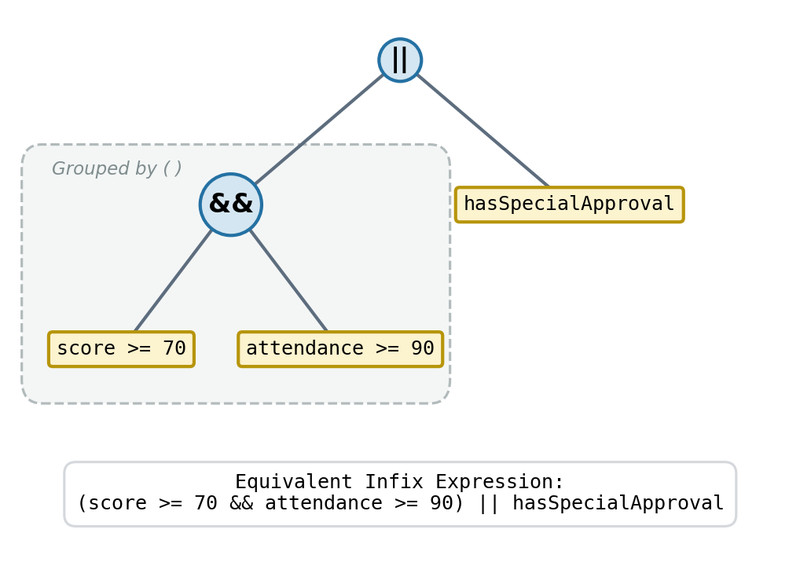
Boolean expression tree for a compound condition
Even when the logic looks complicated, the final result is always one value: true or false.
2. Logical Operators and How They Work
There are exactly three logical operators you need for AP CSA.
NOT !
Flips a Boolean value.
!true→false!false→true!passedmeans “did not pass”
Example:
!isComplete
If isComplete is false, this becomes true.
AND &&
True only if both sides are true.
Truth pattern:
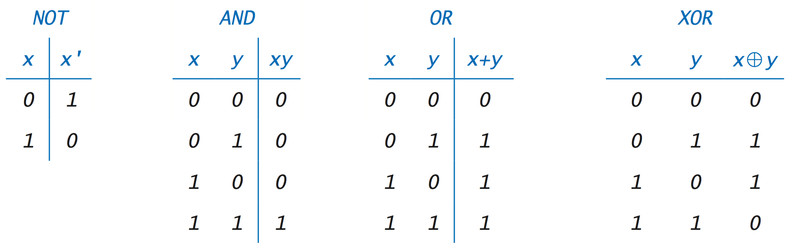
Basic Boolean truth tables
Focus on the AND section in the image. It only outputs true in the bottom row, when both inputs are true.
Think: every condition must pass.
Example:
age >= 16 && hasPermit
If either part is false, the whole thing is false.
OR ||
True if at least one side is true.
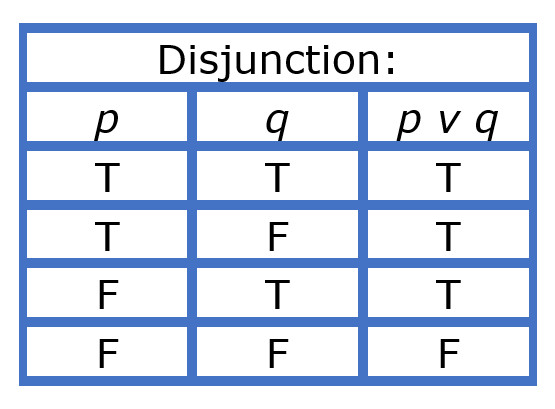
OR (disjunction) truth table
This table shows that the result is false only in the last row, when both inputs are false.
Think: only one condition needs to pass.
Example:
isSenior || hasWaiver
Only false if both are false.
3. Operator Precedence and Grouping
Logical operators follow this order:
!&&||
So Java evaluates:
true || false && false
as:
true || (false && false)
not:
(true || false) && false
That’s because && happens before ||.
When mixing && and ||, parentheses make your intent clear:
(hasTicket && hasID) || isGuest
On quizzes and FRQs, missing parentheses is one of the most common logic mistakes. If the grouping matters to you, make it explicit.
4. Short-Circuit Evaluation
Java sometimes stops early when evaluating && and ||.
With &&
If the first condition is false, Java stops.
false && something
The result must be false, so something is never checked.
With ||
If the first condition is true, Java stops.
true || something
The result must be true.
Why This Matters
1. Preventing Errors
This is safe:
str != null && str.length() > 0
If str is null, Java never checks .length(), so no crash.
Reversing it:
str.length() > 0 && str != null
would cause a NullPointerException.
The order of conditions matters.
2. Side Effects Might Not Run
checkAccess() || logAttempt()
If checkAccess() returns true, logAttempt() never runs.
On the AP exam, they love questions where you assume both sides execute. They don’t.
