Topic 1.7 Notes – Application Program Interface (API) and Libraries
1. What an API Is and How Libraries Are Organized
An API (Application Programming Interface) is the official documentation that tells you how to use a set of classes. It does not show you the internal code. It tells you:
- What classes exist
- What constructors they have
- What methods they provide
- What parameters those methods require
- What they return
Think of it as a user manual for code someone else already wrote.
A library is a collection of related classes.
A package is a way to organize classes inside a library.
Here’s the structure visually:
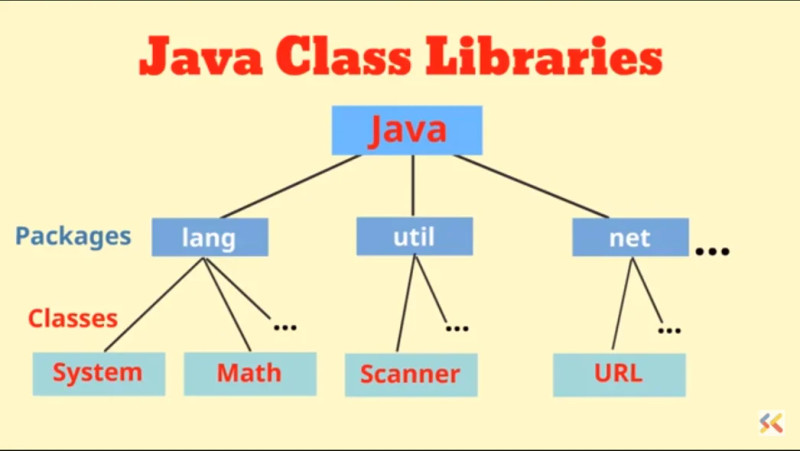
Java library → packages → classes hierarchy
In the diagram, Java is at the top. Under it are packages such as lang, util, and net. Each package contains classes like System, Math, Scanner, and URL.
So the flow is:
- Library
- contains packages
- contain classes
- define a reference type
- from which you create objects
- define a reference type
- contain classes
- contains packages
Important packages you’ll see:
java.lang- Includes
String,Math,Object - Automatically imported
- Includes
java.util- Includes
ArrayList,Random,Scanner - Requires an
importstatement
- Includes
Example:
import java.util.ArrayList;

ArrayList<String> names = new ArrayList<String>();
If you forget the import for a non-java.lang class, you’ll get “cannot find symbol.”
2. Attributes vs Behaviors in an API Class
Every class defines two main things: data and actions.
Attributes
Attributes are the data related to the class. They are stored in variables.
- They represent the state of an object.
- Often they are private, so you don’t access them directly.
- Some appear as constants, like
Math.PI.
Example:
- A
Stringobject stores characters internally. Math.PIis a public constant attribute.
Attributes answer the question:
What does this object have?
Behaviors
Behaviors are defined by methods.
They describe:
- What instances of the class can do
- Or what can be done with them
Example method signatures:
int length()
String substring(int beginIndex, int endIndex)
From this alone, you must know:
length()returns anintsubstring(...)returns aString- The parameters must be
int, intin that order
Behaviors answer the question:
What can this object do?
On the AP exam, you are constantly identifying attributes vs. behaviors when they give you a class and ask how to use it.
3. Reading an API Method Signature Correctly
When you see a method in documentation, break it into parts.
Example:
double sqrt(double a)
Return Type
The first word is the return type.
- If it says
double, you must store the result in adouble. - You cannot assign it to an
intwithout casting (which you won’t be asked to do here).
Method Name
sqrt must be spelled exactly like that. Java is case-sensitive.
Parameters
Inside the parentheses:
- Number of parameters
- Type
- Order
If it says (int x, int y), you must pass two ints in that order.
Static vs Instance Methods
This is one of the most common mistakes.
Static method
- Belongs to the class
- Called using the class name
double value = Math.sqrt(25);
No object needed.
Instance method
- Belongs to an object
- Called using a reference variable
String word = "hello";
int len = word.length();
If you try String.length() → compile error.
If you try to create new Math() → compile error.
On multiple choice, they love giving one answer that confuses static and instance usage.
4. Using Packages and Import Statements
If a class is not in java.lang, you must import it.
Correct:
import java.util.Random;

Random r = new Random();
Without import, you’d have to write:
java.util.Random r = new java.util.Random();
Common AP classes:
String→java.lang(no import)Math→java.lang(no import)ArrayList→java.utilRandom→java.utilScanner→java.util
If you see “cannot find symbol” on a quiz, check the package first.
5. How This Shows Up on Tests
You will often see:
Consider the following class.
Then they give you method signatures. Your job is to:
- Use the correct constructor
- Pass the correct parameter types
- Store the return value in the correct type
- Know whether the method is static or instance
On FRQs, students lose easy points by:
- Ignoring the return type
- Calling instance methods like they’re static
- Passing arguments in the wrong order
You don’t memorize every method. You read the API carefully and use exactly what it says.
