Topic 1.3 Notes – Expressions and Output
Generating Output with print and println
Java sends output to the screen using:
System.out.print(...)System.out.println(...)
They both display whatever is inside the parentheses. The only difference is what happens after printing.
print→ stays on the same lineprintln→ moves to the next line (like pressing Enter)
Look at how the output changes in each case:
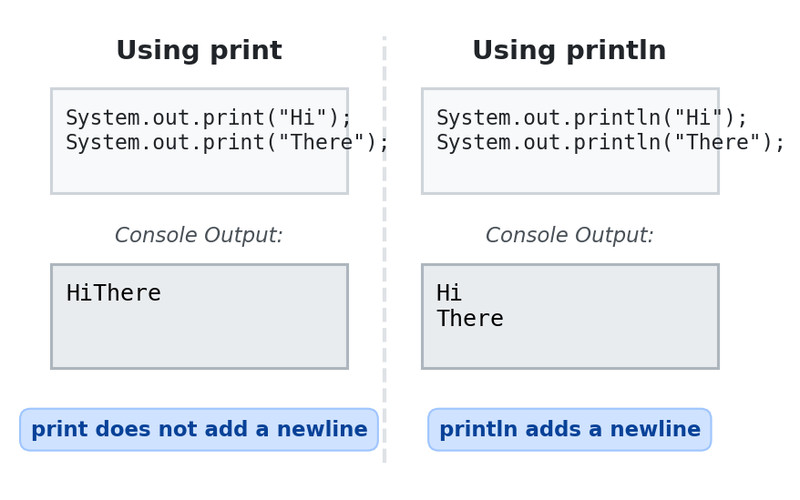
Comparing print and println output
In the first example, both words appear on the same line. In the second example, each call moves the cursor down before the next line prints.
Example:
System.out.print("Score: ");
System.out.println(95);
Output:
Score: 95On quizzes, slow down and trace line by line. If the spacing looks strange, check whether print or println was used.
String Literals and Escape Sequences
A literal is a fixed value written directly in code.
10→ int literal3.5→ double literal"Hello"→ string literal
A string literal:
- Is inside double quotes
" " - Must start and end with quotes
- Cannot spill onto another line unless you use an escape sequence
Escape Sequences
An escape sequence starts with \ and represents a special character.
You need to know:
\"→ prints a double quote\\→ prints a backslash\n→ new line
Example:
System.out.println("She said \"Wow!\"");
System.out.println("Path: C:\\Files\\Docs");
System.out.println("Line1\nLine2");
Common mistake:
Writing "C:\new\folder" accidentally triggers \n as a newline. Always escape backslashes.
Arithmetic Expressions in Java
An arithmetic expression combines:
- Numbers (literals)
- Variables
- Operators
It evaluates to either int or double.
The Five Operators
+addition-subtraction*multiplication/division%remainder
int vs double Rule
This rule explains almost every tricky output question:
intopint→ result isint- If at least one operand is
double→ result isdouble
Example:
System.out.println(5 + 2);      // 7
System.out.println(5 + 2.0);    // 7.0
Special double values like infinity or NaN are outside AP scope, so you don’t need to worry about them.
Division and Remainder Rules
Integer Division
If both numbers are int, Java truncates the decimal.
System.out.println(9 / 4);   // 2
System.out.println(1 / 3);   // 0
It does not round. It simply cuts off the decimal part.
To force decimal division:
System.out.println(9 / 4.0);     // 2.25
System.out.println((double)9 / 4); // 2.25
Division by Zero
int / 0→ ArithmeticException- Double division by zero is not tested in AP CSA.
The Remainder Operator %
a % b gives what’s left over after dividing a by b.
System.out.println(14 % 5); // 4On the AP exam, assume positive values for remainder problems.
Common uses:
- Even check →
num % 2 - Breaking numbers into groups
Operator Precedence and Expression Evaluation
Java follows order of operations.
*,/,%+,-- Same level → evaluated left to right
This left-to-right rule is tested a lot.
Examples:
System.out.println(3 + 4 * 2);   // 11
System.out.println(12 / 3 * 2);  // 8
Second example:
- 12 / 3 = 4
- 4 * 2 = 8
Parentheses override precedence:
System.out.println((3 + 4) * 2); // 14String Concatenation and Expression Output
The + operator has two meanings:
- Numeric addition
- String concatenation
If either side is a string, Java switches to concatenation. Evaluation is left to right.
System.out.println("Total: " + 3 + 2);Steps:
"Total: " + 3→"Total: 3""Total: 3" + 2→"Total: 32"
Compare:
System.out.println(3 + 2 + " total");     // "5 total"
System.out.println("Total: " + (3 + 2));  // "Total: 5"
Once a number becomes part of a string, it stays text.
This shows up constantly in multiple choice. If you get a weird answer like "Total: 32", it’s probably a concatenation order issue.
