Topic 4.3 Notes – Array Creation and Access
1. What a 1D Array Is
A 1D array is a single variable that holds multiple values of the same data type.
- All elements must be:
- primitive values (
int,double,boolean), or - object references (
String,Student, etc.)
- primitive values (
- Each stored value is called an element.
- Each element has a numbered position called an index.
- Arrays use zero-based indexing. The first element is at index
0.
Picture an array like this:
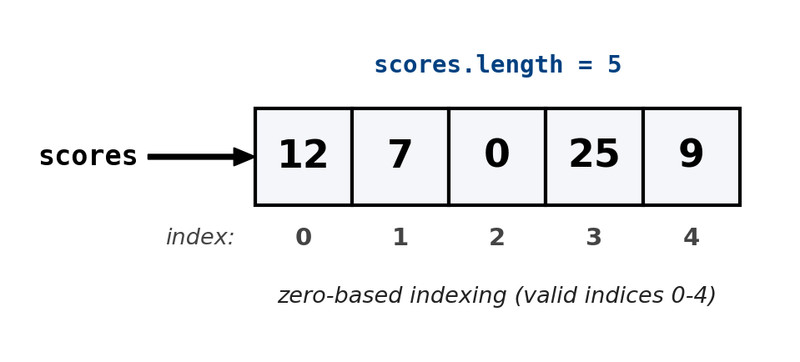
1D array with zero-based indexing
One variable name → many indexed slots.
Arrays are objects
Even though they feel different from other objects, arrays:
- Are created using
new - Have a built-in length attribute
- Store data in memory like any object
Fixed size
The length is set when the array is created and cannot change.
If you create an array with 6 elements, it will always have 6 elements. You can change the values inside, but not the size.
Key vocabulary:
- Element → value inside the array
- Index → position number
- Length → total number of elements
2. Declaring and Creating Arrays
There are two separate ideas here: declaring the variable and creating the array.
Declaration
int[] numbers;
String[] words;
This only creates a reference variable. No array exists yet.
If you try to use it now, you’ll get a NullPointerException.
Creation with new
numbers = new int[4];
Now the array object exists.
- Length is permanently
4 - Valid indices are
0, 1, 2, 3
Default Values
When you use new, Java automatically fills the array:
int→0double→0.0boolean→false- Object references →
null
Example:
String[] names = new String[3];
All three elements currently store null. The array exists, but no String objects are inside yet.
That distinction shows up a lot on quizzes.
Initializer Lists
If you already know the values:
int[] ages = {15, 16, 15, 17};
String[] colors = {"red", "blue", "green"};
- Java figures out the length automatically.
- You don’t write
new int[...]in this form.
You’ll see both styles in multiple choice.
3. Accessing and Modifying Elements
Use square brackets with an index:
ages[1] = 18;       // modify
int x = ages[2];    // access
Same syntax for reading and writing.
Index Rules
Valid index values are:
0 through array.length - 1
In math form:
0 ≤ index < array.length
If array.length is 5, valid indices are 0-4.
The length Attribute
Every array has:
array.length
Notice:
- No parentheses
- It is an attribute, not a method
Common loop pattern:
for (int i = 0; i < array.length; i++) {
    // process array[i]
}
The < is critical.
4. Index Errors and How to Avoid Them
ArrayIndexOutOfBoundsException
This happens if the index is:
- Negative
- Equal to
length - Greater than
length - 1
Example mistake:
for (int i = 0; i <= array.length; i++)
That <= will crash when i == array.length.
Most AP questions that involve arrays are testing whether you understand that the last valid index is length - 1.
NullPointerException with Arrays
There are two different null problems.
1. The array reference is null
int[] nums;
nums[0] = 5;   // crash
The array was declared but never created.
2. The elements are null
String[] names = new String[2];
int len = names[0].length();  // crash
The array exists, but names[0] is null.
On multiple choice, they love mixing these up.
5. How This Appears on the AP Exam
Arrays show up constantly.
You’ll be asked to:
- Trace loops that use
array.length - Identify which line causes an exception
- Write methods that process arrays
- Use arrays as instance variables in classes
If you see array code, immediately:
- Identify the length.
- Determine valid index range.
- Watch for
<=. - Check for null references.
Arrays are the foundation for 2D arrays later. Everything about indexing and length carries forward.
