Topic 4.17 Notes – Recursive Searching and Sorting
1. Recursive Searching and Sorting as Divide and Conquer
You already know recursion means a method calls itself and must have a base case. Divide-and-conquer recursion adds a pattern:
- Base case → smallest possible input (empty range or size 1).
- Divide → shrink the problem (often cut in half).
- Conquer → recursive call(s).
- Combine → only for sorting, merge results back together.
This pattern works on:
- Strings (move an index forward each call),
- arrays (use
leftandrightbounds), - ArrayList (same idea, but use
.size()and.get()).
When you trace recursion on a quiz, write each call with its parameters. For example, if a method searches arr, left, right, list the changing left and right values step by step. Most mistakes happen because students skip calls mentally.
2. Binary Search
Binary search looks for a value in a sorted collection by repeatedly checking the middle.
If the data is not sorted, binary search is invalid. That shows up a lot in multiple choice.
How It Shrinks the Problem
Each step eliminates half the remaining elements. In the example below, the search starts with the full range and checks the middle index.

Binary search narrowing from the middle element
Step by Step Logic
left = 0,right = arr.length - 1mid = left + (right - left) / 2- Compare
arr[mid]to target- Equal → return
mid - Target smaller → search left half (
right = mid - 1) - Target larger → search right half (
left = mid + 1)
- Equal → return
- Stop when
left > right→ return-1
Notice the mid - 1 and mid + 1. If you forget the ±1, you can get stuck repeating the same middle.
Recursive vs Iterative
- Recursive version calls itself with new bounds.
- Iterative version uses
while (left <= right).
Same logic. Different structure. The AP may give you either and ask what index is returned.
Efficiency Comparison
| Search | Requirement | Time |
|---|---|---|
| Linear | None | O(n) |
| Binary | Sorted data | O(log n) |
Binary search is much faster for large arrays because it keeps halving the search space.
3. Merge Sort
Merge sort is a recursive sorting algorithm. It keeps splitting the array in half until each piece has one element, then merges back together in sorted order.
The Splitting Pattern
Start with an example array like [8, 3, 6, 2]. Merge sort divides it into smaller and smaller pieces, then builds it back up in order.
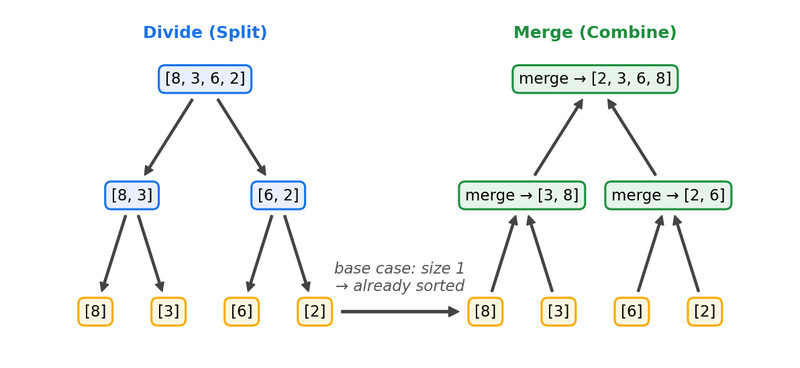
Merge sort splitting and merging for [8, 3, 6, 2]
Each single-element array is already sorted. That’s the base case.
The Merge Step
Merging is where most errors happen.
You compare the first unused elements of both halves:
- Copy the smaller value into a temporary array.
- Move that half’s pointer forward.
- Repeat until one half runs out.
- Copy the remaining elements.
- Copy the merged result back.
Students often:
- Start the right half at
midinstead ofmid + 1. - Forget to copy leftover elements.
- Copy back to the wrong indices.
On tests, you’ll often be asked what the array looks like after a specific merge, not just the final result. That means you need to understand the merge process itself, not just the idea of splitting.
Merge sort runs in O(n log n) time and works for arrays and ArrayList. Other advanced sorts like quicksort are outside AP scope.
4. What You’re Expected to Do
You are not usually writing full binary search or merge sort from scratch. You are expected to:
- Trace recursive calls and determine the return value.
- Identify the base case.
- Track how parameters change.
- Determine what subarrays look like after a merge.
- Spot incorrect boundary logic.
When tracing, always:
- Write the current bounds.
- Identify the middle.
- State which half is eliminated.
- Stop at the base case.
- Work back up for recursive returns.
