Topic 2.4 Notes – Nested if Statements
1. What Nested If Statements Are
A nested if statement is any if, if-else, or if-else-if placed inside another one.
Here’s the basic shape:
if (outerCondition) {

    if (innerCondition) {
        // runs only if BOTH are true
    } else {
        // outer true, inner false
    }

} else {
    // outer false
}
The key rule you must remember:
The inner Boolean expression is evaluated only if the outer condition is true.
So think in layers:
- Outer condition = first filter
- Inner condition = more specific check that only matters after passing the first filter
Visualizing the Logic
This flowchart shows how control moves through an outer test and, only if that test is true, into a nested test.
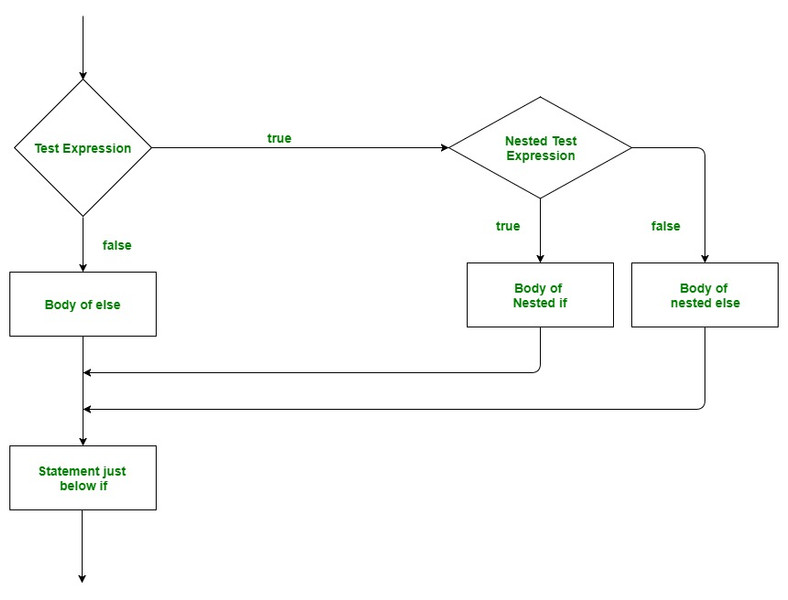
Flowchart of a nested if-else structure
If the outer test expression is false, execution goes straight to the outer else and the nested decision is never checked. On code tracing questions, this is where students lose points.
2. Multiway Selection with if-else-if
A multiway selection uses an if-else-if chain to choose one block from several possibilities.
if (condition1) {
    // block 1
} else if (condition2) {
    // block 2
} else if (condition3) {
    // block 3
} else {
    // default block
}
How it runs:
- Check
condition1. - If true → execute block 1 and stop.
- If false → check
condition2. - Continue down the chain.
- If none are true and there’s an
else, that block runs.
Important facts:
- Conditions are evaluated top to bottom.
- No more than one block executes.
- The first true condition “wins.”
Order Matters
int score = 92;

if (score >= 70) {
    System.out.println("C");
} else if (score >= 90) {
    System.out.println("A");
}
This prints C, because score >= 70 is true first. The >= 90 check never happens.
For ranges, order from most specific to most general:
if (score >= 90) {
    System.out.println("A");
} else if (score >= 80) {
    System.out.println("B");
} else if (score >= 70) {
    System.out.println("C");
} else {
    System.out.println("F");
}
On tests, they love giving overlapping ranges just to see if you understand this.
3. How Nested Branching Executes
When tracing nested conditionals, slow down and go one layer at a time.
Example:
int x = 5;
int y = 10;

if (x < 10) {
    if (y > 20) {
        System.out.println("A");
    } else {
        System.out.println("B");
    }
} else {
    System.out.println("C");
}
Step-by-step:
x < 10→ true- Enter outer block.
y > 20→ false- Print
"B"
You never even consider "C" because the outer condition was true.
Nested vs Separate ifs
Compare:
if (a > 0) {
    if (b > 0) {
        System.out.println("Both positive");
    }
}
vs.
if (a > 0) {
    System.out.println("a positive");
}
if (b > 0) {
    System.out.println("b positive");
}
- Nested version checks
bonly ifa > 0. - Separate
ifs check both independently.
This difference shows up constantly in multiple choice tracing problems.
4. Writing Correct Nested Logic
You nest when a second decision only makes sense after passing the first one.
Example:
if (balance >= amount) {
    if (amount > 0) {
        balance = balance - amount;
    }
}
The withdrawal only happens if:
- There’s enough money.
- The amount is positive.
Avoiding Logical Errors
Unreachable branch:
if (num >= 50) {
    // ...
} else if (num > 50) {
    // never runs
}
The second branch can never run: any num greater than 50 is also >= 50, so it already took the first branch. Order range checks from most specific to least specific.
Variable Scope Reminder
If you declare a variable inside a block, you can’t use it outside:
if (x > 0) {
    int result = x * 2;
}
// result not accessible here
Declare it before the if if you need it later.
5. Common AP Mistakes
- Forgetting that the inner
ifruns only when the outer is true. - Thinking multiple
else-ifblocks can execute. - Writing conditions in the wrong order.
- Missing a final
elsewhen every case should be handled. - Confusing nested
ifs with separateifs. - Creating overlapping or unreachable conditions.
When tracing on a quiz, literally mark which branch runs and stop evaluating once a true else-if executes. That habit alone saves a lot of points.
