Topic 1.9 Notes – Method Signatures
What a Method Signature Is
A method is a named block of code inside { } that only runs when it’s called. You use methods through procedural abstraction. You need to know what it does, not how it’s implemented inside.
A method signature is:
- The method name
- The ordered list of parameter types
That’s it.
It does not include:
- Return type
- Parameter names
public,private, orstatic
Seeing the Signature
Look at this method:
public double power(double base, int exponent) {
    return Math.pow(base, exponent);
}
The signature is:
power(double, int)Only the name and parameter types matter.
Critical Rules
- Order matters
combine(int, double)is different fromcombine(double, int) - Return type does NOT matter
You cannot write:
Same signature → Java can’t tell them apart.public int getScore() { ... } public double getScore() { ... } // Compile error - No parameters still means parentheses
getCount()is correct.
getCountis not a method call.
If you’re ever unsure, ask yourself:
Name + parameter types in order? That’s the signature.
Parameters vs Arguments and Call by Value
Once you know what the signature is, you need to match it when calling the method.
Parameters
- Variables declared in the method header
- Act like local variables inside the method
public int multiply(int x, int y) {
    return x * y;
}
Here, x and y are parameters.
Arguments
When you call the method:
int result = multiply(4, 5);4and5are arguments- They must match the number, order, and type in the signature
Java uses call by value:
- The parameter gets a copy of the argument.
- Changing the parameter does not change the original variable.
Example:
public void addTen(int num) {
    num = num + 10;
}
int x = 5;
addTen(x);
// x is still 5On multiple choice, they love testing whether you think x changed. It didn’t.
Type Compatibility
int→doubleworks (automatic widening)double→intdoes not
So if the signature is average(double, double), this works:
average(3, 7); // ints become doublesVoid vs Non-Void Methods and How to Call Them
The return type controls how you’re allowed to call the method.
Void Methods
- Return type is
void - Perform an action
- Do not produce a value
public void printLine(String text) {
    System.out.println(text);
}
Call it like this:
printLine("Hello");You cannot do:
String s = printLine("Hello"); // Compile errorVoid methods are standalone statements.
Non-Void Methods
- Return a value
- The value matches the declared return type
public boolean isEven(int num) {
    return num % 2 == 0;
}
You must use the result:
boolean check = isEven(6);

if (isEven(10)) {
    System.out.println("Even");
}
You can ignore it:
isEven(6); // legal but pointlessFlow of Control
When a method is called, the program temporarily leaves the current method and creates a new stack frame for the method being executed.
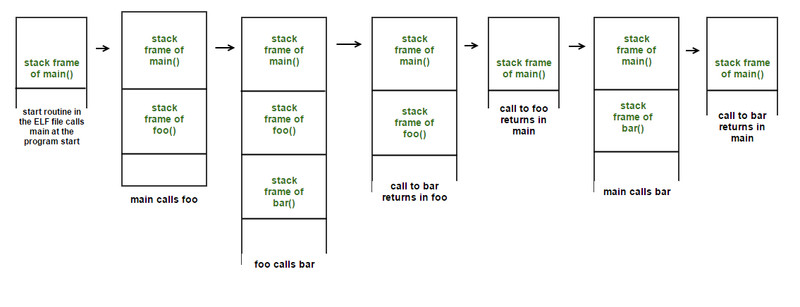
Method calls and stack frames over time
- Execution pauses where the call happens
- A new stack frame is pushed for the called method
- That method runs its code
- When it finishes, its stack frame is removed and execution resumes immediately after the call
In the diagram, notice how main calls foo, and then foo calls bar. Each call adds another frame on top of the stack. When bar returns, its frame disappears and control goes back to foo, then eventually back to main.
If a return statement runs, the method immediately stops and sends control back.
This matters in tracing questions.
Method Overloading
Overloading means multiple methods share the same name but have different signatures.
public int sum(int a, int b) { ... }
public double sum(double a, double b) { ... }
public int sum(int a, int b, int c) { ... }
Valid because:
- Different parameter types
- Or different number of parameters
Not valid:
public int sum(int a, int b) { ... }
public double sum(int a, int b) { ... }  // Same signature
Java decides which version to call based on:
- Number of arguments
- Types of arguments
- Order of arguments
It does not use return type to decide.
On exams, you’ll often see 3 overloaded methods and one method call. Match the argument types carefully and ignore the return type when choosing.
Identifying the Correct Method to Call
When reading documentation or code, check in this order:
- Does the method name match?
- Do the arguments match the signature?
- Same number?
- Same order?
- Compatible types?
- Are you using the return value correctly?
- Void used in assignment → error
- Did you include parentheses?
A surprising number of mistakes are just missing ().
