Topic 4.8 Notes – ArrayList Methods
1. What an ArrayList Is
An ArrayList is a resizable object that stores references to objects. Unlike arrays, it can grow or shrink as your program runs.
Here’s the mental model:
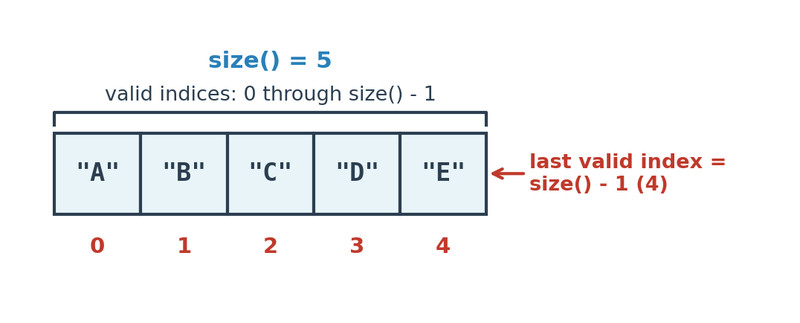
ArrayList indices and size relationship
Key facts:
- Indices start at 0.
- Last valid index is
size() - 1. - The size changes automatically when you add or remove elements.
- It stores objects, not primitives directly.
ArrayList<Integer>✔️ArrayList<int>❌
Because it stores references:
ArrayList<Integer>holdsIntegerArrayList<Double>holdsDoubleArrayList<String>holdsString
Creating and Importing
ArrayList is part of the java.util package, so you must import it:
import java.util.ArrayList;
Create an empty list:
ArrayList<String> words = new ArrayList<String>();
The constructor ArrayList() creates a list with size 0.
Generics Matter
The <E> part specifies the element type:
ArrayList<String> names = new ArrayList<String>();
That means:
addtakes aStringgetreturns aString
Always use generics on the AP exam. Raw ArrayList is not what they expect.
2. The Core ArrayList Methods You Must Know
These are straight from the Java Quick Reference. You should know what each does, what it returns, and whether it changes the list.
Adding Elements
boolean add(E obj)
- Adds to the end
- Increases size by 1
- Returns
true
void add(int index, E obj)
- Inserts at
index - Shifts elements at that index and higher right
- Valid index:
0 ≤ index ≤ size
Accessing Elements
E get(int index)
- Returns element at
index - Does not change the list
- Valid index:
0 ≤ index < size
int size()
- Returns number of elements
- Last valid index =
size() - 1
Modifying Elements
E set(int index, E obj)
- Replaces element at
index - Returns the old value
- Size stays the same
Removing Elements
E remove(int index)
- Removes element at
index - Shifts elements after it left
- Decreases size by 1
- Returns the removed element
3. How ArrayList Operations Affect Indices
Understanding shifting is huge for tracing code.
Inserting
If you insert at index 2:
Before:
0   1   2   3
A   B   C   D
After add(2, "X"):
0   1   2   3   4
A   B   X   C   D
Everything at index 2 and above moves right.
Removing
Before:
0   1   2   3
A   B   C   D
After remove(1):
0   1   2
A   C   D
Everything after index 1 shifts left.
This is where students lose points in code tracing. If a loop removes elements while going forward, you can accidentally skip elements.
4. Using ArrayList Methods in Algorithms
Most processing uses this pattern:
for (int i = 0; i < list.size(); i++)
Inside the loop:
- Read →
get(i) - Update →
set(i, newValue) - Remove →
remove(i)
Removing While Looping
If you remove while looping forward, elements shift left and the next element moves into the current index. Then i++ skips it.
Safer approach:
for (int i = list.size() - 1; i >= 0; i--)
Looping backward avoids skipping.
When the AP gives you a method that removes certain elements, always think about shifting.
5. Common Exam Mistakes
IndexOutOfBoundsException
Happens when:
get(size())set(size(), value)- Negative index
Valid indices for get, set, remove:
0 to size() - 1
For add(index, obj):
0 to size()
Confusing size and last index
Wrong:
list.get(list.size());
Correct:
list.get(list.size() - 1);
This shows up constantly in multiple choice.
Integer Removal Trap
With:
ArrayList<Integer> nums = new ArrayList<Integer>();
If you do:
nums.remove(1);
That removes index 1, not the value 1.
On the AP exam, they love giving a list like [4, 1, 7] and asking what remove(1) does. It removes the element at index 1.
