Topic 4.5 Notes – Implementing Array Algorithms
1. What Array Algorithms Are
An array algorithm is a structured way of looping through an array to solve a problem.
Most follow this pattern:
- Initialize a variable (
sum,count,minIndex,boolean found, etc.) - Loop from
0toarray.length - 1 - Update the variable based on a condition
- Return or use the result
Picture the loop moving across the array one index at a time and updating something as it goes:
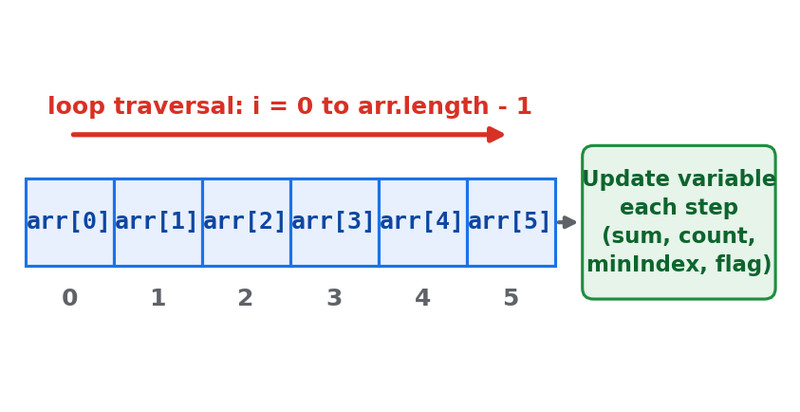
Standard array traversal pattern
You’re scanning left to right and accumulating information.
If you recognize the pattern, you can adapt it to almost any prompt.
2. Standard Traversal Patterns You Must Know
These are required. You should be able to write each one without notes.
a. Find Minimum or Maximum
You track the “best so far.”
int minIndex = 0;
for (int i = 1; i < arr.length; i++) {
    if (arr[i] < arr[minIndex]) {
        minIndex = i;
    }
}
Key ideas:
- Initialize to index
0 - Start loop at
1 - Often return the index, not the value
Common mistake: initializing min to 0 instead of arr[0].
b. Compute Sum or Average
You accumulate everything.
int sum = 0;
for (int i = 0; i < arr.length; i++) {
    sum += arr[i];
}
double average = (double) sum / arr.length;
Watch for:
- Integer division
- Dividing inside the loop (don’t)
c. At Least One Element Matches (Any?)
Return true immediately when found.
for (int i = 0; i < arr.length; i++) {
    if (arr[i] > 100) {
        return true;
    }
}
return false;
This is a form of linear search.
Students often forget the early return and overcomplicate it.
d. All Elements Match (All?)
Return false as soon as something fails.
for (int i = 0; i < arr.length; i++) {
    if (arr[i] <= 0) {
        return false;
    }
}
return true;
Do not return true inside the loop.
e. Count Elements That Match
Very common in FRQs.
int count = 0;
for (int i = 0; i < arr.length; i++) {
    if (arr[i] % 2 == 0) {
        count++;
    }
}
return count;
This is just “sum,” but instead of adding values, you add 1s.
f. Access Consecutive Pairs
You compare arr[i] and arr[i + 1].
for (int i = 0; i < arr.length - 1; i++) {
    if (arr[i] > arr[i + 1]) {
        return false;
    }
}
return true;
The loop stops at arr.length - 2 so that i + 1 is still a valid index.
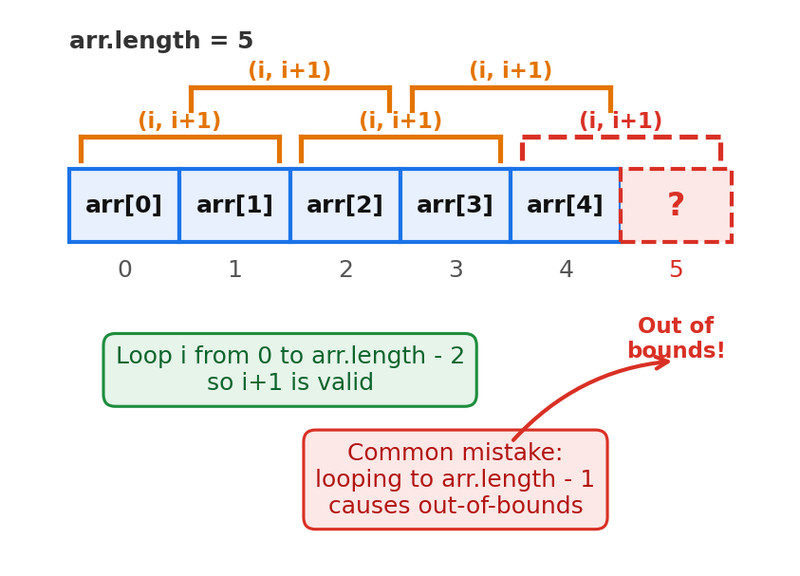
Consecutive pair traversal with i and i + 1
If you loop to arr.length - 1, then i + 1 tries to access index arr.length, which is out of bounds.
Used for:
- Checking sorted order
- Detecting adjacent duplicates
- Neighbor comparisons
g. Detect Duplicate Elements
Two approaches:
1. Adjacent check (array must be sorted)
Use the consecutive pair pattern.
2. Nested loops
for (int i = 0; i < arr.length; i++) {
    for (int j = i + 1; j < arr.length; j++) {
        if (arr[i] == arr[j]) {
            return true;
        }
    }
}
return false;
Important:
- Inner loop starts at
i + 1 - Avoid comparing element to itself
- Avoid duplicate comparisons
h. Shift or Rotate Elements
Shift left
- Save first element if needed
- Move each element to index
i - 1
Shift right
- Loop backward
- Move each element to
i + 1
Overwriting is the big danger. Save values before moving them.
Rotation means wrapping around. That usually requires a temporary variable.
i. Reverse an Array
Use two indices moving inward.
int start = 0;
int end = arr.length - 1;

while (start < end) {
    int temp = arr[start];
    arr[start] = arr[end];
    arr[end] = temp;
    start++;
    end--;
}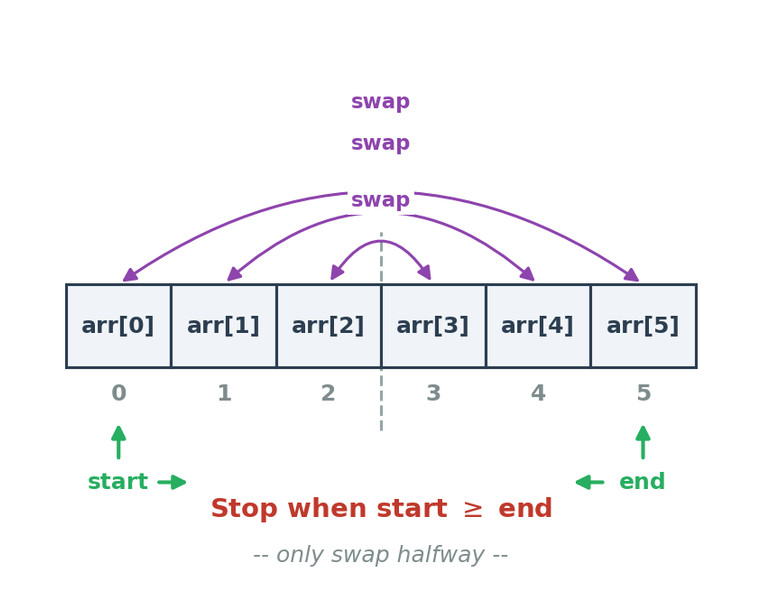
Reversing an array with two pointers
Stop when start >= end. You only swap halfway through.
3. Modifying These for Context
On the exam, you won’t see “find the max.” You’ll see:
- Find the object with the highest
getScore() - Count objects meeting two conditions
- Return the first index where something complex happens
The structure stays the same. Only the condition changes.
When reading a prompt, silently ask:
- Is this a sum?
- A count?
- A search?
- A min/max?
- A neighbor comparison?
- A modification?
Once you identify the base pattern, coding becomes mechanical.
4. Common AP Mistakes
Off-by-one errors
- Using
<= arr.length - Wrong bounds for consecutive pairs
- Starting min loop at 0 instead of 1
Incorrect initialization
- Starting min at 0 instead of
arr[0] - Forgetting to initialize
countorsum
Returning in the wrong place
- Returning
trueinside “all” loop - Forgetting early return for “any”
Overwriting values during shifts
- Not saving before moving elements
Most lost points come from tiny loop-bound errors, not logic mistakes.
