Topic 1.8 Notes – Documentation with Comments
1. What Comments Are and Why They Matter
Comments are notes written for humans, not the computer.
They help explain:
- The purpose of a method or class
- The meaning of parameters and return values
- Any assumptions or restrictions
The Java compiler completely ignores comments. They are not executed.
Think of it this way:
- Code shows what happens
- Comments explain why it exists and how to use it
On AP FRQs, especially class design questions, good documentation makes your intent clear. If someone cannot correctly call your method without reading its body, your documentation is incomplete.
2. The Three Types of Comments in Java
Here’s the big picture. Java supports three different comment styles, and each one has a specific purpose:
a. Single-line comments //
- Used for short notes
- Apply to one line only
- Common inside methods to clarify logic
Example:
// check if score is passing
if (score >= 70) {
    passed = true;
}
Use these to explain tricky logic, not to restate obvious code.
b. Block comments /* ... */
- Can span multiple lines
- Often used to describe a section of code
Example:
/* Calculate total cost including tax
   and apply discount if eligible */
These are still informal comments. They do not generate documentation.
c. Javadoc comments /** ... */
These are the official documentation comments.
- Placed directly above a class or method
- Used to generate API documentation
- Expected style for method documentation on the AP exam
Structure:
/**
 * Returns the maximum value in the array.
 *
 * @param nums array of integers (must not be empty)
 * @return the largest value in nums
 */
public int findMax(int[] nums) {
Common tags:
@param→ describes each parameter@return→ describes what is returned
Every parameter should have a corresponding @param line.
3. Preconditions and Postconditions
This is where documentation becomes powerful. You’re defining a contract.
a. Preconditions
A precondition is something that must be true before the method runs.
Important rule for AP CSA:
The method is not required to check that preconditions are satisfied.
The caller is responsible.
Examples:
- Array must not be empty
- Index must satisfy
0 ≤ index < arr.length - Parameter must be positive
Example documentation:
/**
 * @param index position in the array (0 ≤ index < arr.length)
 */
If that condition is violated, behavior is undefined unless you explicitly handle it.
b. Postconditions
A postcondition is what is guaranteed to be true after the method finishes.
It describes:
- What value is returned
- How object data changes
Examples:
- “Returns the average of all elements.”
- “Balance is reduced by the withdrawal amount.”
- “The list is sorted in ascending order.”
If preconditions were met, postconditions must hold.
Think of it as a flow. The caller provides input values that satisfy the preconditions. The software component runs. If everything was valid, you are guaranteed certain output values and state changes described by the postconditions.
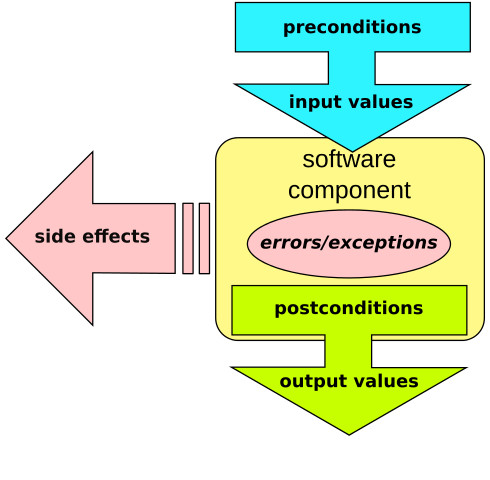
Design by contract overview
4. Writing Strong Method Documentation
When you document a method, think in this order.
Clear purpose statement
First sentence answers:
What does this method do?
Bad:
Processes data.
Better:
Counts the number of strings longer than five characters that contain no spaces.
Be specific.
Document each parameter properly
For each parameter:
- What it represents
- Any restrictions
- Valid range if relevant
Weak:
@param x the xStrong:
@param count number of items to process (must be nonnegative)Explain the return value
Especially important for:
booleanmethods → what doestruemean?intreturn values → what does 0 mean? negative?
Make the meaning unambiguous.
Include preconditions and postconditions when needed
Use them when:
- The method assumes valid input
- The method modifies object state
- There are edge cases
AP scorers look for clarity about assumptions.
5. Common Documentation Mistakes
Being too vague
If your comment says “Does something with the list,” it’s useless.
Someone should be able to call your method correctly without reading the implementation.
Forgetting constraints
If your method assumes:
- Non-null parameters
- Non-empty arrays
- Valid index ranges
You must say so.
Over-documenting obvious code
Trivial getters like:
public int getAge()do not need long explanations unless constraints exist.
Letting comments contradict code
If behavior changes, update documentation.
Outdated documentation causes more confusion than none.
