Topic 2.11 Notes – Nested Iteration
1. What Nested Iteration Is
A nested loop is simply a loop inside the body of another loop.
for (int outer = 0; outer < 3; outer++) {
    for (int inner = 0; inner < 2; inner++) {
        System.out.println(outer + " " + inner);
    }
}
Here’s the rule you must lock in:
The inner loop completes all its iterations for each single iteration of the outer loop.
Mental Model
Think of a clock:
- Outer loop = hours
- Inner loop = minutes
For every hour, the minutes go through their entire cycle before the hour changes.
The Multiplication Effect
If:
- Outer loop runs A times
- Inner loop runs B times
Then the inner statement runs A × B times.
That multiplication idea shows up constantly in multiple choice questions that ask, “How many times does this execute?”
For each outer value, the inner values repeat completely.
2. How Nested Loops Execute and How to Trace Them
Most nested loops look like this:
for (int i = 0; i < A; i++) {
    for (int j = 0; j < B; j++) {
        // body
    }
}
Step-by-step tracing
When you trace this on a quiz:
- Fix the outer variable (say
i = 0). - Run the entire inner loop (
j = 0toB - 1). - Increment outer (
i = 1). - Run the entire inner loop again.
- Repeat.
Never jump back and forth randomly. Always finish the inner loop first.
If a variable is updated inside the inner loop, that update happens A × B times, not A + B times. Students often add instead of multiply.
Early exits
If there’s a break inside the inner loop:
- It exits only the inner loop.
- The outer loop keeps going.
If there’s a return, the entire method stops immediately. That’s a common trick in multiple choice.
3. Common Patterns You Must Recognize
Nested loops are not random. On the AP exam, they show up in predictable patterns.
a. 2D Array Traversal
for (int row = 0; row < matrix.length; row++) {
    for (int col = 0; col < matrix[row].length; col++) {
        System.out.print(matrix[row][col] + " ");
    }
}
Key reminders:
matrix.length→ number of rowsmatrix[row].length→ number of columns in that row- Outer loop usually controls rows
- Inner loop usually controls columns
Think of it like a spreadsheet. The outer loop moves down the rows, and the inner loop moves across each column in that row.
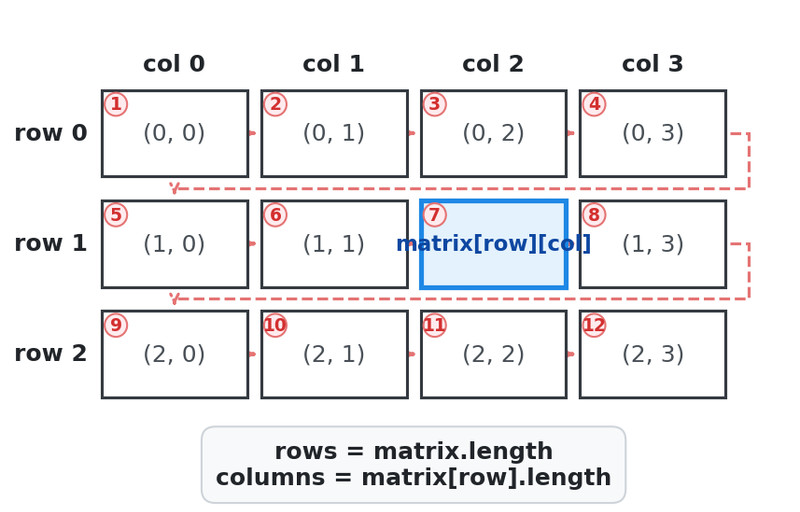
2D array row-major traversal
Traversal goes row by row, left to right.
This pattern is used to:
- Sum elements
- Count matches
- Find a max
- Modify every element
If you see a 2D array FRQ, you are using nested loops. No exceptions.
b. Comparing All Pairs in a 1D Array
for (int i = 0; i < arr.length; i++) {
    for (int j = i + 1; j < arr.length; j++) {
        if (arr[i] == arr[j]) {
            System.out.println("Duplicate found");
        }
    }
}
Notice j = i + 1.
That avoids:
- Comparing an element with itself
- Re-checking the same pair twice
This structure means you are checking combinations. That’s an automatic nested loop situation.
c. Pattern Generation
Outer loop controls rows.
Inner loop controls what happens inside each row.
Example idea:
- Print a rectangle
- Print a triangle
- Print number grids
If output forms a grid shape, you probably need two loops.
4. Common Mistakes and How to Avoid Them
Mixing up variables
Wrong:
matrix[col][row]Right:
matrix[row][col]Use descriptive names like row and col instead of i and j when possible.
Off-by-one errors
Wrong:
for (int r = 0; r <= matrix.length; r++)Right:
for (int r = 0; r < matrix.length; r++)Always use < array.length, never <=.
Miscounting iterations
Outer runs 4 times.
Inner runs 5 times.
Total body executions = 20, not 9.
Multiply.
