Topic 1.2 Notes – Variables and Data Types
1. What Data Types and Variables Are
A data type is a set of values and the operations you’re allowed to perform on those values.
For AP CSA, the core primitive types are:
int- Values: whole numbers like −3, 0, 42
- Operations: arithmetic such as
+,-,*,/,%
double- Values: real numbers with decimals like 3.14 or −0.5
- Operations: decimal arithmetic
boolean- Values:
trueorfalse - Operations: logical expressions like
&&,||,!
- Values:
A variable is a named storage location that:
- Has a type
- Has a name
- Holds a value that can change while the program runs
For primitive types, the variable directly stores the actual value. Think of each variable as its own labeled box that contains the value itself.
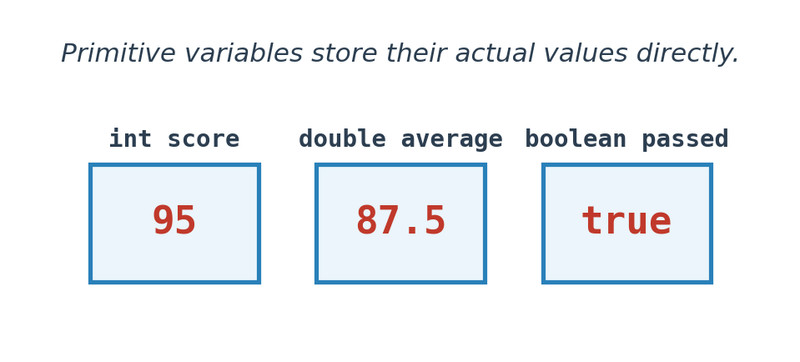
When you see int count = 5;, that 5 is literally stored inside count.
Keep this mental model as we compare primitive and reference types.
2. Primitive vs Reference Types
Java splits data types into primitive and reference types.
Primitive Types (AP Scope)
You only need to know three:
intdoubleboolean
Other primitives like long, float, char, short, and byte are outside AP scope.
Key features:
- Store actual values directly.
- Written in lowercase.
- Used for numbers and logical flags.
Reference Types
A reference type stores a reference to an object in memory, not the object itself.
Examples:
StringScanner- Any class you create
The diagram below shows the difference. A primitive variable holds its value directly. A reference variable holds a pointer to a separate object.
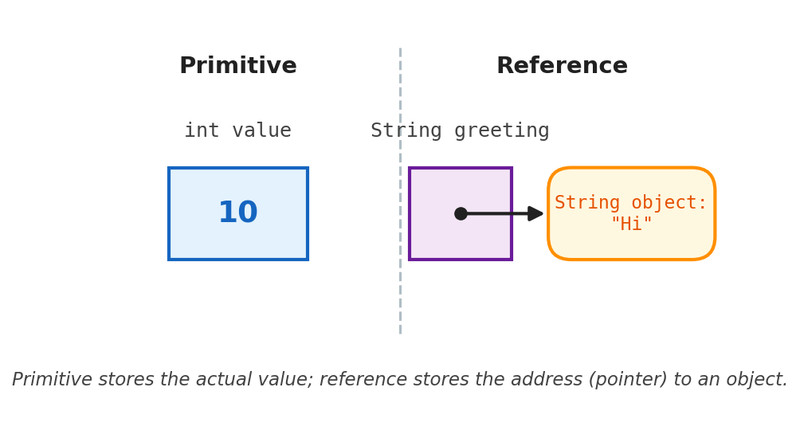
Primitive vs. reference variable memory model
For this topic, you mostly need to recognize the difference conceptually. If it’s a number or true/false, it’s primitive. If it’s an object like a String, it’s reference.
3. Declaring and Initializing Variables
A declaration tells Java the type and name.
int points;
double price;
boolean isReady;
Format:
type variableName;
Initialization gives the variable a value.
int points = 10;
double taxRate = 0.07;
boolean finished = false;
You can declare and initialize together, or separately.
What you cannot do:
int bonus;
System.out.println(bonus); // compile error
Java requires local variables to be assigned a value before use. On quizzes, a common trick is initializing a variable in only one branch of an if statement and then using it after.
4. Choosing the Correct Data Type
When reading a problem, the wording usually tells you the type.
- “Count how many” →
int - “Average” or “percentage” →
double - “Returns true if…” →
boolean - Loop counters and array indices → always
int
Examples:
int totalStudents = 28;
double classAverage = 91.4;
boolean isPassing = true;
If decimals might appear at any point, use double. Even if the starting value is 5, if it could become 5.5 later, it should be a double.
5. Type Compatibility and Common Traps
Type Mismatch
Illegal:
int x = 4.8;      // double into int
boolean flag = 1; // number into boolean
Legal:
double y = 7; // int automatically promoted to double
Java allows widening (int → double) but not narrowing automatically.
Explicit cast:
double price = 12.99;
int dollars = (int) price;  // becomes 12
Casting truncates. It never rounds.
Integer Division
If both operands are int, the result is int.
7 / 4 → 1
This causes subtle bugs:
int correct = 18;
int total = 25;
double percent = correct / total * 100;  // wrong
correct / total evaluates first using integer division.
Fix it:
double percent = (double) correct / total * 100;
Or:
double percent = correct / 25.0 * 100;
Any time you see division in a multiple choice question, check the types immediately.
