Topic 1.1 Notes – Collaboration
1. What a Computing Innovation Is
A computing innovation is an innovation that includes a program as an integral part of its function. If you remove the code, it no longer works as intended.
Think of it this way: the program is not an add-on. It is the brain of the innovation.
Most computing innovations:
- Collect data (user input, sensor readings, clicks, location)
- Process or analyze data (calculate, compare, decide)
- Store data (accounts, history, preferences)
- Respond automatically based on code
If something works without any program running it, it’s not a computing innovation for AP CSP purposes.
Types of Computing Innovations
You need to know all three categories.
| Type | What It Is | Examples |
|---|---|---|
| Physical computing innovation | A tangible device that relies on embedded software | Self-driving car, smartwatch, smart thermostat, robot vacuum |
| Nonphysical software innovation | A program or app with no physical form | Photo editor, word processor, video game, messaging app |
| Nonphysical computing concept | A broad system powered by computing | E-commerce platforms, social networking systems |
A self-driving car is physical hardware plus code.
A video editing app is software only.
E-commerce is a whole system built on many programs working together.
On tests, they may describe something and ask if it qualifies. The key question is always: Would this function without code?
2. Why Collaboration Improves Computing Innovations
Real computing innovations are almost never built by one person. They are developed by teams that combine different strengths and perspectives.
Effective collaboration improves innovations because:
- Different perspectives lead to better solutions
Someone else may notice a flaw, security risk, or usability issue you missed. - Different talents strengthen the product
One person may specialize in design, another in algorithms, another in testing. - Bias is reduced
If only one type of person designs a product, it may unintentionally exclude others.
Diverse teams are more likely to catch:- Accessibility issues
- Cultural assumptions
- Gender or racial bias in data or design
- Problems are caught earlier
Bugs, confusing layouts, or unfair outcomes are easier to fix during development than after release.
On the AP exam, they love giving scenarios where a product caused harm because certain groups were not considered. The expected reasoning is that including diverse perspectives during development could have reduced that bias.
Collaboration works best when the final product reflects the combined contributions of the team, not just the loudest voice.
3. How Developers and Users Work Together
Collaboration is not just developer-to-developer. It also includes users.
Before Development
Developers gather information to understand the purpose of the program:
- Surveys
- Interviews
- Market research
- Observations of how people currently solve the problem
This helps clarify what the program is supposed to do from multiple perspectives.
During Development
- Beta testing
- Usability testing
- Bug reports
Users try early versions and give feedback.
After Release
- Reviews
- Feature requests
- Ongoing updates and patches
Information from users helps developers:
- Improve functionality
- Make the program more accessible
- Adjust features to meet real needs
- Reduce unintended bias
If you ever write about your Create Task, mentioning user feedback influencing design decisions strengthens your explanation.
4. How Groups Develop Computing Innovations
Most innovations are built by organized teams using structured collaboration models.
Pair Programming
Pair programming uses two clearly defined roles that work together at one computer.
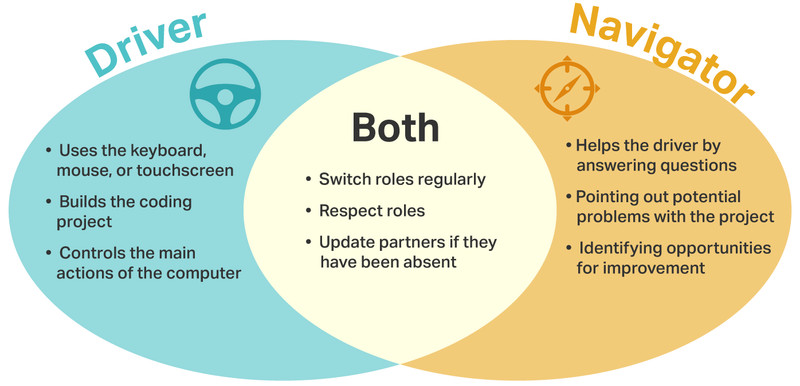
Driver and Navigator roles in pair programming
In pair programming:
- The driver writes the code and controls the keyboard or mouse.
- The navigator reviews the work, catches errors, and suggests improvements.
- They switch roles regularly and communicate throughout the process.
This leads to fewer mistakes and clearer logic because someone is always reviewing in real time.
Team-Based Development
Larger teams often divide responsibilities:
- Front-end development
- Back-end logic
- Testing
- UI/UX design
- Project management
Constant communication keeps all parts aligned.
Online Collaboration Tools
Online tools make collaboration possible even when people are not in the same place.
They allow teams to:
- Share documents in real time
- Track tasks and deadlines
- Store and manage code versions
- Give feedback and comment on changes
Version control systems are especially important because they track who changed what and allow teams to merge work safely.
5. Interpersonal Skills That Make Collaboration Work
Technology skills alone do not make a strong team. Teams succeed when members practice strong interpersonal skills.
- Communication
Clear explanations, active listening, asking clarifying questions. - Consensus building
Making sure everyone has input before final decisions are made. - Conflict resolution
Disagreements are handled respectfully and focused on improving the product. - Negotiation
Teams prioritize features and sometimes compromise to meet deadlines or constraints.
In group projects and the Create Task, this is exactly what the rubric expects you to demonstrate.
