Topic 4.1 Notes – The Internet
1. How Computing Devices Form Networks
Start small.
A computing device is any physical machine that can run a program.
Examples: laptop, tablet, server, router, smart thermostat, sensor.
When multiple computing devices and programs work together for a common purpose, that’s a computing system.
A computer network is a specific kind of computing system:
- A group of interconnected computing devices
- Capable of sending and receiving data
So the relationship looks like this:
- Computing device → building block
- Computing system → devices working together
- Computer network → a computing system focused on communication
Paths and Routing
Devices on a network don’t have to be directly connected.
A path is a sequence of directly connected devices that starts at the sender and ends at the receiver.
For example, data could travel from device A to device E through intermediate devices:
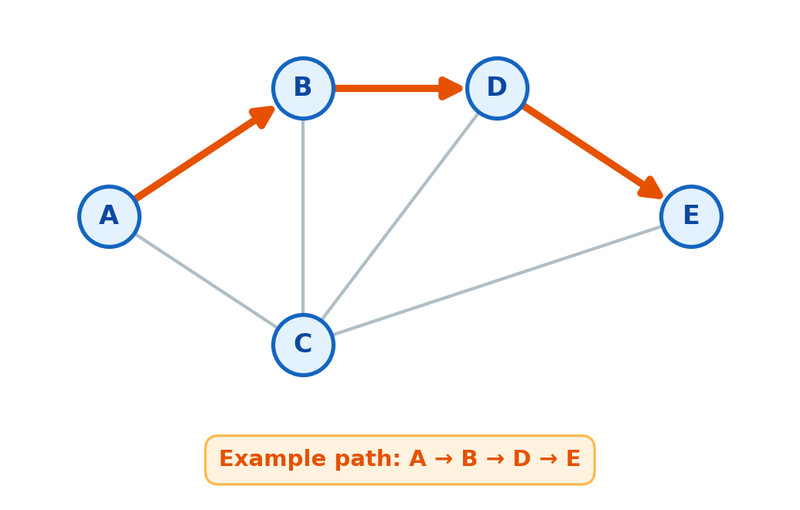
One possible path through a network
In this example, one possible path is A → B → D → E. There may be other valid paths between the same two devices.
The process of choosing a path is called routing.
Important detail for tests:
Routing on the Internet is usually dynamic, meaning the path is decided as data moves. It is not pre-planned in advance. If one path is busy or broken, another can be chosen.
Bandwidth
Bandwidth is the maximum amount of data that can be sent in a fixed amount of time.
- Measured in bits per second (bps)
- Higher bandwidth = more data per second
Students often confuse bandwidth with speed. Bandwidth is capacity. Think of it like lanes on a highway. More lanes means more cars at once.
2. What the Internet Is
The Internet is a computer network made up of many interconnected networks that use standardized, open (nonproprietary) communication protocols.
Break that down:
- It’s a network of networks
- It uses open protocols (anyone can use them)
- Any compatible device can connect
To access the Internet, your device must connect to another device that is already connected, such as:
- A home router
- A school network
- An Internet Service Provider (ISP)
Protocols
A protocol is an agreed-upon set of rules that specify how systems communicate.
Common Internet protocols:
- IP (Internet Protocol)
- Handles addressing and moving packets to the correct destination.
- TCP (Transmission Control Protocol)
- Ensures reliable delivery
- Reorders packets
- Requests missing ones
- UDP (User Datagram Protocol)
- Faster
- Minimal error checking
- Used when speed matters more than perfect accuracy
Here’s how TCP and UDP compare:
| Feature | TCP | UDP |
|---|---|---|
| Reliability | High (checks for errors, reorders packets) | Low (no guarantee of delivery) |
| Speed | Slower | Faster |
| Used for | Web browsing, email, file transfer | Streaming, gaming, live calls |
On multiple choice questions, they love scenarios like live video vs bank transaction. Think: accuracy needed → TCP. Speed prioritized → UDP.
Scalability
Scalability is a system’s ability to grow and handle increased demand.
The Internet was designed to be scalable:
- Open protocols allow new devices to join.
- Dynamic routing allows traffic to adjust.
- Networks can be added without redesigning everything.
That design choice is why billions of devices can connect today.
3. How Data Moves Through the Internet
When you send information, it travels as a data stream. That stream is broken into smaller pieces called packets.
Each packet contains:
- A chunk of the data
- Metadata, including:
- Source address
- Destination address
- Information for reassembly
This wrapping of data with metadata is called encapsulation.
What Happens to Packets
- Data is split into packets.
- Packets travel independently.
- They may take different paths.
- They may arrive:
- In order
- Out of order
- Not at all
- The receiving device reassembles them.
Here’s what that looks like conceptually:
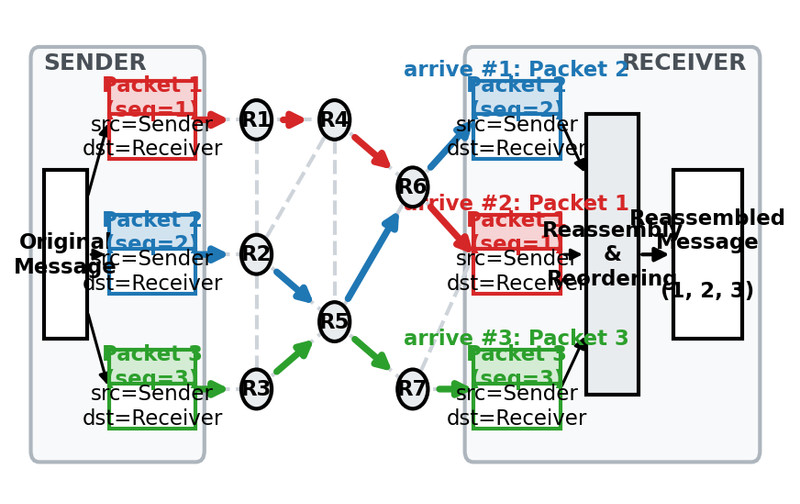
Packets taking different routes and being reassembled
Notice how the packets leave the sender together, move through different routers, and arrive at the receiver in a different order before being put back together. That independence is a key feature of packet switching.
Critical exam idea:
The Internet itself does not guarantee order or delivery. Reliability depends on the protocol, especially TCP.
4. The Internet vs the World Wide Web
These are not the same thing.
The Internet
- Physical infrastructure
- Global network of interconnected networks
- Uses IP, TCP, UDP
- Supports many services (email, gaming, file transfer)
The World Wide Web
- A system of linked pages, programs, and files
- Runs on top of the Internet
- Uses HTTP (HyperText Transfer Protocol)
- HTTP is built on top of TCP/IP
| Internet | World Wide Web |
|---|---|
| Infrastructure | Content system |
| Moves data | Links web pages and resources |
| Uses IP, TCP, UDP | Uses HTTP |
If the Internet disappeared, the Web would not work. But the Internet can exist without the Web.
