Topic 3.3 Notes – Mathematical Expressions
1. What an Algorithm Is
An algorithm is a finite set of instructions that accomplishes a specific task. It’s the logic of the solution.
A program is how that algorithm is written in a programming language so a computer can execute it.
Think of it like this:
- The algorithm is the plan.
- The program is the version written in code so the computer can follow it exactly.
Algorithms are not tied to one language. You can express the same algorithm as:
- Plain English steps
- A flowchart
- Pseudocode (like the AP reference sheet)
- JavaScript, Python, etc.
Every algorithm can be built from combinations of:
- Sequencing (steps in order)
- Selection (decisions)
- Iteration (repetition)
Right now, we’re focused on sequencing. Selection and iteration come next.
2. Sequencing and Code Statements
What Sequencing Means
Sequencing means statements run in the order they appear.
Computers execute code top to bottom, one statement at a time. A statement finishes before the next one begins.
If you rearrange statements, you can change the result.
Example in AP pseudocode:
score ← 10
bonus ← 5
total ← score + bonus
DISPLAY(total)
This runs in order:
- Store 10 in
score - Store 5 in
bonus - Compute
score + bonus - Display the result
If you tried to compute total before assigning score, it wouldn’t work logically.
What a Code Statement Is
A code statement expresses an action. Examples:
- Assigning a value →
x ← 8 - Performing math →
y ← x * 2 - Calling a procedure →
result ← RANDOM(1, 6) - Displaying output →
DISPLAY(y)
Each statement does one action, and they execute in sequence.
On quizzes and the AP exam, you might see a paragraph like:
“Take a number, double it, subtract 4, and display the result.”
You should be able to write that as ordered pseudocode statements without using a specific programming language.
Clarity matters. Clean variable names and logical order make your thinking easy to follow, especially on written responses.
3. What Expressions Are
An expression is something that evaluates to one single value.
It can include:
- A number →
12 - A variable →
total - Operators →
a + b - A procedure call that returns a value →
RANDOM(1, 10)
Key difference:
- Expression → produces a value
- Statement → performs an action
Example:
x ← 4
y ← x + 3
x + 3 is an expression.
y ← x + 3 is a statement.
When evaluated, every expression becomes exactly one value.
4. Arithmetic Operators and Order of Operations
Arithmetic Operators (from the AP reference sheet)
+addition-subtraction*multiplication/divisionMODremainder
Example:
19 / 4evaluates to4.7519 MOD 4evaluates to3
The AP definition of MOD:
a MOD bgives the remainder whenais divided byb- Assume
a ≥ 0andb > 0
Here is a quick visual of 23 MOD 6. You can see 23 items grouped into sets of 6, with 5 left over.
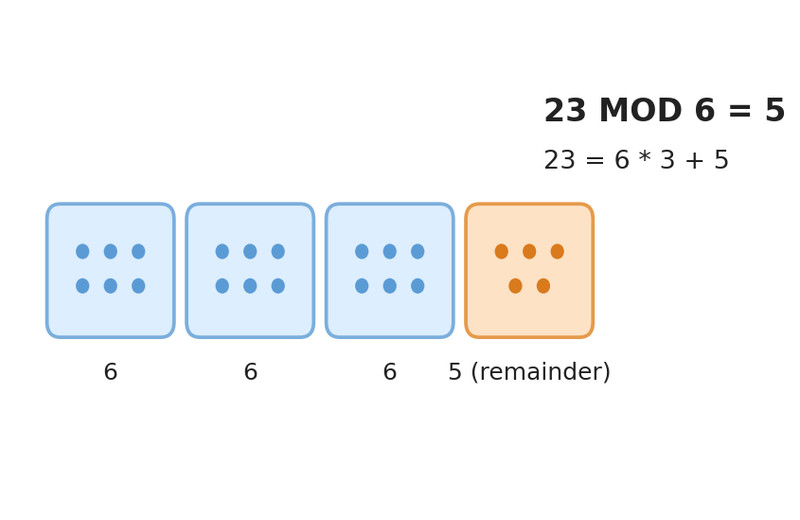
23 MOD 6 = 5
Common uses of MOD:
- Even or odd →
number MOD 2 - Cycling through values (like wrapping from 5 back to 1)
- Checking if something divides evenly (remainder = 0)
Order of Operations
Expressions follow standard math rules:
- Parentheses
- Multiplication, Division, MOD (left to right)
- Addition, Subtraction (left to right)
Important detail:
MOD has the same precedence as * and /.
Example:
result ← 6 + 8 / 4 * 2
Evaluate in this order:
8 / 4 = 22 * 2 = 46 + 4 = 10
Not left-to-right blindly. The AP loves giving expressions that mix /, *, and MOD to see if you apply precedence correctly.
When in doubt, rewrite step by step on scratch paper.
5. Connecting It All
Here’s how everything fits:
- An algorithm is a step-by-step plan.
- A program implements that plan.
- Sequencing means steps run in order.
- Statements perform actions.
- Expressions calculate values.
- Arithmetic operators follow strict precedence rules.
When you trace code on a test:
- Go line by line in order.
- Evaluate each expression fully.
- Respect order of operations.
If your answer is wrong, it’s almost always because you skipped a step or ignored precedence.
