Topic 5.6 Notes – Safe Computing
1. Personally Identifiable Information and Digital Footprints
Personally Identifiable Information (PII) is any information that identifies, links to, relates to, or describes a specific person.
You should instantly recognize these as PII:
- Social Security number
- Age and race
- Phone number(s)
- Medical records
- Financial information (bank accounts, credit cards)
- Biometric data (fingerprints, facial recognition, eye scans)
But privacy risk goes beyond obvious things.
Devices and websites also collect:
- Search history (what you’ve looked up)
- Browsing history and cookies
- Website visit records
- IP address
- Geolocation data (where you are, how you got there, how long you stayed)
Search engines:
- Store your past searches
- Suggest results based on that history
- Use it for targeted marketing (ads tailored to you)
Websites:
- Track who visits their pages
- Connect activity across sessions using cookies
Here’s the key idea students miss: separate pieces of harmless-looking data can be aggregated to reveal something personal.
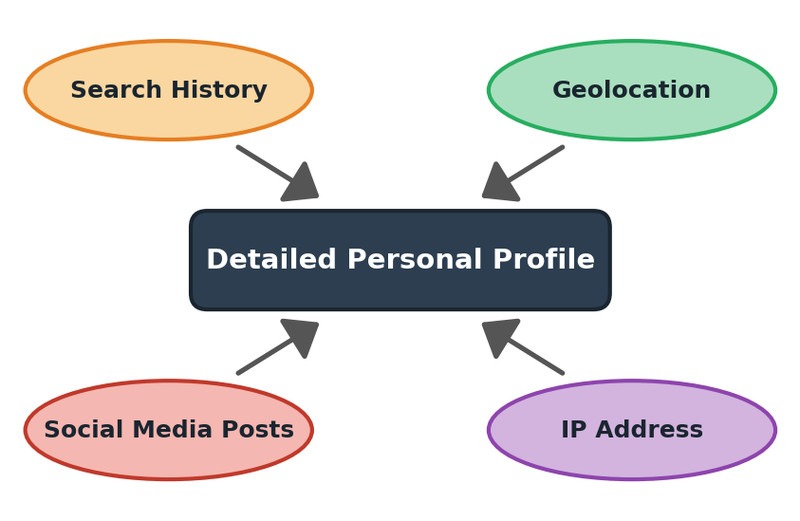
Aggregated data forming a detailed personal profile
Individually, search history, geolocation, social media posts, and an IP address may not seem revealing. Combined, they can paint a detailed personal profile.
For example:
- Social media post about a concert
- Location data showing you at a specific stadium
- Public records with your home address
Together, that can reveal patterns about where you live and when you’re not home.
Once something is online:
- It can be copied, forwarded, screenshotted
- It may be used by employers or colleges
- It is extremely difficult to fully delete
Programs can even track where you’ve been, how you traveled there, and how long you stayed. That level of detail surprises people on tests.
2. Benefits and Risks of Data Collection
Technology enables the collection, use, and exploitation of data about individuals, groups, and institutions.
Benefits
Data collection can:
- Personalize recommendations (music, videos, shopping)
- Save payment/shipping info for faster checkout
- Improve search accuracy
- Enable location-based services (maps, ride apps)
- Connect you with friends online
PII can make systems more convenient and customized.
Risks
If protections fail or are ignored:
- Identity theft using SSN or financial info
- Stalking using location data
- Targeted scams based on your activity
- Data breaches exposing stored user data
- Profiling by companies or governments
Information may:
- Be sold or shared
- Be used beyond its original purpose
- Be exploited if security is weak
On multiple-choice questions, they often describe a scenario where data improves convenience but increases vulnerability. You’re expected to recognize the privacy vs convenience trade-off.
3. Protecting Computing Resources
Authentication
Authentication verifies identity to prevent unauthorized access.
Strong Passwords
A strong password:
- Is easy for you to remember
- Is hard for others to guess
- Avoids personal info (birthdays, names)
- Avoids obvious choices (“12345”)
- Uses varied characters
Weak passwords are one of the most common vulnerabilities tested.
Multifactor Authentication (MFA)
MFA requires at least two categories:
| Category | Example |
|---|---|
| Knowledge | Password, PIN |
| Possession | Phone, security token |
| Inherence | Fingerprint, facial scan |
Each factor adds another layer. If someone steals your password, they still cannot log in without the second factor.
Encryption
Encryption encodes data to prevent unauthorized access. Decryption decodes it.
Two types you must know:
- Symmetric key encryption
- One key encrypts and decrypts
- Both parties share the same key
- Public key encryption
- Public key encrypts
- Private key decrypts
- Sender does not need the receiver’s private key
The diagram below contrasts these two approaches. Focus on how the left side uses a single shared secret key, and the right side uses a public key to encrypt and a private key to decrypt.
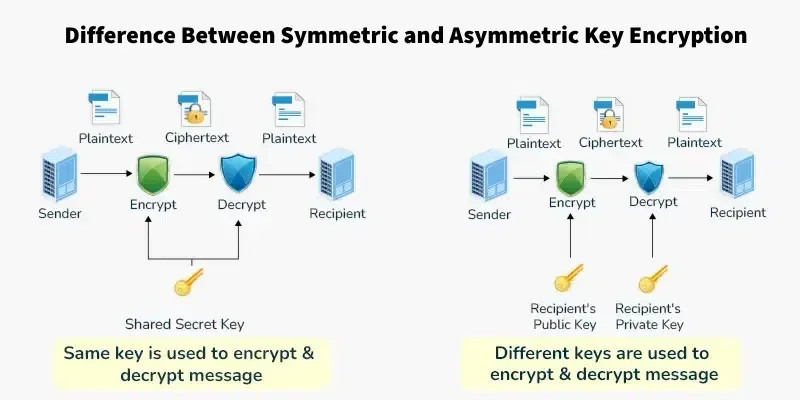
Symmetric vs asymmetric key encryption
Public key systems use digital certificates issued by certificate authorities (CAs). These verify ownership of encryption keys using a trust model. No math required for the exam.
System Protection Practices
- Malware/virus scanning software
- Regular software updates (patch vulnerabilities)
- Reviewing app permissions
- Limiting data collection
- Backups
All real systems have flaws. Updates fix weaknesses that attackers exploit.
4. How Unauthorized Access Happens
Phishing
Fake messages pretending to be trusted sources. They trick users into revealing passwords or financial info. Malicious links can be disguised.
Keylogging
Software records every keystroke to steal confidential information.
Rogue Access Points
Fake WiFi networks that intercept or modify transmitted data. Common risk on public networks.
Malware and Viruses
Malware is software intended to damage or control systems.
A computer virus:
- Is malicious
- Copies itself
- Often attaches to legitimate files
- Requires user activation
Common infection sources:
- Unsolicited email attachments
- Compromised accounts
- Untrustworthy free downloads
Most attacks succeed because of human behavior, weak authentication, or unpatched systems.
