Topic 1.2 Notes – Program Function and Purpose
What a computing innovation is designed to do
Every computing innovation is created for a purpose. The purpose is the intended goal of the technology.
Two big categories cover almost everything:
- Solving problems
- Automating calculations (tax software, grade calculators)
- Organizing or communicating information (messaging apps, cloud storage)
- Managing systems (banking apps, traffic control systems)
- Creative expression
- Video games
- Digital music or art tools
- Animation or storytelling platforms
When you’re asked for a purpose, answer in one clear sentence:
“This program allows users to ___.”
Keep it focused on the intended goal, not how it works.
Why purpose matters:
- It guides design decisions.
- It determines what inputs and outputs are needed.
- It shapes the program’s behavior.
A vague purpose leads to messy design. A clear purpose makes everything else make sense.
Programs, code segments, and statements
A program (also called software or an application) is a collection of program statements that performs a specific task when run.
Think in levels:
- Program
- The entire application.
- Code segment
- A portion of the program.
- A group of statements that accomplish part of the task.
- Statement
- A single instruction executed by the computer.
Here’s a simple hierarchy that shows how a full program is broken into parts:
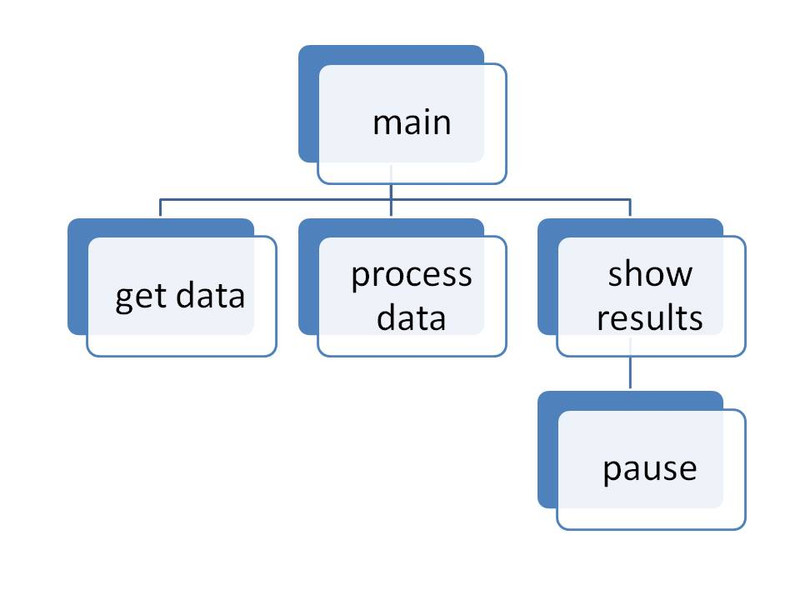
Hierarchical program structure
The top box labeled main represents the overall program. The boxes branching below it, such as get data, process data, and show results, represent code segments that handle specific parts of the task. Each of those segments is made up of individual statements.
On tests, you’ll often see a short snippet of code and be asked what it does. That snippet is a code segment, not the whole program.
You should be able to describe a program in two ways:
- Broad description (what it does)
“This program tracks a user’s daily water intake.” - Detailed description (what and how)
- Accepts number of ounces entered by the user
- Adds it to a stored total
- Displays updated progress toward a goal
Both types of descriptions are expected in class and on the AP exam.
Also remember: a program must work for a variety of inputs and situations, not just the “happy path.”
Program inputs and events
A program runs using input, which is data sent to a computer for processing.
Forms of input:
- Text (typed words, numbers)
- Tactile (button presses, screen taps)
- Audio (microphone input)
- Visual (camera, image upload)
Input can come from:
- A user
- Another program (like an API sending weather data)
Events
An event is an action that triggers code to run and often supplies input data.
Common examples:
- Key pressed
- Mouse clicked
- Program started
- Timer finished
In event-driven programming, code runs when triggered by events. It doesn’t just execute top to bottom once.
Here’s the difference. In an event-driven system, an action like a button click becomes an event that is placed in a queue and handled by a callback function.

Event-driven architecture flow
On multiple choice, they love asking which action is the event and what input it provides. Read carefully. The event is the trigger. The input is the data sent because of it.
Inputs usually affect the output produced.
Program outputs and behavior
Output is any data sent from a program to a device.
Forms of output:
- Text (messages, results)
- Visual (images, animations)
- Audio (sounds, music)
- Tactile (vibration)
Output is usually based on:
- The program’s input
- The program’s prior state (stored values, variables)
For example, if a fitness app shows “Goal reached,” that output depends on:
- Input (steps recorded)
- Prior state (daily step total stored so far)
Program behavior
A program’s behavior is how it functions during execution, especially how it responds to user interaction.
Behavior includes:
- What happens when valid input is entered
- What happens with unexpected input
- How the program responds to events
Even if a developer didn’t plan for a situation, the program will still behave somehow. Sometimes that behavior is crashing.
Behavior should align with the program’s purpose. If the purpose is to help users budget, the behavior should support tracking and updating expenses accurately.
On exams and in the Create task, you should be ready to clearly identify:
- The program’s purpose
- Its inputs
- Its outputs
- The events involved
- Its behavior in response
Use the vocabulary precisely. That precision earns points.
