Topic 2.1 Notes – Binary Numbers
1. Bits Are the Building Blocks of All Data
A bit (binary digit) is either 0 or 1. That’s it. It’s the smallest unit of data in a computer.
Computers are built from physical components (like transistors) that have two stable states, such as on/off. Those two states map perfectly to 0 and 1. That’s why computing devices represent data digitally using bits.
A byte is 8 bits grouped together. Grouping matters because:
- 1 bit → 2 possible values (0 or 1)
- 2 bits → 4 possible values
- 8 bits (1 byte) → 256 possible values
More bits = more possible combinations.
Even when you write code with:
- Variables
- Lists
- Constants
- Inputs and outputs of procedures
…underneath all of that, the data is still just bits. The variable name is an abstraction. The bits are the reality.
Abstraction and Bit Grouping
Abstraction means reducing complexity by hiding details and focusing on what matters.
You don’t think in 0s and 1s when you type your name. Instead, bits are grouped into higher-level meanings:
- Numbers
- Characters (text)
- Colors
- Sound samples
Here’s the key idea that shows up on quizzes a lot:
The same sequence of bits can represent different things depending on context.
Look at the example below. It shows the same 8-bit pattern being interpreted two different ways.
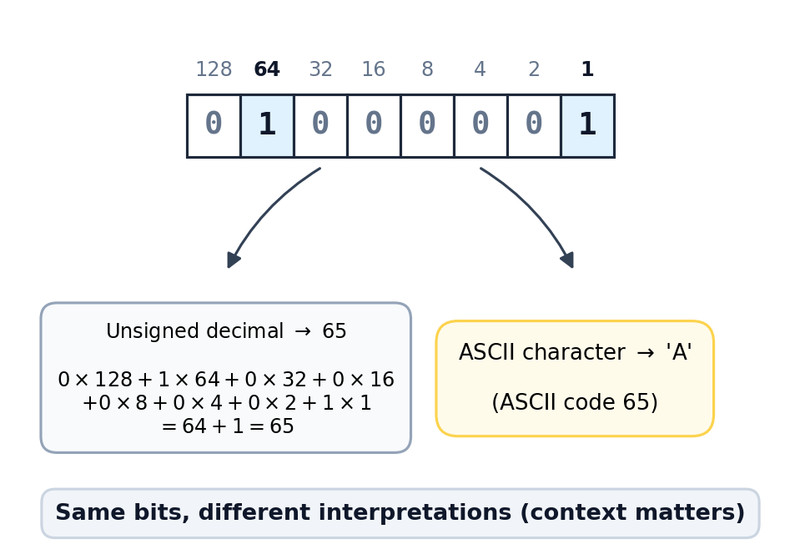
Same 8 bits, different interpretations
The bit pattern 01000001 could mean:
- The number 65 (in unsigned decimal)
- The letter “A” (in ASCII)
The bits don’t “know” what they mean. Programs interpret them.
That connects directly to the enduring idea of this unit: how data is stored internally is different from how it’s displayed to users.
2. Binary and Decimal Number Systems
You already know decimal (base 10).
- Digits: 0-9
- Each position is a power of 10
- Rightmost position is power 0
Example:
347 = 3×10² + 4×10¹ + 7×10⁰
Binary works the same way structurally, but it’s base 2.
- Digits: 0 and 1
- Each position is a power of 2
- Rightmost position is power 0
Each box represents a power of 2, increasing from right to left.
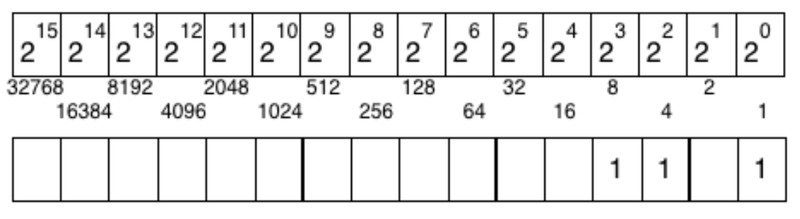
Binary place value chart (powers of 2)
Example binary number:
10110
Label place values:
1×16 + 0×8 + 1×4 + 1×2 + 0×1
= 16 + 4 + 2
= 22
Binary → Decimal (process)
- Label powers of 2 from right to left.
- Multiply each bit by its place value.
- Add them up.
Decimal → Binary (process)
Convert 19:
- Largest power of 2 ≤ 19 is 16 → write 1
- 19 − 16 = 3
- Next powers (8, 4) don’t fit → write 0s
- 2 fits → write 1
- 1 fits → write 1
Result: 10011
Comparing Binary Numbers
If they’re the same length, compare left to right like decimal.
Example:
- 11001
- 10111
Since the first number has 1 in the 2⁴ place and the second has 1 too, move right. The first has 1 in 2³ place while the second has 0, so 11001 is larger.
If lengths differ (no leading zeros), the longer one is larger.
3. Representing Analog Data Digitally
Some real-world data changes smoothly. That’s analog data.
Examples:
- Volume of music
- Temperature
- Light intensity
- Position of a runner
Digital data uses discrete values. Finite possibilities. Stored as bits.
Here’s the comparison:
| Analog | Digital |
|---|---|
| Continuous change | Discrete steps |
| Infinite possible values | Finite possible values (limited by bits) |
| Example: sound wave | Example: MP3 file |
Sampling
Analog data is converted to digital using sampling.
Think of a smooth sound wave over time. To digitize it, we measure the wave at evenly spaced moments.

Analog signal sampled at regular time intervals
Each dot represents a measurement taken at a specific moment. The original curve is continuous, but the stored values come from those individual sample points.
Sampling means:
- Measure the signal at regular intervals (samples).
- Store each measurement as bits.
More samples → closer approximation.
Important wording for tests:
Digital representation approximates analog data. It does not perfectly capture it. That approximation itself is an example of abstraction.
4. Limits and Errors in Bit Representation
Bits are powerful, but limited.
Integer Limits
In many programming languages, integers use a fixed number of bits.
With n bits (unsigned), the maximum value is:
2ⁿ − 1
Example:
8 bits → 2⁸ − 1 = 255
If you try to store 300 in 8 bits, you get an overflow error. The value might wrap around or become incorrect.
Important nuance:
- On the AP CSP exam, integers in pseudocode are limited only by memory.
- In real languages (like Java or C), they usually have fixed limits.
MC questions love asking which situation could cause overflow.
Real Number Limits
Real numbers (decimals) are also stored using a fixed number of bits.
Some numbers:
- Cannot be represented exactly.
- Are stored as approximations.
This causes round-off errors.
Example idea: adding 0.1 repeatedly may not equal exactly 1 due to approximation.
You don’t need to know specific range limits. Just understand:
- Finite bits → limited precision.
- Limited precision → possible small errors.
