Topic 1.3 Notes – Program Design and Development
1. The Program Development Process
A program development process is the way developers move from an idea to a working program. It can be:
- Ordered and intentional → clear stages, planned steps
- Exploratory → experimenting, adjusting, learning as you go
Most real projects mix both. Even structured processes leave room for creativity and risk-taking.
Two development approaches show up constantly on quizzes and the AP exam.
Iterative vs Incremental Development
| Iterative Development | Incremental Development |
|---|---|
| Repeated refinement of the same feature | Build in pieces, adding one part at a time |
| Uses feedback, testing, reflection to revise | Each piece works before adding the next |
| You revisit earlier phases | You expand the program step by step |
| Example: Improve the same login screen multiple times | Example: Finish login → then profile page → then messaging |
A project can be both:
- Iterative within each feature
- Incremental across the whole program
If a question describes “revising after user feedback,” that’s iterative. If it describes “adding features one at a time,” that’s incremental.
2. The Four Common Phases of Development
Most development processes include four recurring phases:
- Investigating and Reflecting
- Designing
- Prototyping
- Testing
In iterative development, you cycle through these multiple times.
Investigating and Reflecting
This is where you figure out what problem you’re solving.
You:
- Identify the goal of the program
- Determine program requirements
- Identify constraints (time, hardware, cost, platform limits)
- Understand the users’ concerns and interests
Ways developers investigate:
- Surveys
- Interviews
- User testing
- Direct observation
Reflection happens after feedback. Each cycle usually asks more specific questions than the last.
If a test question mentions “understanding user needs before designing,” that’s this phase.
Designing
Design explains how you will meet the requirements.
It may include:
- Brainstorming ideas
- Storyboarding or planning
- Organizing into modules or functional components
- Creating user interface diagrams
- Developing a testing strategy
For example, a user interface layout diagram might sketch the structure of a login screen before any code is written:
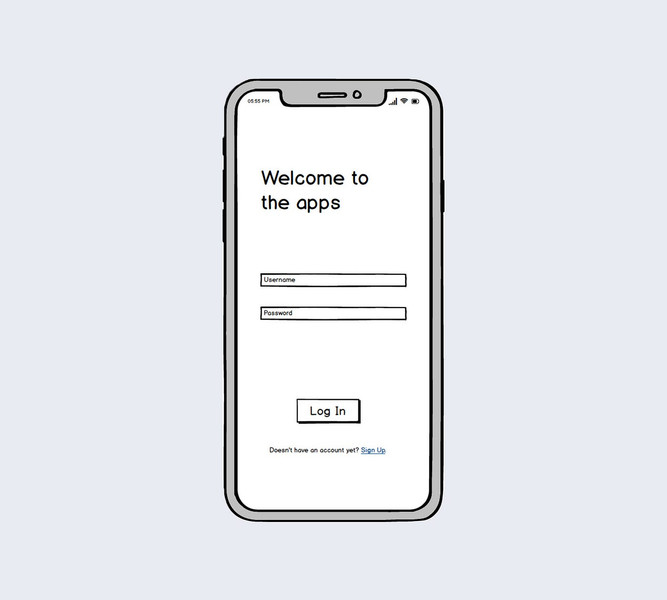
Example of a login screen wireframe
The design phase does not mean coding yet. It’s planning structure and interaction.
Prototyping
A prototype is a working model of part (or all) of the program.
- It doesn’t need to be polished.
- It’s built to test ideas early.
- It supports iteration because it gives something concrete to revise.
Think of it as a draft version you can improve.
Testing
Testing checks whether the program:
- Meets its requirements
- Handles inputs correctly
- Works for users
- Has errors or usability issues
Testing can send you back to investigation or design. It is not a “final step.” In good development, testing happens throughout.
3. Program Requirements and Specifications
These terms get mixed up a lot.
Program Requirements
- Describe how a program functions
- Include required inputs, outputs, and user interactions
- Example: “The user must be able to enter a number and see the average.”
Program Specification
- A formal document defining the program’s requirements
- Agreed upon before full development
Specification defines what must happen. Design defines how it will happen.
If a multiple-choice question asks which document lists what the program must do, that’s the specification.
4. Program Documentation and Code Acknowledgment
Program Documentation
Program documentation is written explanation of:
- What a program or code segment does
- How it functions
- How it was developed
It should be written throughout development, not just at the end.
Documentation helps:
- Other programmers understand the code
- Teams collaborate
- Future updates happen smoothly
- You remember your own logic later
Comments
Comments are documentation written inside the code.
- Meant for humans
- Ignored by the computer
- Explain purpose or reasoning
Some environments don’t support comments, so documentation may exist in separate documents.
On the Create Task, clear documentation makes it much easier to explain your code in your written responses.
Acknowledging Code from Other Sources
You must acknowledge code that:
- Was written collaboratively
- Came from another person or source
Acknowledgment:
- Can appear in program documentation
- Should include the original author or source
Failing to credit code is both unethical and against AP rules. If you use outside help, document it clearly.
