Topic 3.4 Notes – Strings
What Strings Are
A string is an ordered sequence of characters. Those characters can be:
- letters like
"A"or"hello" - digits like
"4"or"2025" - spaces like
" " - symbols like
"!","_", or"#"
Because a string is ordered, position matters. "CAT" and "TAC" use the same characters, but they are different strings because the characters are in a different order.
That idea of order is why strings are often discussed in terms of character positions, like this example:
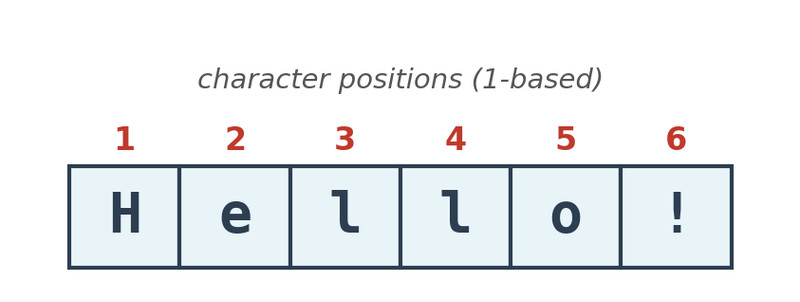
Character positions in a string
A quick reminder from earlier topics. When you evaluate an expression, your job is to determine the exact value it produces. Here, that value is often a string.
For AP CSP, the focus is narrow:
- joining strings together
- extracting part of a string
You do not need every string method from a programming language. Also, treat strings as text values, even when they look numeric. "42" is text, not the number 42.
Two String Operations You Need
Concatenation
Concatenation joins strings end-to-end to make a new string.
let first = "Hello";
let second = "World";
let result = first + second;
console.log(result);
This produces HelloWorld.
A few details matter a lot:
- order stays exactly as written
- nothing gets inserted automatically
- spaces and punctuation must already be in the strings
So:
"AP" + "CSP"gives"APCSP""AP " + "CSP"gives"AP CSP""score" + ":" + "90"gives"score:90"
This is string building, not arithmetic.
Substring
A substring is part of a larger string. You get it by selecting a range of characters from the original string.
let word = "computer";
console.log(word.substring(0, 4));
In JavaScript, that gives comp.
What matters for AP CSP is the idea:
- you begin with a larger string
- you choose positions
- you get back only the characters in that range
What to compare
- Concatenation puts whole pieces together
- Substring pulls a smaller piece out of a larger string
How to Evaluate String Expressions
When a problem mixes string operations, slow down and trace exactly what text appears.
- Identify each string value exactly.
- Include spaces, punctuation, and capitalization.
- Notice the operations being used.
- Are strings being joined, or is a piece being extracted?
- For concatenation, place strings side by side in order.
- Check for missing spaces.
- For substring, mark positions in the original string.
- Then extract only the requested characters.
- If both appear, keep track of intermediate results.
Example:
let a = "Hi";
let b = " there";
let c = a + b;
console.log(c.substring(0, 5));
Trace it:
a + b = "Hi there"
substring(0, 5) = "Hi th"
On multiple-choice questions, compare your final answer character by character.
Indexing Rules and Off-by-One Traps
This is where students miss easy points. Strings use indices for positions, but indexing rules are not universal.
Two common differences:
- counting may start at 0 or 1
- the ending index may be included or excluded
For example, this same string can be numbered in two different ways.
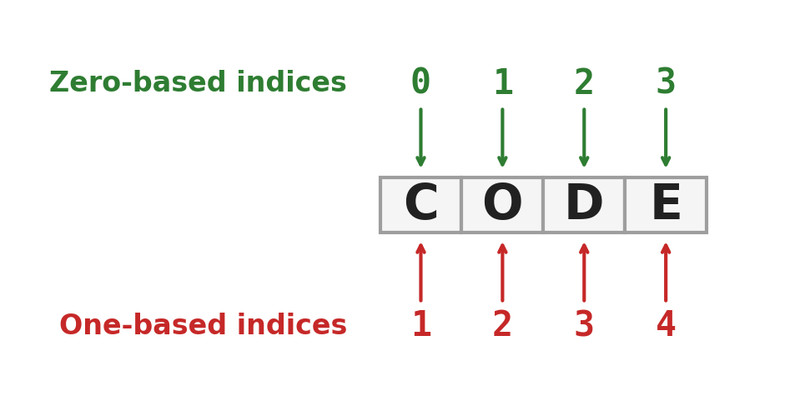
Zero-based and one-based indexing
That means the same numbers can return different substrings in different languages.
The most common mistake is an off-by-one error:
- starting one character too early
- starting one character too late
- including the last character when you should not
- leaving it out when you should include it
The safest move is to check the rules shown in the problem. If your class language and AP pseudocode differ, use the rules from the question in front of you.
Common Mistakes and What the Exam Wants
A few traps show up over and over:
- Concatenation does not add spaces.
"Hello" + "World"gives"HelloWorld". - Strings are text.
"42"is still a string unless converted. - Languages do not all slice the same way.
- Every character counts, including spaces, underscores, punctuation, and capitals.
On the exam, string questions usually ask for the exact resulting string. This also matters in programs that build messages, labels, usernames, or output from user input.
