Topic 3.14 Notes – Libraries
1. What Software Libraries Are
A software library is a collection of prewritten procedures that you can use in your own program.
Instead of building every tool yourself, you call procedures that someone else already created, tested, and debugged.
Here’s the core idea in plain terms:
- You write your program.
- Your program calls a procedure from a library.
- The library does the complex work.
- You get the result.
That’s reuse.
The diagram below shows this layered structure. Your user program calls a library function, and that library function may rely on lower-level system calls provided by the operating system.
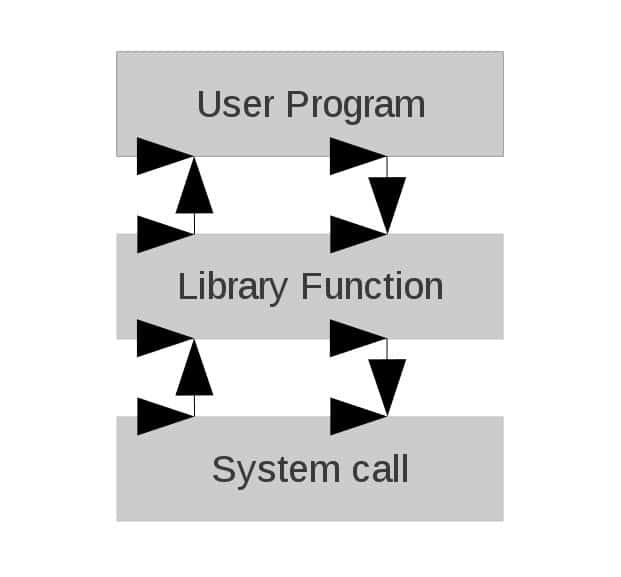
User program calling a library function
Why this matters in AP CSP terms:
- It’s an example of abstraction. You don’t need to know how the procedure works internally.
- It supports modularity. Programs are built from smaller pieces.
- It reduces errors because the code has already been tested.
- It saves development time.
On multiple-choice questions, when you see a programmer using a built-in or imported procedure instead of writing their own, that’s demonstrating abstraction and reuse.
2. Where Existing Code Comes From
When you reuse code, it usually comes from one of two places.
External Libraries
These are written by other programmers and imported into your program.
They often provide specialized functionality like:
- Graphics or image processing
- Mathematical operations
- Data analysis
- Communication over the internet
You don’t need to memorize specific library names. What matters is recognizing that programmers often import tools instead of rebuilding them.
Previously Written Code (Your Own)
You can also reuse:
- Procedures from earlier assignments
- Utility functions you’ve already created
- Code modules from past projects
This is still reuse. It still supports abstraction. The source just happens to be you.
A common test scenario describes a programmer building a new app. The most efficient solution usually involves:
- Reusing an existing procedure
- Importing a relevant library
- Avoiding rewriting complex logic
If an answer choice says “rewrite the entire algorithm from scratch,” that is rarely the best design decision.
3. Application Programming Interfaces (APIs)
A library contains the code.
An API (Application Programming Interface) explains how to use it.
An API specifies:
- The name of each procedure
- The required parameters
- The type of data each parameter expects
- What value (if any) is returned
- How the procedure behaves
Think of the API as the instruction manual for the library.
For example, if a procedure requires two numbers as parameters and returns a list, the API tells you that. Without it, you wouldn’t know how to call the procedure correctly.
APIs matter because they:
- Standardize communication between software components
- Allow different programs to interact predictably
- Prevent misuse of procedures
If a question asks how two software systems communicate correctly, the answer usually involves following an API specification.
4. Why Documentation Is Essential
An API is only useful if it’s documented.
Documentation explains:
- What the procedure does
- What inputs it expects
- What it returns
- Any errors it might generate
- Example usage
Without documentation, you would be guessing:
- Are the parameters in the right order?
- Does it return a value or just perform an action?
- What data type does it expect?
On free-response style questions, if you’re asked how a programmer would learn to correctly use a library, the answer involves reading the API documentation, not experimenting randomly or rewriting the function.
Documentation enables:
- Correct implementation
- Fewer logical errors
- Faster development
It’s what turns a collection of code into something usable.
5. How to Select an Appropriate Library
When building a program, choosing the right library is part of problem solving.
The process looks like this:
- Identify the needed functionality.
Does your program need to manipulate images? Analyze data? Communicate over a network? - Check whether a library already exists.
Reinventing common tools wastes time and increases error risk. - Evaluate the library.
- Does it solve your exact problem?
- Is it reliable and well documented?
- Does its API match the inputs and outputs you need?
- Integrate it correctly.
- Import the library.
- Call procedures using the API specifications.
- Pass correct parameters.
- Handle returned values properly.
Using a library simplifies complex programs because you only write the unique logic for your application. The heavy lifting is handled elsewhere.
That’s how large, complex software systems are actually built.
