Topic 3.6 Notes – Conditionals
What Selection Does in an Algorithm
Up to now, you’ve seen that programs normally run sequentially. One statement runs, then the next, then the next.
Selection changes that flow.
A conditional statement:
- Checks a Boolean expression (true/false)
- Decides which block of code runs
- Skips the other block
So the flow becomes something like this:
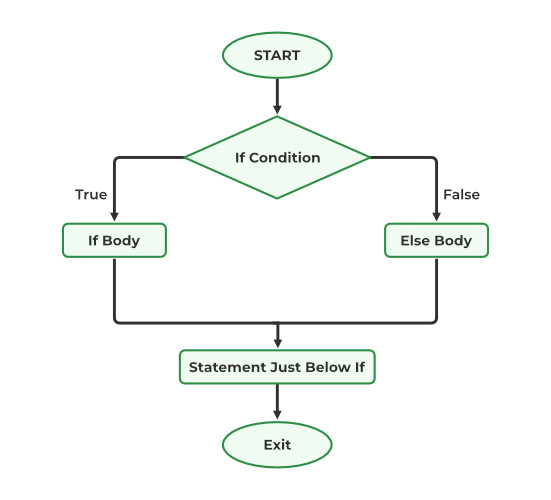
Flowchart of an if-else conditional
The diamond labeled If Condition is the decision point. Only one path, either the True branch or the False branch, is taken before the program continues.
This connects directly to the big idea of Unit 3: how statements are combined determines the result. If you change the condition, you change which path runs. That changes the output.
Boolean Conditions Drive the Decision
Everything in a conditional depends on a Boolean expression.
A Boolean expression:
- Evaluates to true or false
- Often compares values
score ≥ 70age = 18temperature < 0
- Can combine conditions using:
AND→ both must be trueOR→ at least one must be trueNOT→ reverses the value
Example:
(age ≥ 16) AND (hasLicense = true)This is only true if both parts are true.
Where students lose points is mis-evaluating the Boolean. If you get the condition wrong, the entire execution path is wrong. On multiple-choice questions, they love giving slightly tricky conditions like:
x > 5 AND x < 10If x ← 5, that condition is false. 5 is not greater than 5.
Be precise.
The Two Forms of Conditional Statements
The AP exam reference sheet gives you two official formats. You need to recognize and write both exactly like this.
IF (condition)
IF (condition)
{
   <block of statements>
}
What happens:
- If condition is true → run the block.
- If condition is false → skip it.
- Execution continues after the block.
So this form gives you zero or one block executed.
Example:
IF (score ≥ 90)
{
   DISPLAY("A")
}
If the score is 85, nothing displays. The program just moves on.
IF (condition) ELSE
IF (condition)
{
   <first block>
}
ELSE
{
   <second block>
}
What happens:
- If condition is true → run first block.
- Otherwise → run second block.
- Exactly one block runs. Never both.
Here’s how they compare:
| Feature | IF | IF-ELSE |
|---|---|---|
| If condition is true | Block runs | First block runs |
| If condition is false | Nothing happens | Second block runs |
| Possible paths | 0 or 1 block | Exactly 1 block |
A common mistake is thinking both blocks somehow run. They don’t. The condition forces a choice.
Tracing Conditional Statements
Being able to determine the result of a conditional is heavily tested.
When tracing:
- Identify current variable values.
- Evaluate the Boolean expression carefully.
- Decide true or false.
- Execute only that block.
- Continue sequentially.
Example:
x ← 4
IF (x MOD 2 = 0)
{
   x ← x + 3
}
ELSE
{
   x ← x - 1
}
DISPLAY(x)
4 MOD 2 = 0→ true- First block runs →
x ← 7 - Output is 7
Students often:
- Forget that
=means equality comparison (not assignment). - Change a variable from a block that never executed.
- Forget that earlier conditionals may change values used later.
Slow down and follow the flow.
Expressing Selection Without Code
You are also expected to describe an algorithm in plain language that uses selection.
Your description must clearly include:
- The condition
- What happens if it’s true
- What happens if it’s false (if applicable)
Example in words:
If the user enters the correct PIN, display “Access Granted.” Otherwise, display “Access Denied.”
That’s a complete conditional. It shows the decision and both outcomes.
On written responses, vague wording like “check the PIN and respond accordingly” is not enough. You must clearly state what happens in each case.
Think in this structure:
If (condition is true) → do this
Otherwise → do that
If someone else could turn your sentence directly into an IF-ELSE block, you’ve done it right.
