Topic 3.1 Notes – Variables and Assignments
1. What a Variable Is
A variable is an abstraction inside a program that represents a value. Think of it as a labeled storage space in memory.
- Each variable has one value at a time.
- That value could be:
- A single number
- A string of text
- A Boolean
- A whole list (which itself contains many values)
So when we say “one value,” that includes collections. A variable can hold one list, and that list can hold many items.
This is how programs solve general problems. Instead of hard-coding “5 students,” you store the number in a variable. Then the same algorithm works for 5, 50, or 5,000.
Key Properties
- A variable must be assigned a value before it’s used.
- The value stored is always the most recent assignment.
- Variable names are:
- Case-sensitive →
totalandTotalare different. - Spelling-sensitive →
countandcoutnare different variables.
- Case-sensitive →
Naming Variables Well
Meaningful names make code readable:
totalScoreis clearer thantuserAgeis clearer thanx
On the Create Task, clear variable names make your algorithm easier to explain in writing. Readers should understand what your variable represents without guessing.
2. Data Types Variables Can Represent
A data type is a category of value. The type determines what operations are allowed.
Numbers
Used for math.
- In AP CSP, mostly integers (positive or negative whole numbers).
- You can use arithmetic:
+,-,*,/
Example:
points ← 12
bonus ← 3
total ← points + bonus
Strings
A string is text inside quotation marks.
"Hello""2026"(this is text, not a number)
You cannot do math with strings. "5" + "3" does not behave like 5 + 3 in CSP pseudocode.
Strings are used for:
- Names
- Messages
- User input
- IDs like phone numbers (since you don’t calculate with them)
Booleans
A Boolean has only two values:
truefalse
Used in:
- Conditionals
- Comparisons
- Decision-making
Example:
passed ← trueLists
A list is an ordered sequence of elements.
- Stored as a single value in one variable.
- Can contain numbers, strings, Booleans, or a mix.
Example:
scores ← [80, 90, 75]Even though there are three numbers, scores holds one list. The variable points to one list value, and that list contains multiple elements.
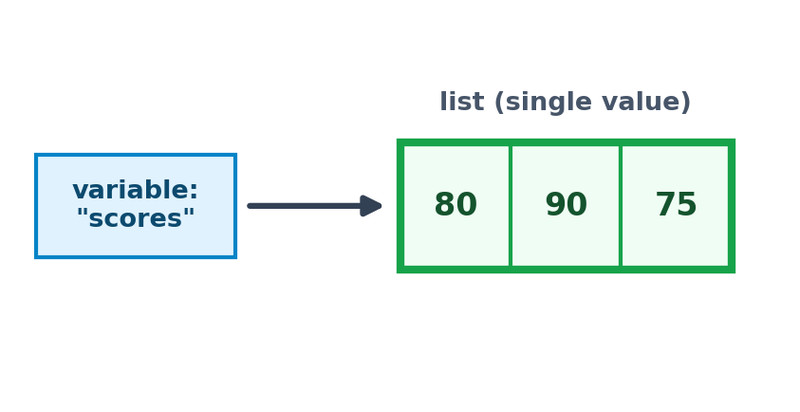
One variable storing one list value
Choosing the Right Type
Match the type to how you’ll use the data:
- Doing calculations → number
- Storing text → string
- Yes/no state → Boolean
- Group of related items → list
This shows up in multiple-choice questions where the “wrong” answer uses the wrong type, like storing a zip code as a number and then trying to preserve leading zeros.
3. Assignment and the Assignment Operator
Assignment is how variables get values.
In AP CSP pseudocode, the assignment operator is:
a ← expressionHere’s what happens:
- The right side is evaluated first.
- A copy of that result is stored in the variable on the left.
- The old value is replaced.
This is not math equality.
It means “store this value in this variable.”
Reassignment
Variables can change:
level ← 1
level ← 2
After this, level is 2. The first value is gone.
Programs constantly update variables as they run.
4. Tracing Variable Values After Assignments
You must be able to determine a variable’s value after several lines of code.
Example:
x ← 4
y ← x
x ← x + 3
DISPLAY(y)
Trace it:
xstarts as 4ygets a copy of 4xbecomes 7DISPLAY(y)shows 4
y does not change when x changes. It stored a copy.
One way to stay organized is to use a small trace table as you move through each line:
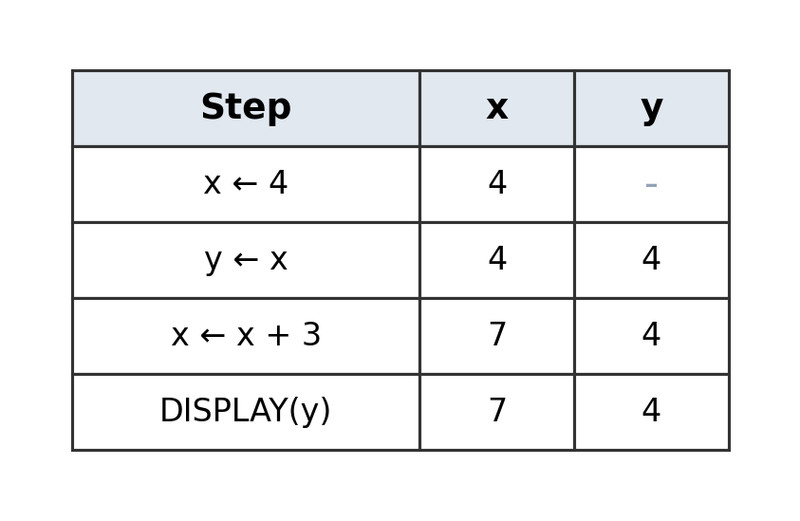
Step-by-step trace table for variable updates
On quizzes and the AP exam, they love stacking assignments like this. Go line by line. Update values immediately. Use the most recent assignment only.
