Topic 3.11 Notes – Binary Search
1. What Binary Search Is
Binary search is a search algorithm used to find a target value in a sorted list.
Instead of starting at the beginning and checking every element, it:
- Looks at the middle element.
- Compares it to the target value.
- Eliminates half the list based on that comparison.
- Repeats the process on the remaining half.
- Stops when the value is found or when no elements remain.
Here’s the idea visually.
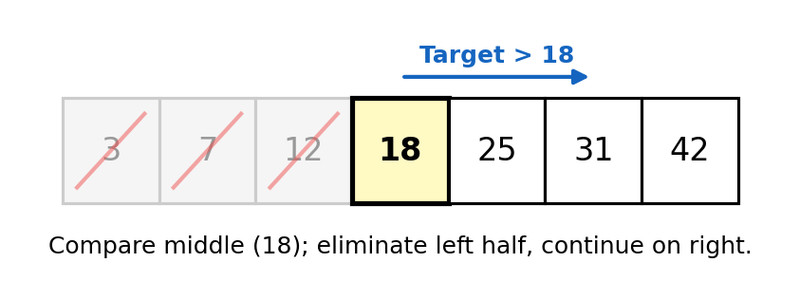
Binary search eliminating half the list
Each step uses:
- Sequencing (do steps in order),
- Selection (
IF target = middle,<, or>), - Iteration (repeat until found or empty).
The big idea is simple: each comparison cuts the problem size in half.
If the target:
- Equals the middle → you’re done.
- Is less than the middle → search the lower half.
- Is greater than the middle → search the upper half.
- If nothing is left → it’s not in the list.
Specific code implementations are not tested. You need to understand the logic.
2. Requirements for Binary Search to Work
Binary search only works if two conditions are met.
Sorted Data (most important)
The list must be in sorted order (ascending or descending).
Why? Because when you compare the target to the middle value, you’re assuming:
- Everything on one side is smaller.
- Everything on the other side is larger.
If the list isn’t sorted, eliminating half the data would be guessing.
This is one of the most common multiple-choice traps. If the list isn’t sorted, binary search is invalid.
Comparable Values
You must be able to compare values using <, >, or =.
- Numbers work.
- Alphabetical strings work (if sorted alphabetically).
- If values can’t be ordered, binary search doesn’t make sense.
If either requirement fails, you must use something else like linear search.
3. Binary Search vs Linear Search
Both algorithms search for a value. The difference is how they shrink the problem.
| Linear (Sequential) Search | Binary Search |
|---|---|
| Checks elements one by one from start to end | Checks the middle, eliminates half each time |
| Works on sorted or unsorted lists | Requires sorted lists |
| Worst case: up to n checks | Worst case: about log₂(n) checks |
| Reduces by 1 element each step | Reduces by half each step |
Here’s how their growth compares as the list gets bigger. Focus on the difference between the O(n) line and the O(log n) curve.
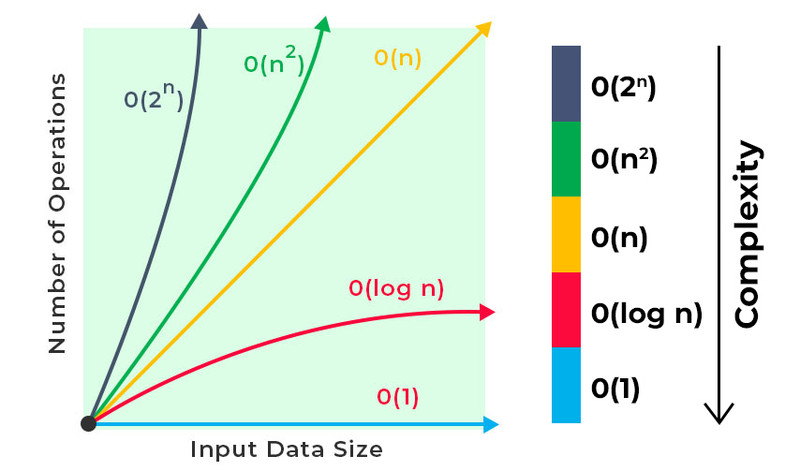
Big-O growth rates comparison
With 1,000 elements:
- Linear search might check close to 1,000 items.
- Binary search might only need around 10 checks.
That difference is huge on large datasets.
4. Determining the Number of Iterations
Each iteration divides the remaining list by 2.
So the real question becomes:
How many times can you divide n by 2 before you reach 1 (or 0)?
That number is approximately:
You are not expected to compute exact logarithms. You should be able to reason through repeated halving.
How to Think Through It
Suppose there are 64 elements:
64 → 32 → 16 → 8 → 4 → 2 → 1
That’s 6 halvings.
So binary search would take at most 6 iterations.
Notice something important:
- If the list doubles in size, you only add one more iteration.
This is why binary search grows so slowly compared to linear search.
On quizzes, they often give you a list size and ask for the maximum number of iterations. Just keep dividing by 2 and count.
5. Why Binary Search Is Efficient
Binary search is efficient because it eliminates large chunks of data instantly.
- Linear search removes one possibility per comparison.
- Binary search removes half the possibilities per comparison.
That creates:
- Linear growth for sequential search.
- Logarithmic growth for binary search.
When datasets are small, the difference isn’t dramatic. When datasets are large, binary search saves massive amounts of work.
Any time you see:
- A sorted list
- A need to find a specific value
- A question about minimizing comparisons
Binary search should come to mind.
