Topic 1.4 Notes – Identifying and Correcting Errors
1. Types of Errors in a Program
When something goes wrong in code, the first question is: What kind of error is this? The type tells you how to fix it.
Syntax Errors
A syntax error happens when you break the rules of the programming language.
Think grammar rules, but for code.
Examples:
- Missing a parenthesis
- Misspelling a variable name
- Forgetting a quotation mark
- Incorrect indentation (in indentation-based languages)
If there’s a syntax error, the program usually won’t run at all. The editor often highlights the issue and gives an error message.
Fixing it means correcting the structure so it follows the language rules exactly. These are usually the easiest to fix because the computer tells you where to look.
Logic Errors
A logic error means your algorithm is wrong.
The program runs, but the output is incorrect.
Common causes:
- Wrong condition in an
IFstatement - Resetting a variable inside a loop
- Using
>instead of≥ - Incorrect formula
Example in AP pseudocode:
count ← 0
FOR EACH item IN myList
    count ← 0
    IF item = 5
        count ← count + 1
RETURN count
The issue? count ← 0 resets every loop iteration. The algorithm’s logic is flawed.
Logic errors are harder to spot because there’s no error message. You have to compare expected output to actual output.
Run-Time Errors
A run-time error happens while the program is running.
The program starts, but then crashes or stops.
Examples:
- Dividing by zero
- Accessing a list index that doesn’t exist
- Invalid input
Each programming language defines its own run-time errors, but on the AP exam you just need to recognize the situation.
Overflow Errors
An overflow error happens when a number is outside the computer’s allowed range.
Computers store numbers using a limited number of bits.
Here’s the idea visually. The diagram shows two 8-bit binary numbers being added, with a carry in and a carry out:
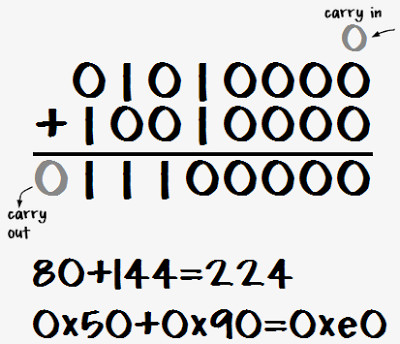
If the sum requires more bits than are available, the extra carry bit cannot be stored. The stored value becomes incorrect or wraps around.
On questions, overflow is usually about exceeding numeric limits.
2. How to Find and Fix Errors
Debugging is part of the iterative development process. You test, revise, and improve.
Here are the core strategies you’re responsible for knowing.
Test Cases
A test case includes:
- Specific input(s)
- Expected output or behavior
If the actual output doesn’t match the expected output, something’s wrong.
Test cases help you detect logic errors in particular.
Hand Tracing
Hand tracing means manually tracking variable values step by step.
This is huge for AP pseudocode.
You might make a table like:
| Iteration | item | count |
|---|---|---|
| 1 | 3 | 0 |
| 2 | 5 | 1 |
| 3 | 5 | 2 |
This helps you see:
- When variables reset
- Whether conditions evaluate correctly
- Whether loops stop at the right time
Many multiple-choice questions can be solved just by careful tracing.
Adding Extra Output Statements
You can insert temporary DISPLAY statements to check variable values mid-execution.
Example:
DISPLAY(count)This exposes what’s happening internally, especially inside loops.
Visualizations and Debuggers
Some tools let you:
- Step through code line by line
- Watch variables change in real time
You won’t use these on the AP exam, but you should understand that they are structured debugging tools.
3. Testing for Correctness
Testing isn’t random. It depends on program requirements.
Program Requirements
Before testing, you must know:
- What the program is supposed to do
- What inputs it accepts
- What outputs it should produce
If you don’t know the goal, you can’t judge correctness.
On exam questions, the first step is always: What is this algorithm intended to do?
Boundary and Extreme Cases
Errors often happen at the edges.
These are boundary cases:
- Minimum value
- Maximum value
- Just outside valid range
Examples:
- If valid inputs are 1 through 20 → test 1, 20, and 21
- If a list could be empty → test empty list
- If dividing → test 0
The AP loves edge-case reasoning. Many questions hinge on noticing an off-by-one loop error or failure to handle an empty list.
4. Identifying and Correcting Errors on the Exam
You’ll often be asked to:
- Identify the incorrect line
- Name the type of error
- Choose the correct fix
Common patterns:
- Initializing variables inside a loop instead of before it
- Loop runs one time too many or too few
- Condition checks wrong comparison
- Counter never updates
Always figure out the algorithm’s purpose first. Then trace with a simple input. Watch where behavior stops matching expectations.
Debugging is part of the iterative, user-focused design process. Programs improve through testing and revision.
