Topic 4.3 Notes – Parallel and Distributed Computing
1. Sequential, Parallel, and Distributed Computing
Computational models describe how a program’s tasks are executed.
Sequential Computing
Sequential computing means instructions run one at a time, in order.
- Each step waits for the previous one to finish.
- Total time = sum of all steps.
- Limited by the speed of a single processor.
If a program has steps that take 3, 5, and 7 seconds, total time is 3 + 5 + 7 = 15 seconds.
Simple. Predictable. No overlap.
Parallel Computing
Parallel computing splits a program into smaller sequential tasks, and some of those tasks run at the same time.
- Uses multiple cores/processors on one machine.
- Has two parts:
- A sequential portion (must stay in order)
- A parallel portion (independent tasks)
The diagram below contrasts a fully sequential process with one where part of the work branches into parallel tasks before merging again.
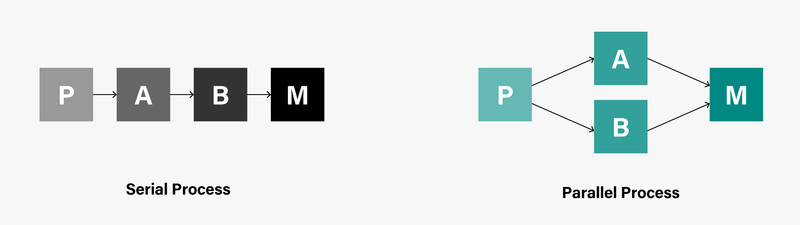
Sequential vs. parallel process flow
Not every step can be parallelized. If Step B needs the result of Step A, they must stay sequential.
Distributed Computing
Distributed computing uses multiple devices (separate computers) to run a program.
- Devices may be in different locations.
- They communicate over a network.
- Each device handles part of the problem.
Used when:
- The problem is too big for one computer’s processing power
- The problem requires more storage than one machine has
Think large search engines or massive data analysis systems.
Quick Comparison
| Feature | Sequential | Parallel | Distributed |
|---|---|---|---|
| Number of processors | One | Multiple cores (same machine) | Multiple computers |
| Task execution | One at a time | Some simultaneous | Simultaneous across devices |
| Total time depends on | Sum of all steps | Sequential part + longest parallel path | Workload + communication time |
| Used for | Smaller problems | Faster processing | Very large-scale problems |
2. How Execution Time Is Calculated
Sequential Execution Time
Add every step together.
If steps are 4, 6, and 10 seconds:
Total = 4 + 6 + 10 = 20 seconds
If a step depends on a previous result, it must remain sequential.
Parallel Execution Time
Parallel time depends on two things:
- Any required sequential steps
- The longest-running parallel workload
Rule to remember:
Even if some processors finish early, the program ends when the slowest active processor finishes.
How to approach AP-style problems
- Identify required sequential steps.
- Identify independent tasks.
- Distribute tasks across processors.
- Find which processor has the most total work.
- Add required sequential time.
Students often miss this: the answer is not the average time. It’s controlled by the processor that finishes last.
3. Speedup and Efficiency
Efficiency compares time to complete the same task.
Shorter time = more efficient.
Speedup Formula
If sequential time is 24 seconds and parallel time is 8 seconds:
Speedup = 24 / 8 = 3
That means the parallel solution is three times faster.
If speedup = 1, there was no improvement.
On multiple-choice questions, watch for students accidentally flipping the fraction. Sequential time always goes on top.
4. Limits, Scaling, and Tradeoffs
The Sequential Bottleneck
Every parallel program still has a sequential portion.
That portion limits the maximum speed.
If 20% of a program must stay sequential, adding more processors will eventually stop helping. At some point, processors sit idle waiting.
This ceiling effect shows up often in conceptual questions.
Scalability
Scalability means how well a solution handles increasing workload.
- Sequential systems must handle everything alone.
- Parallel systems can add more processors.
- Distributed systems can add more machines.
Parallel and distributed systems usually scale better, but improvement slows when:
- The sequential portion dominates.
- Communication between processors/devices adds overhead.
Distributed systems also introduce complexity. Devices must coordinate and exchange data, which takes time.
5. Benefits and Challenges
Benefits
- Faster processing of large datasets
- Can solve problems too large for one computer
- Increased storage and computing capacity
- Better handling of growth in workload
Challenges
- Sequential bottlenecks
- Communication overhead
- Coordination complexity
- Some problems simply cannot be divided efficiently
Remember the core distinction:
- Sequential = one processor
- Parallel = one machine, multiple cores
- Distributed = multiple machines
