Topic 1.4 Notes – Representing a Categorical Variable with Graphs
1. Bar Graphs for One Categorical Variable
What a bar graph shows
A bar graph displays the distribution of one categorical variable.
Each bar represents a category, and the height (or length) of the bar equals:
- The frequency (count)
- Or the relative frequency (proportion or percent)
Key features you’re expected to recognize:
- Bars are separated by gaps (this is how you know it’s categorical).
- All bars have equal width.
- The vertical axis shows counts or proportions.
Here’s a simple example showing students’ favorite school subject.
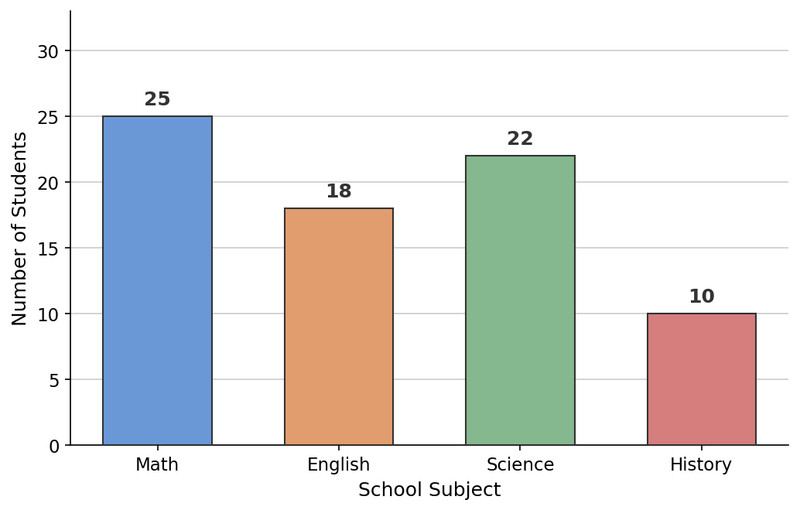
Bar graph of favorite school subject
You should immediately be able to see that Math has the highest count and History the lowest, just by comparing bar heights.
How to construct a bar graph
When you build one (calculator, software, or by hand), the logic is always:
- Identify the categories.
- Make a frequency or relative frequency table.
- Label axes:
- Horizontal → categories
- Vertical → counts or proportions
- Use a consistent scale, usually starting at 0.
- Draw equal-width bars with correct heights.
- Add a clear, contextual title.
On a quiz, missing labels or unclear scale absolutely costs points.
Counts vs. proportions
This matters when comparing groups later.
- Use counts when you care about number of individuals and group sizes are the same.
- Use relative frequencies (percents) when:
- Group sizes differ.
- You want to emphasize parts of a whole.
Students often compare raw counts from unequal groups. That leads to wrong conclusions.
Common mistakes
- Using a bar graph for quantitative data (that’s a histogram).
- Bars touching each other.
- Y-axis not starting at 0, exaggerating differences.
- No context in title or axes.
2. Pie Charts and Other Displays of Categorical Data
Pie charts
A pie chart shows how categories make up a whole.
Each slice represents a relative frequency. In this example, the whole is 100 households and each slice shows the percent of households with that type of pet.
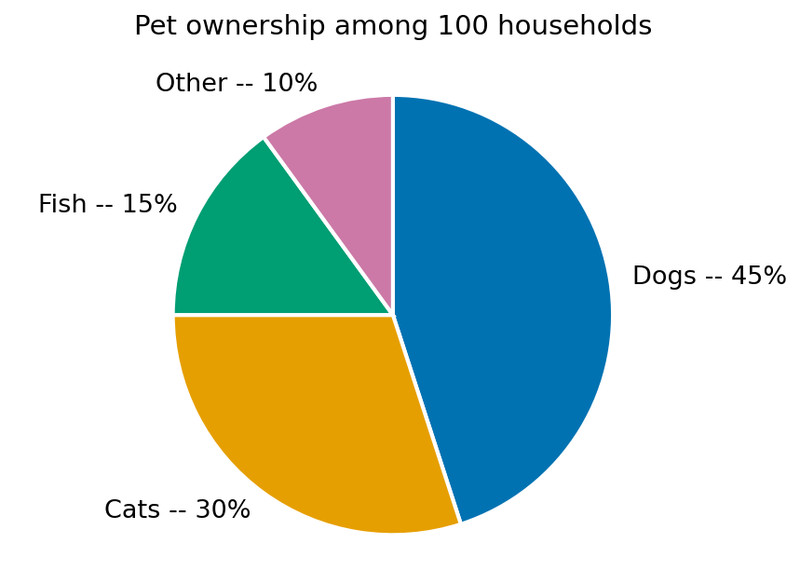
Pie chart of pet ownership among 100 households
They work best when:
- There are few categories.
- Differences in proportions are clear.
- You care about percentage of the whole.
They struggle when:
- There are many tiny slices.
- Proportions are similar.
- You need precise comparisons. A bar graph is usually better.
Frequency and relative frequency tables
Before graphing, you often create a table:
| Category | Count | Percent |
|---|---|---|
| Dogs | 45 | 45% |
| Cats | 30 | 30% |
| Fish | 15 | 15% |
| Other | 10 | 10% |
These help you check that percentages add to 100%. On the AP exam, small arithmetic mistakes here can carry through the whole question.
3. Describing a Distribution of Categorical Data
When you describe a graph, always write in context.
A strong description includes:
- The population or sample
- The variable
- The most common category
- The least common category
- Notable differences in proportions
Example phrasing:
Among the surveyed households, the most common type of pet was dogs at about 45%, while fish were least common at about 15%. Dog ownership was substantially more common than any other category.
Avoid:
- Listing numbers with no context.
- Claiming cause and effect.
- Ignoring obvious patterns.
AP readers look for full sentences tied to the real situation, not just “Dogs = highest.”
4. Comparing Multiple Sets of Categorical Data
When comparing groups on the same categorical variable, you’ll use:
- Side-by-side bar graphs
- Segmented (stacked) bar graphs
- Two-way tables
Side-by-side bar graphs
Best for comparing proportions across groups.
In a side-by-side bar graph like the one below, each letter grade (A through F) appears on the horizontal axis, and each cohort has its own colored bar within each grade. That setup lets you compare how the proportions differ across groups for the same category.
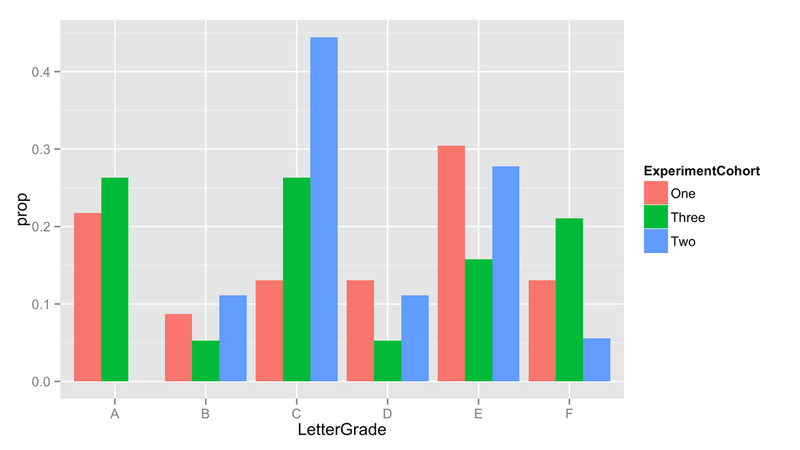
You look for:
- Which group has higher or lower proportion in each category.
- Whether differences are noticeable.
Again, use percents if group sizes differ.
Two-way tables
A two-way (contingency) table shows two categorical variables together.
| Passed | Failed | Total | |
|---|---|---|---|
| Took Prep | 40 | 10 | 50 |
| No Prep | 30 | 20 | 50 |
| Total | 70 | 30 | 100 |
To compare groups, compute conditional relative frequencies.
Example:
Among students who took prep, passed.
Among students who did not, passed.
If conditional distributions differ, there may be an association between variables. If they’re similar, the variables may be independent.
Students lose points by comparing raw counts instead of conditional percents.
5. Choosing the Right Graph and Avoiding Misleading Displays
Use bar or pie charts only for categorical data.
Do not use them for:
- Continuous quantitative data
- Trends over time
- Relationships between two quantitative variables
Watch for:
- Truncated axes exaggerating differences.
- 3D effects distorting area.
- Comparing groups on different scales.
Always apply the area principle. The visual area must represent the actual data value. If something looks dramatic, check the scale before believing it.
Key Takeaways
Contingency Table / Two-Way Table
Organizes counts for two categorical variables in rows and columns, usually with marginal totals.
Comparing Multiple Sets of Categorical Data
Use tables or graphs to compare counts or proportions for the same categories across groups.
Frequency, Relative Frequency, and Their Tables
Counts and proportions for each category can be organized in tables to summarize categorical data.
Bar Graph / Bar Chart
Uses separated equal-width bars to show and compare category counts or relative frequencies.
Bar Graphs vs. Pie Charts
Bar graphs compare categories clearly, while pie charts show each category's proportion of the whole.
Misleading Categorical Graphs
Categorical graphs can mislead through truncated axes, distorted areas, poor scaling, or cluttered categories.
Notes
Contingency Table / Two-Way Table
Organizes counts for two categorical variables in rows and columns, usually with marginal totals.
Comparing Multiple Sets of Categorical Data
Use tables or graphs to compare counts or proportions for the same categories across groups.
Frequency, Relative Frequency, and Their Tables
Counts and proportions for each category can be organized in tables to summarize categorical data.
Bar Graph / Bar Chart
Uses separated equal-width bars to show and compare category counts or relative frequencies.
Bar Graphs vs. Pie Charts
Bar graphs compare categories clearly, while pie charts show each category's proportion of the whole.
Misleading Categorical Graphs
Categorical graphs can mislead through truncated axes, distorted areas, poor scaling, or cluttered categories.
