Topic 1.5 Notes – Representing a Quantitative Variable with Graphs
1. Discrete vs Continuous Variables
You already know a quantitative variable is numerical. Now we split that into two types.
Discrete variables
A discrete variable takes on a countable number of values. The number of possible values might be finite (0-10 pets) or countably infinite (0, 1, 2, 3, …).
- Comes from counting
- Has gaps between possible values
- Examples:
- Number of students in a class
- Number of cars in a parking lot
- Number of goals scored in a game
You can’t have 4.6 students. Whole numbers only.
Continuous variables
A continuous variable can take on infinitely many values within an interval. Between any two values, there’s always another possible value.
- Comes from measuring
- No gaps in possible values
- Examples:
- Height of a child
- Time to finish a race
- Temperature outside
Even if a child’s height is recorded as 52 inches, the true height could be 52.3 or 52.37 inches.
This distinction matters because it affects how we graph the data.
2. The Main Graphs for Quantitative Data
All of these show the distribution of the variable.
Histogram
A histogram groups data into equal-width intervals (bins).
- Height of each bar = frequency or proportion in that interval
- Bars touch (unless there is an actual gap in the data)
- Best for large datasets, especially continuous variables
- Does not show individual values
Here’s a simple example using exam scores from 50 to 100:
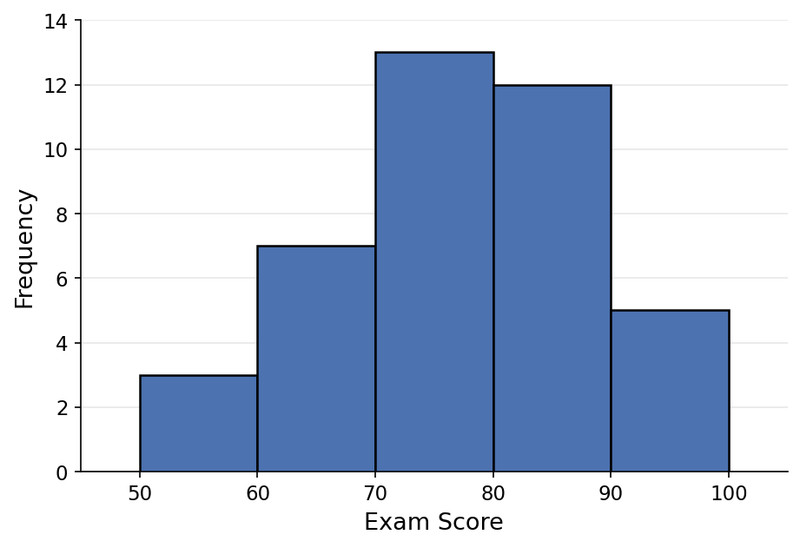
Histogram of exam scores (equal-width bins)
Changing bin width can completely change how the graph looks. The AP loves showing two histograms of the same data with different bins and asking what changed. The data didn’t change. The grouping did.
Dotplot
A dotplot puts each observation as a dot on a number line.
- Dots stack when values repeat
- Great for small datasets
- Preserves every data value
- Makes clusters and outliers easy to see
Here is a dotplot showing the number of books read by a small group of students:
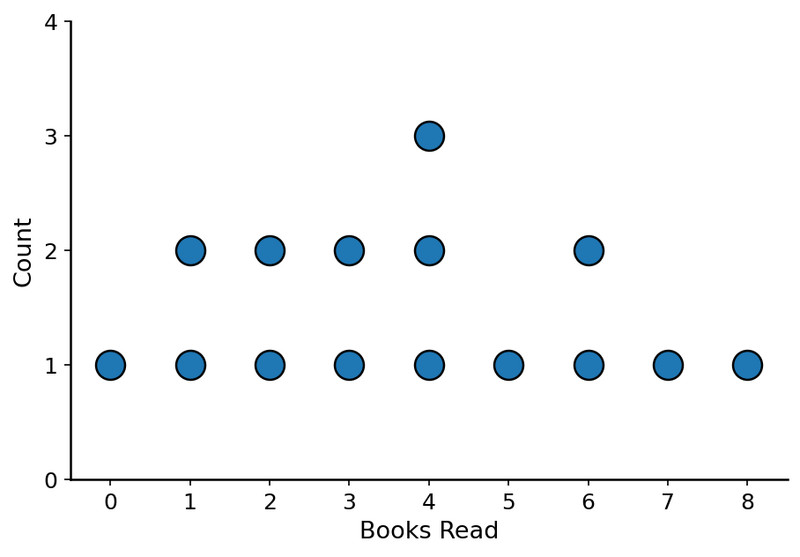
Dotplot of books read
Because every point is shown, this is ideal when you have around 50 or fewer observations.
Stem-and-Leaf Plot (Stemplot)
A stemplot splits each value into:
- Stem = first digit(s)
- Leaf = last digit
Example:
5 | 2 7
6 | 1 4 8
7 | 0 3
Key: 6 | 4 = 64
- Leaves are listed in order
- Always include a key
- Preserves original data values
If you rotate it sideways, it looks like a histogram. That’s not a coincidence.
Cumulative Graph (Ogive)
An ogive shows the number or proportion less than or equal to a given value.
- Always increasing
- Used to estimate:
- Median
- Percentiles
- Proportion below a cutoff
This ogive shows cumulative relative frequency for test scores:
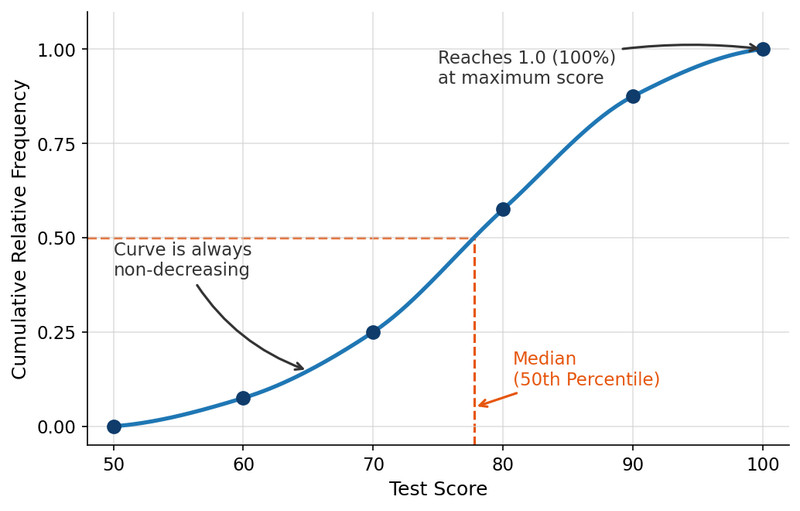
Ogive of test scores
Unlike a histogram, an ogive does not show how many are in each bin. It shows how many are at or below a value. Students mix that up all the time.
Other representations
You might also see:
- Relative frequency histograms
- Frequency polygons (lines connecting midpoints of bins)
- Technology-generated graphs
For AP purposes, focus on histogram, dotplot, stemplot, and ogive.
3. Choosing the Right Graph
Think about what you need to see.
- Small dataset → Dotplot or stemplot (you keep individual values)
- Large dataset → Histogram (clear overall shape)
- Need cumulative information → Ogive
And one rule you cannot break:
Quantitative variable → Never use a bar graph.
Bar graphs are for categorical data.
If you’re asked to justify a choice, mention:
- Type of variable (discrete or continuous)
- Sample size
- Whether individual values matter
- Whether cumulative info is needed
4. What to Look for in Any Quantitative Graph
When describing a distribution, always include:
- Shape (symmetric, skewed left/right, unimodal, bimodal)
- Center (rough middle)
- Spread (range or variability)
- Outliers
- Clusters or gaps
These features connect directly to mean, median, and standard deviation later in Unit 1.
Key Takeaways
Discrete Vs. Continuous Quantitative Variables
Discrete variables take countable values; continuous variables take infinitely many uncountable values within intervals.
Stem-And-Leaf Plot
A display splitting each value into a stem and leaf while preserving individual data values.
Dotplot
A graph placing one dot per observation above its value, stacking dots for repeated or close values.
Cumulative Graph / Ogive
A graph showing the number or proportion of observations less than or equal to each value.
Frequency Polygon
A line graph connecting class midpoint frequencies to show a quantitative distribution.
Histogram
A graph of quantitative data using adjacent interval bars whose heights show frequency or proportion.
Notes
Discrete Vs. Continuous Quantitative Variables
Discrete variables take countable values; continuous variables take infinitely many uncountable values within intervals.
Stem-And-Leaf Plot
A display splitting each value into a stem and leaf while preserving individual data values.
Dotplot
A graph placing one dot per observation above its value, stacking dots for repeated or close values.
Cumulative Graph / Ogive
A graph showing the number or proportion of observations less than or equal to each value.
Frequency Polygon
A line graph connecting class midpoint frequencies to show a quantitative distribution.
Histogram
A graph of quantitative data using adjacent interval bars whose heights show frequency or proportion.
